
Aftershokz AS650SG-BR
Aftershokz Air Bone Conduction Wireless Bluetooth Headphones
User Manual
Model: AS650SG-BR
1. Introduction
The Aftershokz Air Bone Conduction Wireless Bluetooth Headphones offer a unique open-ear listening experience, designed to keep you connected to your audio while remaining aware of your surroundings. Utilizing advanced bone conduction technology, these headphones transmit sound through your cheekbones, leaving your ears open to ambient sounds. This design is ideal for athletes, outdoor enthusiasts, and anyone who prioritizes situational awareness.

Image 1: Aftershokz Air Bone Conduction Wireless Bluetooth Headphones in Slate Grey. These lightweight headphones feature a flexible band and transducers that rest on the cheekbones.
The lightweight titanium frame ensures comfortable long-term wear, while features like PremiumPitch technology deliver rich audio. Integrated reflective strips enhance visibility during low-light activities, making them a safe choice for various environments.

Image 2: Two individuals running outdoors, demonstrating the open-ear design of the Aftershokz Air headphones, allowing them to hear their surroundings while enjoying audio.
2. What's in the Box
Upon opening your Aftershokz Air package, you should find the following components:
- Aftershokz Air Headphone
- Protective Case
- Charging Cable
- Earplugs (for use in noisy environments, if desired)
3. Setup Guide
3.1 Initial Charging
Before first use, fully charge your Aftershokz Air headphones. Connect the provided charging cable to the charging port on the headphones and plug the other end into a USB power source. The LED indicator will show charging status. A full charge provides up to 6 hours of continuous use.
3.2 Bluetooth Pairing
- Power On: Press and hold the power button for 2 seconds.
- Activate Bluetooth: On your device (smartphone, tablet, computer), enable Bluetooth.
- Select Device: Look for "Aftershokz Air" in the list of available Bluetooth devices and select it.
- Confirm Connection: Once paired, the LED indicator will turn solid blue, and a voice prompt will confirm "Connected."
The headphones support multipoint pairing, allowing connection to two devices simultaneously. To use this feature, pair with the first device, then enter pairing mode again and pair with the second device. The headphones will automatically switch between devices.
4. Operating Instructions
4.1 Wearing Your Headphones
Place the headphones with the transducers resting on your cheekbones, just in front of your ears. The band should wrap around the back of your head. Adjust for a comfortable and secure fit. The lightweight titanium material ensures minimal pressure.

Image 3: A man demonstrating the correct placement of the Aftershokz Air headphones, with the band resting comfortably around the back of his head and the transducers on his cheekbones.
4.2 Basic Controls
- Power On/Off: Press and hold the power button for 2 seconds.
- Volume Up/Down: Use the volume buttons located on the side of the headphones.
- Play/Pause: Press the multi-function button once.
- Skip Track: Double-press the multi-function button for next track, triple-press for previous track.
- Answer/End Call: Press the multi-function button once during an incoming call or active call.
- Voice Assistant: Press and hold the multi-function button for 2 seconds to activate your device's voice assistant (e.g., Siri, Google Assistant).
The dual noise-canceling microphones ensure clear calls even in noisy environments.

Image 4: A close-up of a man wearing the Aftershokz Air headphones, emphasizing the discreet design and the quality of the audio experience provided by the PremiumPitch technology and dual noise-canceling microphones.
5. Product Media
5.1 Official Product Video
Video 1: "Push yourself Beyond Your Limits with Trekz Air". This video showcases the Aftershokz Air headphones in various active scenarios, highlighting their open-ear design, comfort, and suitability for sports and outdoor activities.
5.2 Additional Product Images

Image 5: A woman exercising, demonstrating the water-resistant capabilities of the Aftershokz Air headphones, making them suitable for intense workouts and various weather conditions.
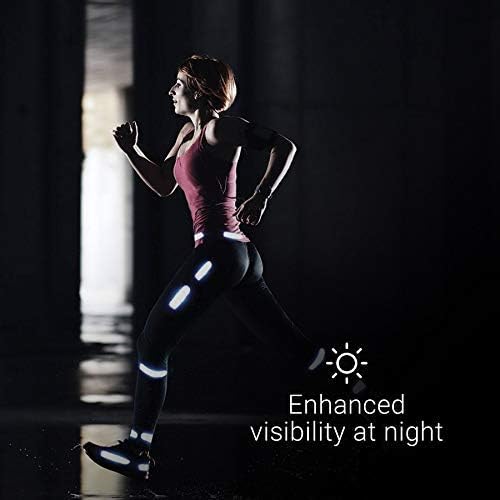
Image 6: A person running at night, illustrating the enhanced visibility provided by the reflective strips that can be adhered to clothing or gear, improving safety in low-light conditions.
6. Maintenance
6.1 Cleaning
To maintain the longevity and hygiene of your headphones, regularly wipe them with a soft, damp cloth. Avoid using harsh chemicals or abrasive materials. Ensure the charging port is dry before charging.
6.2 Storage
When not in use, store your Aftershokz Air headphones in the provided protective case to prevent damage from dust, dirt, and impacts. Store in a cool, dry place away from extreme temperatures.
6.3 Battery Care
For optimal battery life, avoid fully discharging the headphones frequently. Charge them regularly, even if not in constant use. If storing for an extended period, charge them to about 50% before storage.
7. Troubleshooting
| Problem | Possible Cause | Solution |
|---|---|---|
| No Sound | Headphones not powered on or paired; volume too low; device volume too low. | Ensure headphones are on and paired. Increase headphone and device volume. |
| Cannot Pair | Headphones not in pairing mode; device Bluetooth off; interference. | Ensure headphones are flashing red/blue. Turn device Bluetooth off/on. Move closer to device. |
| Charging Issue | Cable or power source issue; charging port dirty. | Try a different cable or USB port. Clean charging port gently. |
| Poor Audio Quality | Out of Bluetooth range; interference; low battery. | Move closer to your device. Avoid strong electromagnetic fields. Charge headphones. |
If problems persist, please refer to the support section or visit the official Aftershokz website for further assistance.
8. Specifications
| Model Name | AfterShokz Air Open-Ear |
| Model Number | AS650SG-BR |
| Connectivity Technology | Bluetooth v4.2 |
| Bluetooth Range | 10 Meters |
| Audio Driver Type | Bone Conduction Driver |
| Frequency Range | 20 Hz to 20,000 Hz |
| Battery Life | 6 Hours |
| Charging Time | (Not specified in input, omit or state typical) |
| Item Weight | 30 Grams (1.06 ounces) |
| Material | Titanium |
| Water Resistance Level | Water Resistant (Sweatproof) |
| Microphone | Included, Noise Cancellation |
| Compatible Devices | iOS and Android Bluetooth-ready smartphones or tablets and Mac and PC computers and laptops |
| Control Method | Touch, Voice |
| Color | Slate Grey |
| UPC | 811071030540 |
| Manufacturer | Aftershokz Limited Corporation |
9. Warranty and Support
For detailed warranty information and customer support, please refer to the warranty card included with your product or visit the official Aftershokz website. You can also find FAQs and additional resources there to help you with your Aftershokz Air headphones.
Online Support: Aftershokz Official Store on Amazon
Related documentsAS650SG-BR


Ask a question about this manual
Ask about setup, troubleshooting, compatibility, parts, safety, or missing instructions. Manuals+ will review the question and use this page’s manual context to help answer it.