Introduction
This manual provides detailed instructions for the installation, operation, and maintenance of the FSA Orbit X 1-inch threadless headset. Designed for older bicycles, this headset features sealed cartridge angular bearings and durable aluminum cups, ensuring reliable steering performance.
Product Overview
The FSA Orbit X headset is engineered for 1-inch threadless steerer tubes, offering a robust and smooth steering solution. Key features include:
- 1-inch size with 36 degrees/36 degrees Angular Contact Bearings (ACB)
- Stack Height: 18.4mm (upper) + 13.1mm (lower) = 31.5mm total
- Forged and CNC machined 6061/T6 alloy cups
- Alloy top cap
- ISO 26.4mm crown race
Components and Technical Diagram
Refer to the following diagrams for an understanding of the headset's individual components and their technical specifications.
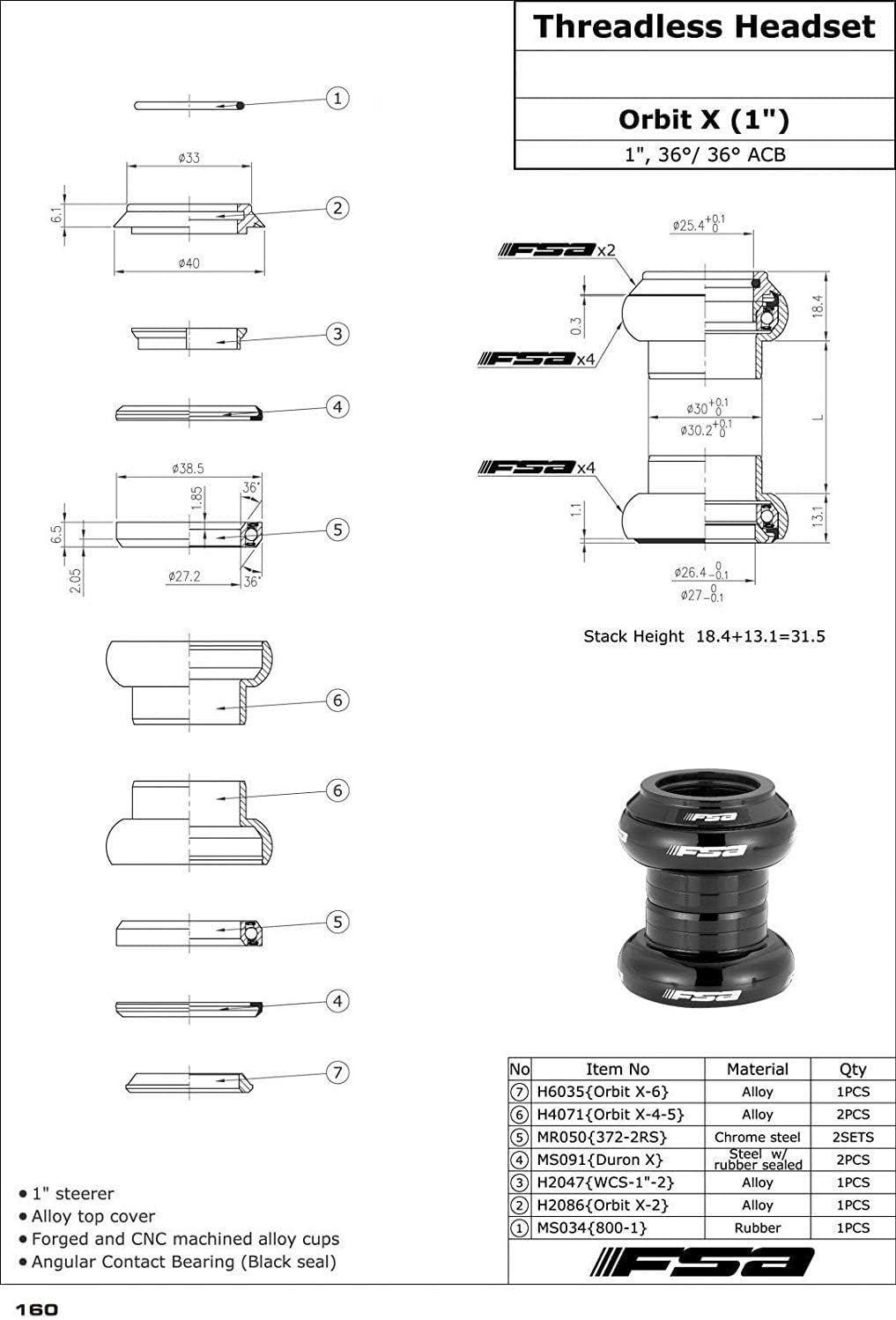
Image Description: This image displays an exploded view of the FSA Orbit X headset, showing all individual components such as the top cap, compression ring, upper bearing, upper cup, lower bearing, lower cup, and crown race. A technical drawing with dimensions and stack height details is also included, illustrating the precise measurements and assembly order.

Image Description: This image shows the fully assembled FSA Orbit X 1-inch threadless headset in black. It highlights the sleek design of the alloy cups and top cap, with the FSA logo visible on the components.
Setup and Installation
Proper installation is crucial for the performance and longevity of your headset. If you are unsure about any step, consult a professional bicycle mechanic.
Tools Required:
- Headset press
- Crown race setting tool
- Rubber mallet
- Hex keys (Allen wrenches)
- Grease
- Digital calipers (recommended for crown race measurement)
Installation Steps:
- Prepare the Frame and Fork: Ensure the head tube of your bicycle frame is properly faced and reamed. The fork steerer tube should be cut to the correct length for a threadless setup, allowing for the headset stack height and stem.
- Verify Crown Race Diameter: The FSA Orbit X uses an ISO 26.4mm crown race. It is critical to measure the base of your fork steerer tube with digital calipers to confirm compatibility. Some older forks may have a 27.0mm JIS standard, which is incompatible with this headset's crown race. Attempting to force an incorrect crown race can damage the fork.
- Install Crown Race: Apply a thin layer of grease to the fork crown race seat. Using a crown race setting tool and a rubber mallet, gently tap the crown race onto the fork steerer tube until it is fully seated against the fork crown.
- Press Headset Cups: Apply a thin layer of grease to the inside of the head tube and the outside of the headset cups. Using a headset press, carefully press the lower cup into the bottom of the head tube and the upper cup into the top of the head tube. Ensure they are pressed in straight and fully seated.
- Install Bearings: Place the lower angular contact bearing onto the crown race on the fork. Insert the fork through the head tube. Place the upper angular contact bearing into the upper headset cup.
- Assemble Remaining Components: Place the compression ring over the top bearing, followed by any required spacers (not included with headset, determined by stem height). Finally, place the top cap over the steerer tube.
- Install Stem and Adjust: Slide your stem onto the steerer tube. Install the top cap bolt and tighten it until there is no play in the headset, but the steering remains smooth. Do not overtighten. Once adjusted, tighten the stem's pinch bolts to secure it to the steerer tube.
Operation
Once properly installed, the FSA Orbit X headset should provide smooth, precise, and play-free steering. The angular contact bearings are designed to handle both axial and radial loads, contributing to stable handling.
- Smooth Steering: The handlebars should turn freely and smoothly without any binding or resistance.
- No Play: There should be no discernible movement or 'play' when rocking the front wheel back and forth while holding the front brake.
- Consistent Performance: The headset should maintain its smooth operation under various riding conditions.
Maintenance
Regular maintenance will extend the life of your FSA Orbit X headset and ensure optimal performance.
- Regular Inspection: Periodically check for any play in the headset. To do this, hold the front brake and rock the bike back and forth. If you feel a clunking sensation, the headset may need adjustment or inspection.
- Cleaning: Keep the area around the headset clean from dirt and debris. Wipe down the top cap and exposed parts of the cups.
- Lubrication: While the angular contact bearings are sealed, it is good practice to disassemble the headset annually (or more frequently if riding in wet/dirty conditions) to clean and re-grease the bearing seats and contact surfaces. Inspect the bearings for any signs of wear or corrosion.
- Torque Check: Ensure the top cap bolt and stem pinch bolts are tightened to the manufacturer's recommended torque specifications (refer to your stem manufacturer's guidelines for pinch bolts).
Troubleshooting
Common issues and their potential solutions:
- Headset Play/Looseness:
- Cause: Insufficient preload on bearings, loose top cap bolt, or loose stem pinch bolts.
- Solution: Loosen stem pinch bolts. Tighten top cap bolt gradually until play is eliminated but steering remains smooth. Re-tighten stem pinch bolts. If play persists, disassemble and inspect bearings and cups for wear or damage.
- Stiff/Notchy Steering:
- Cause: Overtightened top cap bolt, damaged or worn bearings, insufficient grease, or improperly seated cups.
- Solution: Loosen top cap bolt slightly. If still stiff, disassemble, clean, inspect, and re-grease bearings. Check for proper cup seating. Replace bearings if damaged.
- Creaking Noises:
- Cause: Dry interfaces between components (cups and frame, crown race and fork), loose components, or worn bearings.
- Solution: Disassemble, clean all contact surfaces, apply fresh grease, and reassemble. Ensure all components are properly seated and tightened.
Specifications
| Feature | Specification |
|---|---|
| Model | Orbit X |
| Steerer Tube Diameter | 1 inch (Threadless) |
| Bearings | 36°/36° Angular Contact Bearings (ACB) |
| Crown Race Diameter | ISO 26.4mm |
| Cups Material | Forged and CNC machined 6061/T6 alloy |
| Top Cap Material | Alloy |
| Stack Height | 31.5mm (18.4mm upper + 13.1mm lower) |
| Weight | Approximately 109g (with top cap and starnut) |
| Color | Black |
Warranty and Support
For specific warranty information regarding your FSA Orbit X headset, please refer to the official FSA website or contact your point of purchase. FSA provides support for their products, and their official channels are the best resource for technical assistance or warranty claims.
FSA Official Website: www.fullspeedahead.com


