
1. Introduction and Overview
Thank you for choosing the Rosewill RHPA-18001 Portable Air Conditioner. This 3-in-1 unit provides cooling, fan, and dehumidification functions to enhance your indoor comfort. Designed for single room use, it features a compact, space-saving design with easy mobility. Please read this manual thoroughly before operation to ensure proper use, maintenance, and safety.
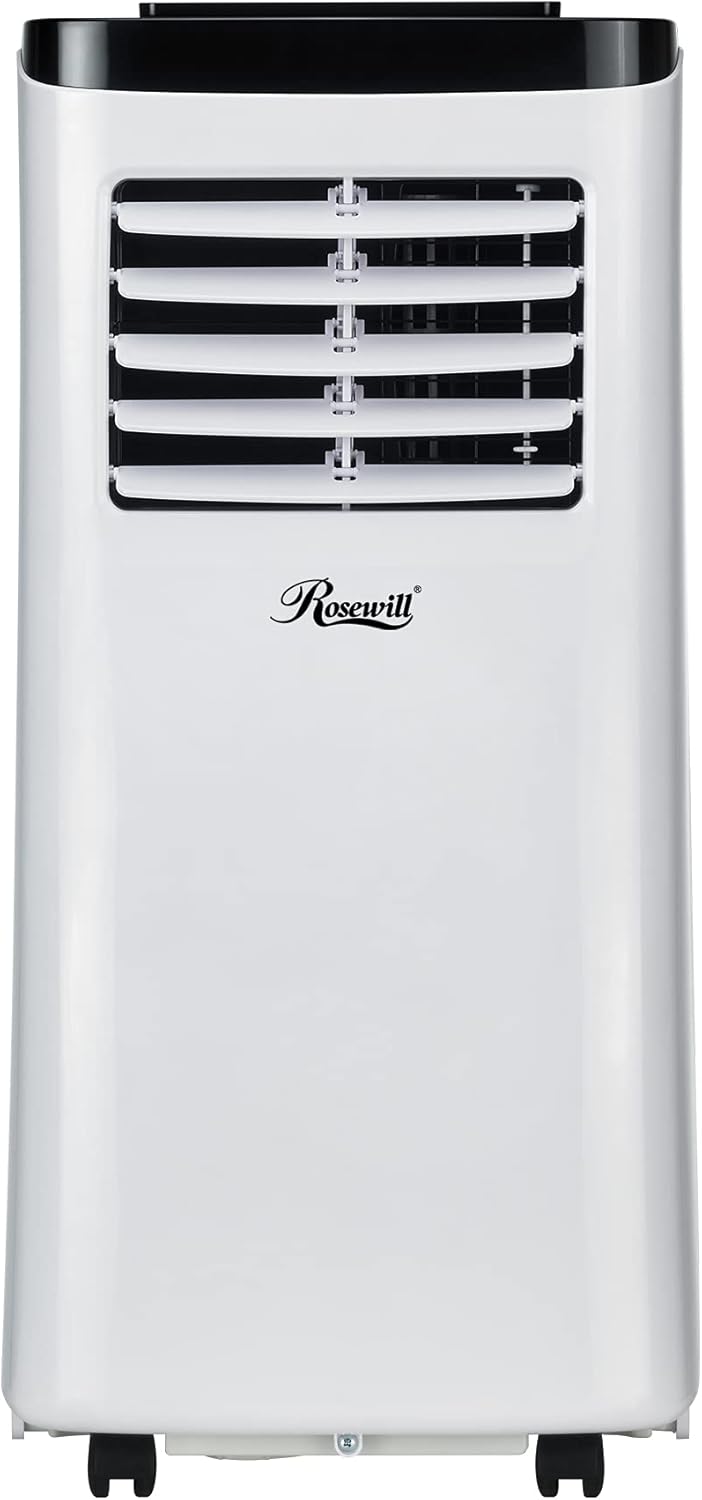
Image: The Rosewill RHPA-18001 Portable Air Conditioner, a white unit with a black top, positioned in a modern living room.
Video: An official overview of Rosewill Portable AC Units, highlighting their features and benefits.
2. Safety Information
Always follow basic safety precautions when using electrical appliances to reduce the risk of fire, electric shock, or injury.
- Read all instructions before using the appliance.
- Ensure the power supply matches the voltage specified on the rating label.
- Do not operate the unit with a damaged cord or plug.
- Keep the unit on a flat, stable surface.
- Do not block air inlets or outlets.
- Unplug the unit before cleaning or servicing.
- This appliance is not intended for use by persons (including children) with reduced physical, sensory or mental capabilities, or lack of experience and knowledge, unless they have been given supervision or instruction concerning use of the appliance by a person responsible for their safety.
3. Package Contents
Verify that all items are present and in good condition upon unpacking.
- Portable Air Conditioner Unit
- Exhaust Heat Pipe Assembly
- Remote Control
- Window Sealing Plate Assembly
- Washer, Screw, Nut (for installation)
- User Manual

Image: All included accessories for the portable air conditioner, laid out on a surface.
4. Product Diagram
Familiarize yourself with the different parts of your portable air conditioner.
Front View

Image: Front view of the portable air conditioner, showing the air outlet and control panel on top.
Side View

Image: Side view of the portable air conditioner, showing its compact profile and handles.
Rear View

Image: Rear view of the portable air conditioner, showing the air intake and exhaust ports.
5. Setup
Proper installation is crucial for efficient operation. This unit is designed for use with a window exhaust kit.
5.1 Window Kit Installation
- Assemble the window sealing plate according to the instructions provided in the package.
- Open the window and place the window sealing plate into the window opening. Adjust the plate to fit securely.
- Close the window firmly against the plate to create a seal.
5.2 Exhaust Hose Connection
- Attach the exhaust hose to the exhaust heat pipe assembly.
- Connect the other end of the exhaust hose to the exhaust port on the back of the air conditioner unit.
- Ensure all connections are secure to prevent hot air from re-entering the room.

Image: The portable air conditioner positioned near a window, with its exhaust hose properly installed in the window kit.
6. Operating Instructions
Your portable air conditioner can be operated using the control panel on the unit or the included remote control.
6.1 Control Panel
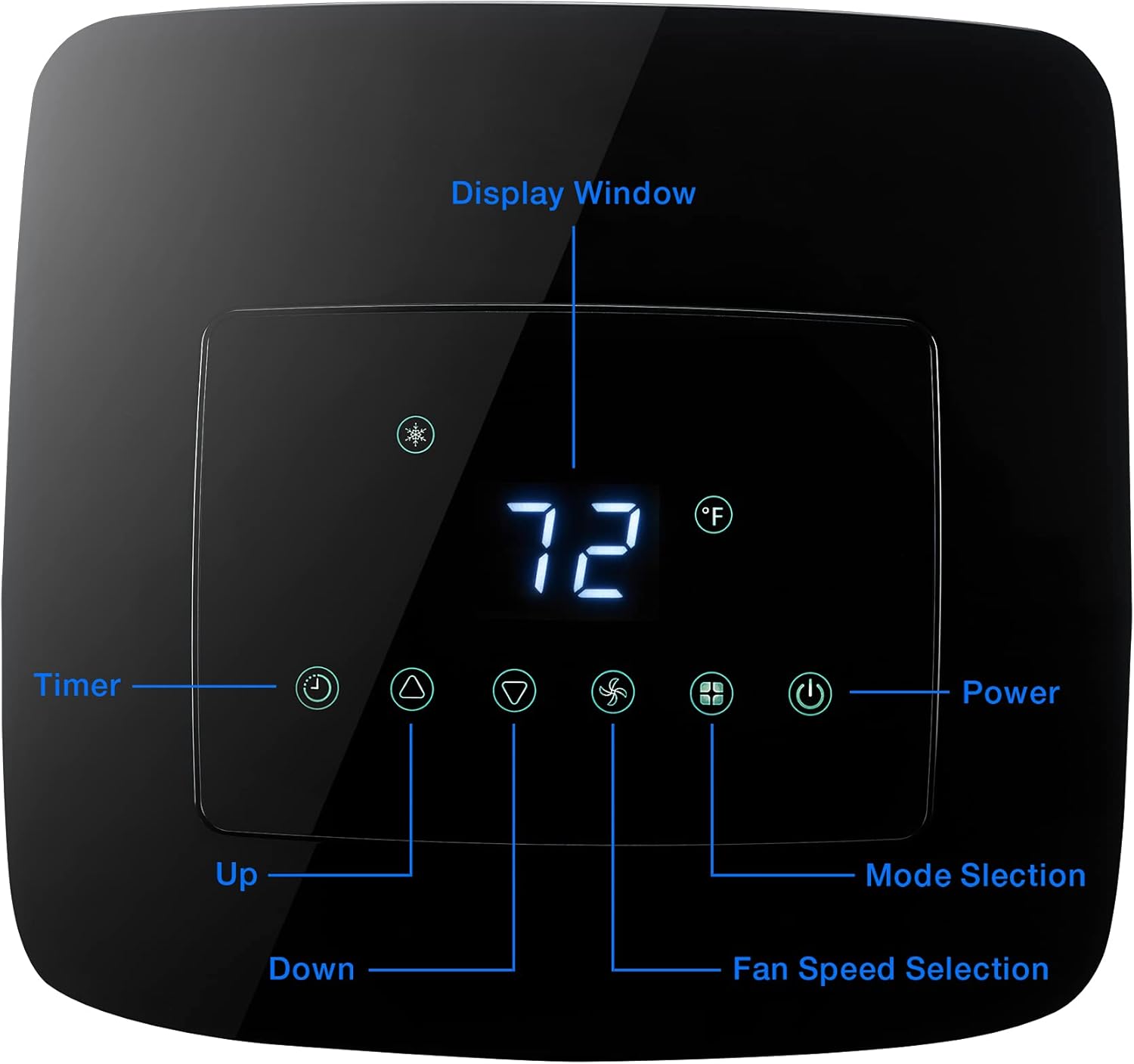
Image: Detailed view of the LED digital display touch control panel, showing buttons for power, mode, fan speed, timer, and temperature adjustment.
6.2 Remote Control

Image: The remote control for the portable air conditioner, with clearly labeled buttons for various functions.
6.3 Operating Modes
Press the 'Mode' button to cycle through the available modes:
- Cooling Mode: Provides powerful cooling for rooms up to 200 square feet. Adjust the temperature using the Up/Down buttons.
- Fan Mode: Circulates air without cooling. Features two fan speeds for optimal airflow.
- Dehumidify Mode: Removes excess moisture from the air, reducing humidity levels. The self-evaporating system minimizes the need for manual draining in most conditions.

Cooling

Fan

Dehumidify
6.4 Fan Speed
Press the 'Fan Speed' button to select between two available fan speeds (Low, High).
6.5 Timer and Sleep Mode
- Timer: Program the unit to turn on or off automatically within a 24-hour period.
- Sleep Mode: Activates a quiet, energy-efficient operation for comfortable overnight use.
7. Maintenance
Regular maintenance ensures optimal performance and extends the lifespan of your unit.
7.1 Filter Cleaning
The unit includes washable dust filters. Clean them regularly to maintain air quality and efficiency.
- Turn off and unplug the air conditioner.
- Locate and remove the air filters (typically on the back or side).
- Wash the filters with warm, soapy water. Rinse thoroughly.
- Allow filters to air dry completely before reinstalling.
7.2 Drainage
The RHPA-18001 features a self-evaporating system, which typically handles most moisture. However, in high humidity environments, manual draining may be necessary.
- Turn off and unplug the unit.
- Place a shallow pan or tray under the drain port (located at the bottom rear of the unit).
- Remove the drain plug to allow water to flow out.
- Replace the drain plug once all water has drained.
7.3 Storage
When storing the unit for an extended period:
- Drain all accumulated water.
- Clean the air filters.
- Store the unit in a cool, dry place, upright and covered to protect from dust.
8. Troubleshooting
Before contacting support, please refer to the following common issues and solutions:
| Problem | Possible Cause | Solution |
|---|---|---|
| Unit does not turn on | No power, power cord unplugged, circuit breaker tripped, LCDI plug tripped. | Check power outlet, plug in securely, reset circuit breaker, reset LCDI plug. |
| Unit does not cool effectively | Windows/doors open, air filter dirty, room too large, exhaust hose not properly installed. | Close windows/doors, clean air filter, ensure room size is within specifications, check exhaust hose connection. |
| Water leakage | Drain plug not securely closed, unit not level, high humidity causing excess condensation. | Ensure drain plug is tight, place unit on a level surface, drain water manually if necessary. |
| Noisy operation | Unit not on a level surface, fan obstruction, normal compressor operation. | Place unit on a level surface, check for obstructions, some noise is normal during operation. |
9. Specifications
| Feature | Detail |
|---|---|
| Model | RHPA-18001 |
| Cooling Capacity | 8,000 BTU |
| Functions | Cooling / Dehumidifying / Fan |
| Coverage Area | Up to 200 Square Feet |
| Fan Speeds | 2 |
| Timer | 24 Hours |
| Control Method | Remote Control, LED Control Panel |
| Special Features | Energy Efficient, Sleep Mode, Self-Evaporation, LCDI Plug |
| Dimensions (H x W x D) | 33.90" x 13.30" x 14.90" |
| Unit Weight | 51.80 lbs. |
| Voltage | 115V |
| Noise Level | 60 Decibels |
| Filter Type | Washable Dust Filters |
| UPC | 840951128077 |
10. Warranty
This Rosewill RHPA-18001 Portable Air Conditioner comes with a 1-year limited warranty. For specific terms and conditions, please refer to the warranty card included in your package or visit the official Rosewill website.
11. Support
For technical assistance, troubleshooting beyond this manual, or warranty claims, please contact Rosewill Customer Support:
- Online Support: Visit the Rosewill Store on Amazon for FAQs and product information.
- Contact Information: Refer to the contact details provided in your product packaging or on the official Rosewill website.


