
1. Introduction
Thank you for choosing the Hopestar Portable Wireless Bluetooth Speaker A10. This manual provides essential information for setting up, operating, and maintaining your speaker. Please read it carefully before use to ensure optimal performance and longevity of your device.
The Hopestar A10 is a versatile portable speaker designed for high-quality audio playback. It supports multiple connectivity options including Bluetooth, FM Radio, AUX input, USB drive, and TF card, making it suitable for various audio sources. Its compact design ensures portability, allowing you to enjoy your music anywhere.
2. Safety Information
- Do not expose the speaker to extreme temperatures, direct sunlight, or high humidity.
- Avoid dropping or subjecting the speaker to strong impacts.
- Do not disassemble, repair, or modify the device yourself. Refer all servicing to qualified personnel.
- Keep the speaker away from water and other liquids.
- Use only the provided charging cable or a certified equivalent.
- Clean the speaker with a soft, dry cloth. Do not use abrasive cleaners or solvents.
3. Package Contents
Please check the package for the following items:
- 1 x Hopestar A10 Portable Wireless Bluetooth Speaker
- 1 x AUX Cable
- 1 x USB Charging Cable
4. Product Overview
Familiarize yourself with the speaker's components and controls.
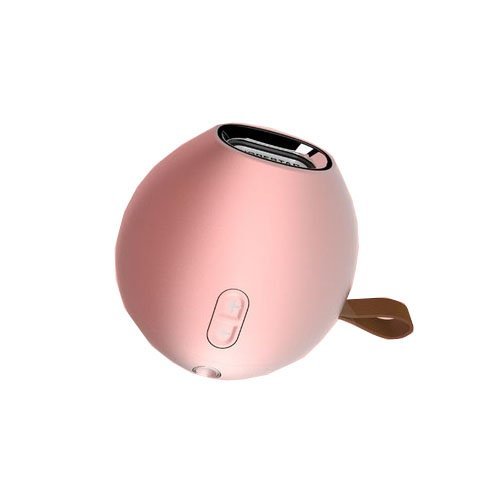
Figure 1: Hopestar A10 Portable Wireless Bluetooth Speaker shown in multiple color options. The speaker features a compact, rounded design with control buttons on the side and a carrying strap.
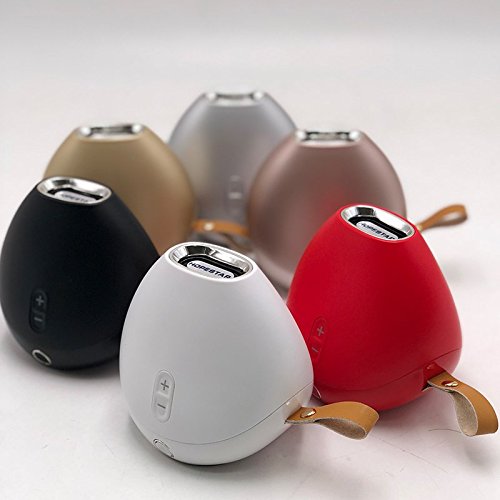
Figure 2: Another view of the Hopestar A10 speakers, highlighting the different available colors and the overall ergonomic shape.
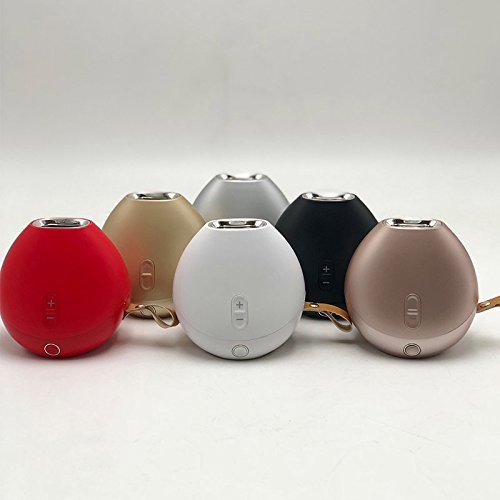
Figure 3: A side perspective of the Hopestar A10 speakers, showcasing the volume controls and the integrated carrying strap.
5. Setup
5.1 Charging the Speaker
- Connect the small end of the USB charging cable to the charging port on the speaker.
- Connect the large end of the USB charging cable to a USB power adapter (not included) or a computer's USB port.
- The charging indicator light will illuminate, typically red, during charging.
- Once fully charged, the indicator light may change color or turn off. Disconnect the speaker from the power source.
5.2 Powering On/Off
- To Power On: Press and hold the Power button for a few seconds until you hear an audible prompt or see an indicator light.
- To Power Off: Press and hold the Power button again for a few seconds until you hear an audible prompt or the indicator light turns off.
6. Operating Instructions
6.1 Bluetooth Pairing
- Ensure the speaker is powered on and in Bluetooth pairing mode (an indicator light may flash, and you might hear a prompt).
- On your mobile device (smartphone, tablet, computer), enable Bluetooth and search for available devices.
- Select "Hopestar A10" from the list of found devices.
- Once paired, the speaker will indicate a successful connection, and the indicator light may become solid.
- You can now play audio from your device through the speaker.
6.2 FM Radio Operation
- Press the Mode button (if available) to switch to FM Radio mode.
- Press the Play/Pause button to automatically scan and save available FM stations.
- Use the Volume Up (+) and Volume Down (-) buttons to navigate between saved stations.
6.3 AUX Input
- Connect one end of the provided AUX cable to the AUX port on the speaker.
- Connect the other end of the AUX cable to the audio output (headphone jack) of your external device.
- The speaker should automatically switch to AUX mode, or you may need to press the Mode button.
6.4 USB Drive Playback
- Insert a USB flash drive containing audio files into the USB port on the speaker.
- The speaker will automatically detect the USB drive and begin playing audio, or you may need to press the Mode button to switch to USB mode.
6.5 TF Card Playback
- Insert a TF (MicroSD) card containing audio files into the TF card slot on the speaker.
- The speaker will automatically detect the TF card and begin playing audio, or you may need to press the Mode button to switch to TF card mode.
6.6 Volume Control
- Press the + button to increase the volume.
- Press the - button to decrease the volume.
7. Maintenance
- Cleaning: Wipe the speaker's exterior with a soft, dry, lint-free cloth. Do not use liquid cleaners or aerosols.
- Storage: When not in use for extended periods, store the speaker in a cool, dry place away from direct sunlight and extreme temperatures.
- Battery Care: To prolong battery life, avoid fully discharging the speaker frequently. Charge it regularly, even if not in use.
8. Troubleshooting
| Problem | Possible Cause | Solution |
|---|---|---|
| Speaker does not turn on. | Low battery. | Charge the speaker fully. |
| Cannot pair via Bluetooth. | Speaker not in pairing mode; device Bluetooth off; too far apart. | Ensure speaker is in pairing mode. Turn on Bluetooth on your device. Move devices closer. |
| No sound. | Volume too low; incorrect mode; device not playing. | Increase speaker and device volume. Check speaker mode. Ensure audio is playing on your device. |
| FM radio reception is poor. | Weak signal. | Move the speaker to a location with better reception. |
9. Specifications
| Feature | Specification |
|---|---|
| Brand | Hopestar |
| Model Number | A10 |
| Connectivity Technology | Bluetooth, Auxiliary, USB, Wireless |
| Special Feature | FM Radio |
| Product Dimensions (LxWxH) | 10 x 10 x 8 cm |
| Item Weight | 450 Grams |
| Included Components | 1 Speaker, 1 Aux cable, 1 USB Cable |
10. Warranty and Support
This product is covered by a standard manufacturer's warranty. Please refer to the warranty card included in your package for specific terms and conditions. For technical support, troubleshooting assistance, or warranty claims, please contact your retailer or the Hopestar customer service department.
Please retain your proof of purchase for warranty purposes.


