
Introduction
Thank you for purchasing the Hopestar H24 Portable Wireless Bluetooth Speaker. This speaker is designed to provide high-quality audio with versatile connectivity options, including Bluetooth, FM Radio, AUX input, USB drive, and TF card support. Its compact and portable design makes it ideal for use anywhere. Please read this manual carefully to ensure proper operation and to maximize your listening experience.
Package Contents
Please check the package for the following items:
- 1 x Hopestar H24 Wireless Bluetooth Speaker
- 1 x AUX Cable
- 1 x USB Charging Cable
Product Overview
Familiarize yourself with the speaker's components and controls.
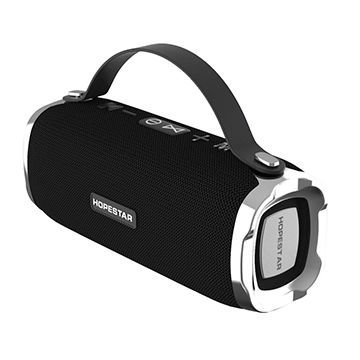
Figure 1: Hopestar H24 Speaker with integrated top handle. This view highlights the control panel on top, including power, volume, and mode buttons, along with the Hopestar branding on the front grille.
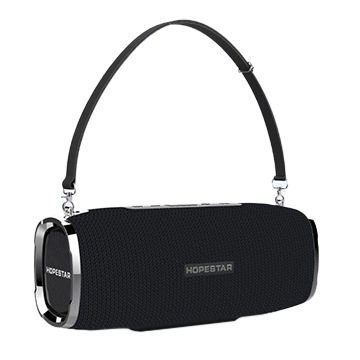
Figure 2: Hopestar H24 Speaker with an optional shoulder strap attached. This image demonstrates the speaker's portability and the attachment points for the strap, offering a different carrying option.
Control Panel (Top View)
- Power Button: Press and hold to turn the speaker ON/OFF.
- Mode Button (M): Press to switch between Bluetooth, FM Radio, AUX, USB, and TF Card modes.
- Play/Pause Button: Press to play or pause audio. In FM mode, press to auto-scan stations.
- Volume Down / Previous Track (-): Press to decrease volume. Press and hold for previous track.
- Volume Up / Next Track (+): Press to increase volume. Press and hold for next track.
Ports (Rear/Side)
- USB Port: For USB drive playback.
- TF Card Slot: For TF (MicroSD) card playback.
- AUX Input: For connecting external audio devices via 3.5mm audio cable.
- Micro USB Charging Port: For charging the speaker.
Setup
1. Charging the Speaker
- Connect the supplied USB charging cable to the Micro USB charging port on the speaker.
- Connect the other end of the USB cable to a USB power adapter (not included) or a computer's USB port.
- The charging indicator light will illuminate, typically red, during charging.
- The light will turn off or change color (e.g., blue) once fully charged. A full charge takes approximately 2-3 hours.
2. Powering On/Off
- To Power On: Press and hold the Power Button for 2-3 seconds until you hear an audible prompt.
- To Power Off: Press and hold the Power Button for 2-3 seconds until you hear an audible prompt.
Operating Instructions
1. Bluetooth Mode
- Turn on the speaker. It will automatically enter Bluetooth pairing mode, indicated by a flashing LED light and an audible prompt.
- Enable Bluetooth on your smartphone, tablet, or other Bluetooth-enabled device.
- Search for available Bluetooth devices and select "HOPESTAR H24" from the list.
- Once paired, the LED light will stop flashing, and you will hear a connection sound.
- You can now play audio from your device through the speaker.
- Use the speaker's volume buttons or your device's volume controls to adjust the sound.
2. FM Radio Mode
- Press the Mode (M) button repeatedly until you hear the FM radio prompt.
- Connect the AUX cable to the AUX port; it acts as an antenna for better reception.
- Press the Play/Pause button once to start automatic station scanning. The speaker will scan and save available FM stations.
- Once scanning is complete, use the Previous Track (-) and Next Track (+) buttons to navigate between saved stations.
3. AUX Input Mode
- Press the Mode (M) button until you hear the AUX mode prompt.
- Connect one end of the supplied 3.5mm AUX cable to the speaker's AUX port.
- Connect the other end of the AUX cable to the headphone jack of your external audio device (e.g., MP3 player, computer).
- Audio will now play through the speaker. Control playback and volume from your connected device.
4. USB Drive / TF Card Mode
- Insert a USB drive into the USB port or a TF (MicroSD) card into the TF card slot.
- The speaker will automatically detect the storage device and switch to the corresponding mode, beginning playback of audio files.
- If it does not switch automatically, press the Mode (M) button to select the correct mode.
- Use the Play/Pause, Previous Track (-), and Next Track (+) buttons to control playback.
Maintenance
- Keep the speaker away from extreme temperatures, direct sunlight, and dusty environments.
- Clean the speaker with a soft, dry cloth. Do not use abrasive cleaners or solvents.
- Although the speaker is indicated as waterproof, avoid submerging it in water or exposing it to heavy rain for extended periods.
- When not in use for a long time, charge the speaker at least once every three months to maintain battery health.
Troubleshooting
| Problem | Possible Cause | Solution |
|---|---|---|
| Speaker does not turn on. | Low battery. | Charge the speaker fully. |
| No sound. | Volume too low; incorrect mode; device not connected. | Increase volume; press 'M' to change mode; ensure Bluetooth/AUX connection. |
| Bluetooth pairing fails. | Speaker not in pairing mode; device too far; interference. | Ensure speaker is in pairing mode; move device closer; restart both devices. |
| Poor FM reception. | No antenna; weak signal. | Connect the AUX cable to act as an antenna; reposition the speaker. |
Specifications
- Model: H24
- Connectivity: Bluetooth, AUX, USB, TF Card
- Wireless Communication Technology: Bluetooth
- Power Source: Battery Powered (1 Lithium Ion battery included)
- Control Method: Touch
- Compatible Devices: Smartphone, Tablet
- Speaker Type: Bookshelf
- Surround Sound Channel Configuration: 2.1
- Product Dimensions: 23 x 10 x 10 cm
- Item Weight: 748 Grams
- Waterproof: Yes
- Included Components: 1 Speaker, 1 Aux cable, 1 USB Cable
Warranty and Support
This Hopestar H24 speaker comes with a 6-month warranty from the date of purchase. This warranty covers manufacturing defects. It does not cover damage caused by misuse, accidents, unauthorized modifications, or normal wear and tear.
For warranty claims or technical support, please contact your retailer or the Hopestar customer service department with your proof of purchase.


