
Introduction
This manual provides instructions for the Janome J-S2 Pop-Up Needle Plate, Slide Plate, and Bobbin Cover. This accessory is designed for use with various Janome electronic and computer sewing machines. Please read these instructions carefully before installation and use to ensure proper function and longevity of the product.
Important Note: Product specifications and shapes may vary depending on the specific sewing machine model. Always refer to your sewing machine's manual for compatibility and specific installation procedures.
Compatibility
This accessory (part number 750-036-012) is a rectangular pop-up needle plate (36mm x 45mm) with two protrusions on the left side. It is compatible with a wide range of Janome electronic and computer sewing machines, including but not limited to:
- Type 659: 2660, CL3010, CL5001, JE3500, JU21
- Type 751: 2860, 3080, 4050, 4500, 5470
- Type 753: 643, 850, 4600, 5740
- Type 755: 2870, 3090, 4080, 4470, 49600, 5470
- Type 806: SP150, NP288, NH22, JF280
- Type 807: DP210, DP310, KP215, KP225
- Type 840: 3770, 5000, 6400, 6550, 840, 970
- Type 841: 5100, 5300, 5400, A8800
- Type 843: JP500, JP510, MP330, MP800, T400
- Other models: JS30 670R, JND1800, Selfy 547EX, L751, Sensor Craft 7510, 7515, JE MOC18, New Eluju DX5780, New Perisia EX957, New Perisia EX956, Perisia EX955
If your model is not listed, please consult your sewing machine's user manual or contact Janome support for compatibility verification.
Setup & Installation
This section outlines the general procedure for installing the pop-up needle plate, slide plate, and bobbin cover. Specific steps may vary slightly depending on your sewing machine model. Always ensure your sewing machine is turned off and unplugged before performing any installation or maintenance.
Step 1: Remove the Existing Needle Plate
Carefully open the bobbin cover area of your sewing machine. Locate the existing needle plate. Depending on your model, it may be secured by screws or simply snap into place. Use a screwdriver if necessary to remove any screws. Gently lift and remove the old needle plate.

Image: Top view of the Janome J-S2 Pop-Up Needle Plate, showing measurement markings and bobbin threading diagram. This image illustrates the component to be installed.
Step 2: Position the New Needle Plate
Align the Janome J-S2 Pop-Up Needle Plate with the opening on your sewing machine. Ensure that the protrusions on the left side of the plate fit correctly into their designated slots.

Image: Angled view of the Janome J-S2 Pop-Up Needle Plate, highlighting the clear plastic construction and the alignment tabs on the left side. This image helps in identifying the correct orientation for installation.
Step 3: Secure the Needle Plate
Gently press the new needle plate into place until it snaps securely. If your machine uses screws, reinsert and tighten them carefully. Do not overtighten.
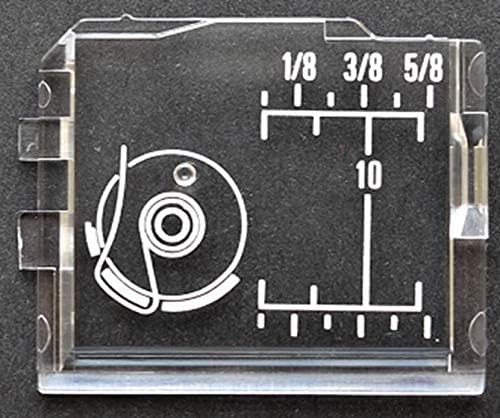
Image: Close-up view of the Janome J-S2 Pop-Up Needle Plate, showing the detailed markings for seam allowances (1/8, 3/8, 5/8 inches) and a bobbin threading guide. This image provides a clearer look at the functional markings on the plate.
Step 4: Verify Installation
Once installed, gently try to move the needle plate to ensure it is firmly seated and does not wobble. Close the bobbin cover.
Operating Instructions
The Janome J-S2 Pop-Up Needle Plate serves as a standard needle plate and bobbin cover for compatible sewing machines. Its clear design allows for better visibility of the bobbin area.
Bobbin Access
To access the bobbin, simply lift the pop-up section of the plate. This design facilitates easy bobbin changes and maintenance.
Seam Allowance Markings
The plate features engraved markings for common seam allowances (e.g., 1/8 inch, 3/8 inch, 5/8 inch) and a 10mm guide. Use these markings to maintain consistent seam widths during sewing. Align the edge of your fabric with the desired marking.
Bobbin Threading Guide
A diagram for bobbin threading is also etched onto the plate, providing a quick reference for proper bobbin insertion and thread path.
Maintenance
To ensure the longevity and proper function of your Janome J-S2 Pop-Up Needle Plate, follow these simple maintenance guidelines:
- Regular Cleaning: Periodically remove the needle plate and use a small brush to clear any lint, dust, or thread buildup from the bobbin case area and under the needle plate.
- Gentle Handling: Avoid dropping or applying excessive force to the needle plate, as it is made of plastic and can crack or break.
- Chemical Avoidance: Do not use harsh chemical cleaners or abrasive materials, as these can damage the plastic and fade the markings. A soft, damp cloth is sufficient for cleaning.
- Storage: When not in use, store the needle plate in a clean, dry place, away from direct sunlight or extreme temperatures.
Troubleshooting
This section addresses potential issues you might encounter with the Janome J-S2 Pop-Up Needle Plate.
Issue: Needle Plate does not fit or is loose.
- Solution 1: Verify compatibility. Ensure your sewing machine model is listed as compatible. Refer to the "Compatible Models" section.
- Solution 2: Check for obstructions. Ensure there is no lint, thread, or debris preventing the plate from seating correctly.
- Solution 3: Re-align. Remove the plate and carefully re-align it, ensuring all tabs and slots match.
Issue: Bobbin cover does not pop up smoothly.
- Solution 1: Clean the area. Lint or debris might be obstructing the mechanism. Clean thoroughly around the pop-up hinge.
- Solution 2: Check for damage. Inspect the pop-up mechanism for any visible damage or warping.
Issue: Markings are fading.
- Solution 1: Avoid harsh cleaners. Ensure you are not using abrasive or chemical cleaners that could degrade the etched markings.
Specifications
| Feature | Detail |
|---|---|
| Brand | Janome |
| Model Number | J-S2 |
| Part Number | 750-036-012 |
| Type | Pop-Up Needle Plate / Slide Plate / Bobbin Cover |
| Dimensions | Rectangular, approximately 36mm x 45mm |
| Material | Clear Plastic |
| Compatibility | Designed for Janome electronic and computer sewing machines (refer to "Compatible Models" section for specific models) |
| Special Features | Integrated seam allowance markings (1/8", 3/8", 5/8", 10mm), bobbin threading guide |
| ASIN | B07FZHSZTR |
Note: Product specifications are subject to change without prior notice.
Warranty Information and Customer Support
For warranty details, please refer to the documentation provided with your original Janome sewing machine or contact Janome customer support directly. This accessory is covered under Janome's standard accessory warranty terms.
Customer Support
If you have any questions regarding the installation, operation, or compatibility of this product, please contact Janome customer support.
- Manufacturer: Janome Sewing Machine Industry Co., Ltd.
- Website: www.janome.co.jp (Please note: This link is for the Japanese website. For international support, please visit your regional Janome website.)
- Contact: Refer to the contact information provided in your sewing machine's manual or on the official Janome website for your region.
Always provide your sewing machine model number and the accessory part number (J-S2 or 750-036-012) when contacting support.