
1. Introduction
This manual provides essential instructions for the safe and efficient use of your Astrum CW200 Qi 2.0 5W Wireless Charger. Please read this manual thoroughly before using the device and retain it for future reference.
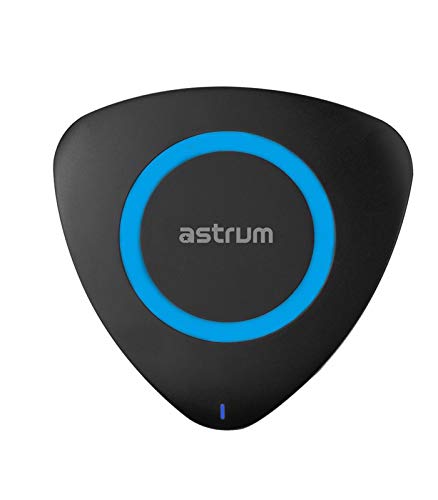
Figure 1: Top view of the Astrum CW200 Wireless Charger. The charger is triangular with rounded corners, black in color, featuring a central blue ring and a small blue LED indicator at the bottom.
2. Safety Information
To ensure safe operation and prevent damage, please observe the following precautions:
- Do not expose the device to water or excessive moisture.
- Avoid extreme temperatures, direct sunlight, or dusty environments.
- Do not disassemble, repair, or modify the charger. This may void the warranty and pose safety risks.
- Keep the charger away from strong magnetic fields.
- Use only the provided USB cable or a certified equivalent.
- Ensure the power adapter (not included) meets the specified input requirements (DC5V/2A).
- Keep out of reach of children.
3. Package Contents
Verify that all items are present in the package:
- 1 x Astrum Qi 2.0 Wireless Ultra Slim Charging Pad (CW200)
- 1 x USB Charging Cable
- 1 x User Manual
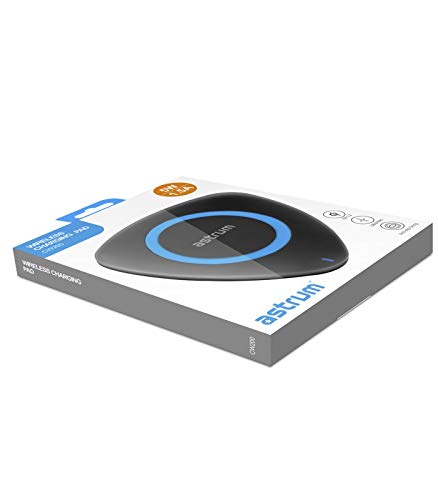
Figure 2: The Astrum CW200 Wireless Charger packaging, displaying the charger and its contents.
4. Product Features
The Astrum CW200 Wireless Charger offers the following key features:
- Qi Standard: Supports fast and efficient wireless charging for compatible devices.
- Non-slip Pad: Designed to securely hold your smartphone in place during charging.
- Wide Compatibility: Compatible with Apple, Samsung, and all other Qi-enabled devices.
- Ease of Use: Simply place your Qi-enabled device on the charging pad to begin charging.
- Safety Protections: Built-in over-voltage, short-circuit, and overheating protection for device safety.
5. Setup Guide
Follow these steps to set up your wireless charger:
- Connect the USB Cable: Insert the small end of the provided USB charging cable into the charging port on the Astrum CW200 wireless charger.
- Connect to Power Source: Plug the larger end of the USB cable into a compatible USB power adapter (DC5V/2A recommended, not included) or a USB port on a computer.
- Placement: Place the wireless charging pad on a flat, stable surface.
- Power Indicator: A small LED indicator light on the charger will illuminate, indicating that the charger is powered on and ready for use.
6. Operating Instructions
To charge your Qi-enabled device:
- Ensure the wireless charger is properly connected to a power source as described in the "Setup Guide".
- Place your Qi-enabled smartphone directly onto the center of the charging pad. The non-slip surface will help keep your device in position.
- The charging indicator on your smartphone should activate, confirming that charging has begun. The LED indicator on the Astrum CW200 charger may change color or blink to indicate active charging (refer to your phone's manual for specific charging indications).
- For optimal charging, ensure your device is centered on the pad and remove any thick cases that might interfere with wireless charging.
7. Troubleshooting
If you encounter issues with your Astrum CW200 Wireless Charger, refer to the following common problems and solutions:
| Problem | Possible Cause | Solution |
|---|---|---|
| Device not charging. | Charger not powered, device not Qi-enabled, device not properly aligned, thick phone case. |
|
| Slow charging. | Insufficient power input, device misalignment, background apps on phone. |
|
| Charger LED not lighting up. | No power supply. |
|
8. Specifications
Technical specifications for the Astrum CW200 Wireless Charger:
| Model | CW200 |
| Input | DC5V / 2A |
| Interface | Qi v1.2 |
| Output | 5V / 1.5A (5W) |
| Transmission Distance | Up to 10mm |
| Charging Efficiency | ≥ 75% |
| Charging Frequency | 110 - 205 kHz |
| Dimensions (L x W x H) | 100 x 100 x 10mm |
| Weight | Approximately 50g |
| Material | Plastic |
| Compatible Devices | All Qi-enabled Smartphones |
9. Maintenance
Proper care ensures the longevity of your wireless charger:
- Cleaning: Use a soft, dry cloth to clean the surface of the charger. Do not use liquid cleaners or aerosols.
- Storage: When not in use, store the charger in a cool, dry place, away from direct sunlight and extreme temperatures.
- Handling: Avoid dropping the charger or subjecting it to strong impacts.
10. Warranty and Support
The Astrum CW200 Wireless Charger comes with a 1-year manufacturer's warranty from the date of purchase. This warranty covers manufacturing defects under normal use.
For warranty claims or technical support, please contact Astrum customer service through their official website or the retailer where the product was purchased. Please retain your proof of purchase for warranty validation.
Country of Origin: China