
Alpicool C22
Alpicool C22 Portable Refrigerator User Manual
Model: C22
Introduction
Thank you for choosing the Alpicool C22 Portable Refrigerator. This manual provides essential information for the safe and efficient operation of your new appliance. Please read it thoroughly before use and retain it for future reference.
The Alpicool C22 is a versatile 23-quart (22-liter) portable refrigerator and freezer designed for vehicle, car, truck, RV, and outdoor use. It operates on 12V/24V DC power and features a USB socket for charging mobile devices, an ice cube tray, and a built-in LED light.
Safety Instructions
- Ensure proper ventilation around the unit.
- Do not block the ventilation openings.
- Avoid placing the unit in direct sunlight or near heat sources.
- Use only the specified power adapters.
- Do not immerse the unit in water.
- Keep out of reach of children.
- Disconnect power before cleaning or maintenance.
Product Overview

Figure 1: Main view of the Alpicool C22 Portable Refrigerator.
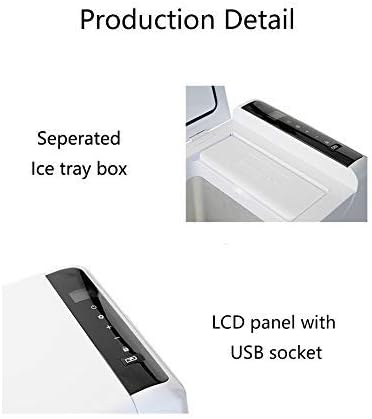
Figure 2: Close-up of the LCD display panel with USB socket and the separated ice tray box.
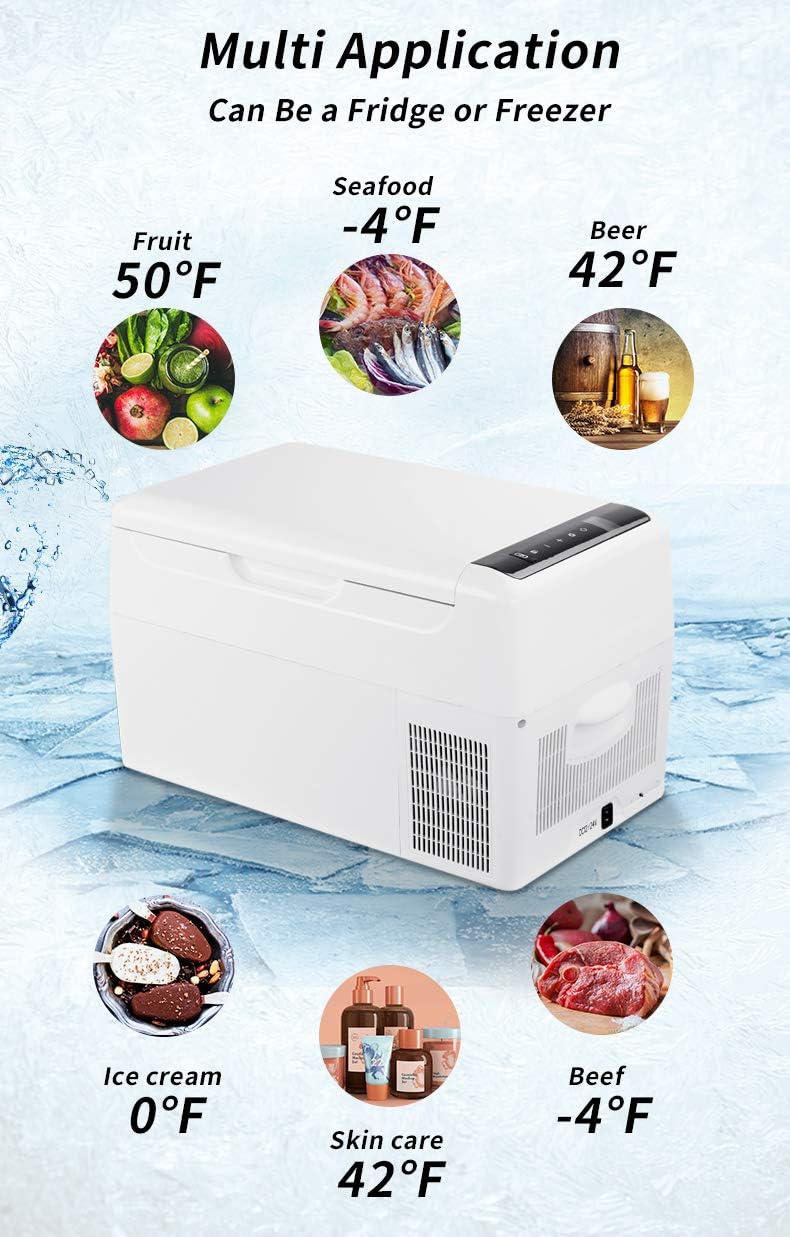
Figure 3: Illustrates the multi-application capability, functioning as a fridge or freezer for various items at different temperatures.

Figure 4: Interior view demonstrating storage capacity with various beverages.

Figure 5: Top-down view of the unit with the lid open, revealing the internal compartment and control panel.

Figure 6: Empty interior of the Alpicool C22, highlighting the clean design and ice cube tray slot.

Figure 7: Technical diagram illustrating the product dimensions and internal capacity measurements.
Setup
Unpacking
- Carefully remove the refrigerator from its packaging.
- Inspect the unit for any shipping damage. If damaged, contact your retailer immediately.
- Remove all internal packing materials and accessories.
Placement
- Place the unit on a flat, stable surface.
- Ensure adequate air circulation around the unit, especially around the ventilation grilles.
- Avoid direct sunlight and heat sources.
Power Connection
- Connect the DC power cable to the unit's DC input port (12V/24V).
- Plug the other end into your vehicle's cigarette lighter socket or a compatible DC power source.
- For AC operation (if using an optional AC adapter, not included), connect the AC adapter to the unit and then to a standard wall outlet.
Operating Instructions
Control Panel Functions
The Alpicool C22 features an intuitive LCD display panel for easy control.
- Power Button: Press to turn the unit ON or OFF.
- Set Button: Press to enter temperature setting mode or switch between modes (e.g., MAX/ECO).
- Temperature Adjustment Buttons (+/-): Use to increase or decrease the desired temperature.
- USB Socket: Located on the control panel, provides power for charging mobile devices.
Temperature Setting
- Turn on the unit using the Power button.
- Press the Set button. The display will flash.
- Use the +/- buttons to set your desired temperature. The unit can achieve temperatures as low as -4°F (-20°C).
- The setting will automatically save after a few seconds of inactivity.
Battery Protection Mode
The unit includes a 3-level battery protection system to prevent your vehicle battery from running down.
- H (High): Highest protection, suitable for starting batteries.
- M (Medium): Moderate protection.
- L (Low): Lowest protection, suitable for deep cycle batteries.
To change the battery protection mode:
- With the unit ON, press and hold the Set button for 3 seconds until the display flashes.
- Press the Set button again to cycle through H, M, L.
- Release the Set button to confirm your selection.
MAX/ECO Mode
The unit offers two operating modes for efficiency:
- MAX: Provides maximum cooling performance.
- ECO: Energy-saving mode for extended battery life.
To switch between MAX and ECO modes:
- With the unit ON, press the Set button briefly to toggle between MAX and ECO.
Maintenance
Cleaning
- Always disconnect power before cleaning.
- Clean the interior and exterior with a damp cloth and mild detergent.
- Do not use abrasive cleaners or solvents.
- Ensure the unit is completely dry before reconnecting power.
Defrosting
Frost may accumulate on the interior cooling surfaces. Defrost the unit when the frost layer is approximately 0.2 inches (5mm) thick.
- Turn off the unit and disconnect power.
- Remove all contents.
- Leave the lid open to allow frost to melt naturally.
- Wipe away melted water with a clean cloth.
- Do not use sharp objects to remove frost.
Storage
When storing the unit for extended periods:
- Ensure the unit is clean and dry.
- Leave the lid slightly ajar to prevent odors and mold growth.
- Store in a dry, well-ventilated area.
Troubleshooting
| Problem | Possible Cause | Solution |
|---|---|---|
| Unit does not turn on. | No power supply; faulty cable; low battery voltage. | Check power connection; ensure power source is active; check vehicle battery voltage; try a different cable. |
| Unit not cooling sufficiently. | Temperature setting too high; blocked ventilation; excessive contents; lid not sealed properly. | Lower temperature setting; clear ventilation; reduce contents; ensure lid is closed tightly. |
| Display shows error code. | Specific internal fault. | Refer to the specific error code in the full manual (if available) or contact customer support. |
| Unusual noise. | Unit not level; fan obstruction; compressor issue. | Ensure unit is on a level surface; check for obstructions around fan; if noise persists, contact support. |
Specifications
| Feature | Detail |
|---|---|
| Model | C22 |
| Capacity | 23 Quart (22 Liters) |
| Dimensions (L x W x H) | 23.5 x 12.6 x 13.19 inches |
| Item Weight | 21.4 pounds |
| Voltage | DC 12V/24V |
| Rated Power | 45 Watts |
| Temperature Range | -4°F to 50°F (-20°C to 10°C) |
| Special Features | LCD Display, USB Charging Port, Ice Cube Tray, Built-in LED Light, 3-level Battery Protection |
Warranty Information
The Alpicool C22 Portable Refrigerator comes with a 1-year warranty from the date of purchase. This warranty covers manufacturing defects in materials and workmanship under normal use.
The warranty does not cover damage caused by:
- Improper installation or operation.
- Accident, abuse, or misuse.
- Unauthorized repairs or modifications.
- Power surges or improper voltage.
Please retain your proof of purchase for warranty claims.
Customer Support
For technical assistance, warranty claims, or general inquiries, please contact Alpicool customer support through the retailer where you purchased the product or visit the official Alpicool website.
You can find more information and contact details on the Alpicool Brand Store on Amazon.
Related documentsC22


Ask a question about this manual
Ask about setup, troubleshooting, compatibility, parts, safety, or missing instructions. Manuals+ will review the question and use this page’s manual context to help answer it.