
1. Introduction
This manual provides detailed instructions for the proper use and maintenance of the MeterTo SL-5868P Sound Level Meter. This device is designed for accurate measurement of sound levels in various environments.
The SL-5868P is widely used to test the sound level of environments, machinery, vehicles, ships, and other noise sources. It is suitable for industrial environmental protection, construction, healthcare, teaching, and research departments.
The meter offers four measurement parameters: Lp (Sound Level), Leq (Equivalent Continuous A Sound Level), Lmax (Maximum Sound Level), and LN (Percent of all readings over alarm value set).
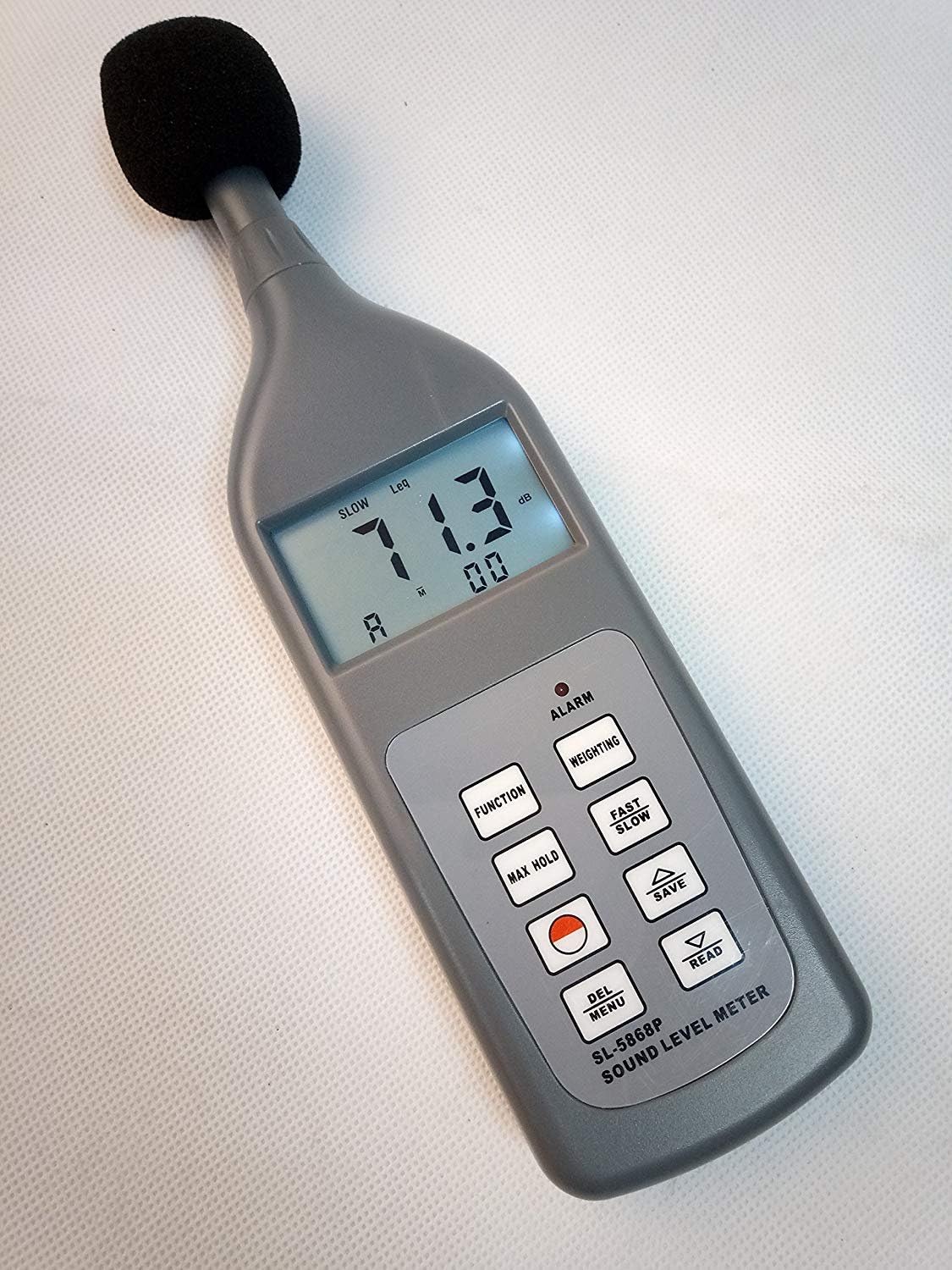
Image 1: Front view of the MeterTo SL-5868P Sound Level Meter with windscreen, showing a reading of 71.3 dB.
2. Safety Information
- Read all instructions carefully before operating the device.
- Do not expose the device to extreme temperatures, humidity, or direct sunlight.
- Avoid dropping or subjecting the device to strong impacts.
- Do not attempt to open or modify the device, as this will void the warranty.
- Dispose of batteries according to local regulations.
3. Product Features
- Permits choice of 'A', 'C', 'F' weighting and 'Fast' / 'Slow' response times.
- Offers 4 measurement parameters: Lp, Leq, Lmax, and LN.
- DC output: 10 mV / dB.
- Auto range selection and digital display.
- Can memorize 30 groups of measurement results and conditions.
- Built-in automatic calibration signal: 94dB at 1 kHz (sinusoidal).
4. Components and Controls
The SL-5868P Sound Level Meter features a clear digital display and intuitive control buttons.

Image 2: Detailed view of the control panel, showing buttons for FUNCTION, WEIGHTING, MAX HOLD, FAST/SLOW, SAVE, DEL MENU, READ, and ALARM indicator. The display shows 94.3 dB.
4.1. Display
- dB Reading: Main sound level measurement.
- Measurement Mode Indicator: Lp, Leq, Lmax, LN.
- Weighting Indicator: A, C, F.
- Response Time Indicator: Fast, Slow.
- Battery Indicator: Shows remaining battery life.
4.2. Buttons
- FUNCTION: Cycles through measurement parameters (Lp, Leq, Lmax, LN).
- WEIGHTING: Selects frequency weighting (A, C, F).
- MAX HOLD: Holds the maximum measured sound level.
- FAST/SLOW: Toggles between Fast (125 ms) and Slow (1 second) response times.
- SAVE: Saves the current measurement data (up to 30 groups).
- DEL MENU: Enters the delete menu for saved data.
- READ: Recalls saved measurement data.
- ALARM (LED): Illuminates when the sound level exceeds the set alarm value.
- Power Button (Red Circle): Turns the device on/off.

Image 3: The MeterTo SL-5868P Sound Level Meter, windscreen, and operation manual neatly packed in its blue carrying case.
5. Setup
5.1. Battery Installation
- Locate the battery compartment on the back of the device.
- Open the battery compartment cover.
- Insert four 1.5V AAA size (UM-4) batteries, ensuring correct polarity.
- Close the battery compartment cover securely.
Note: The device can also be powered by an external 6V DC, 100mA power supply.
5.2. Windscreen Attachment
For outdoor measurements or in windy conditions, gently slide the provided windscreen over the microphone to reduce wind noise interference.
6. Operating Instructions
6.1. Power On/Off
Press the red circular power button to turn the meter on. Press and hold the same button to turn it off.
6.2. Measurement Modes (FUNCTION)
Press the FUNCTION button to cycle through the available measurement parameters:
- Lp: Sound Level (instantaneous).
- Leq: Equivalent Continuous A Sound Level (for selected durations: 10s, 1min, 5min, 10min, 15min, 30min, 1hour, 8hours, 24hours).
- Lmax: Maximum Sound Level recorded during a measurement period.
- LN: Percent of all readings over a user-defined alarm value.
6.3. Frequency Weighting (WEIGHTING)
Press the WEIGHTING button to select the desired frequency weighting:
- A-Weighting: Mimics the human ear's response to sound, commonly used for environmental noise measurements.
- C-Weighting: Provides a flatter response, suitable for measuring peak sound pressure levels and mechanical noise.
- F-Weighting (Flat): Offers a flat frequency response, useful for analyzing raw sound signals.
6.4. Response Time (FAST/SLOW)
Press the FAST/SLOW button to toggle between:
- Fast (125 ms): For capturing rapidly changing noise levels.
- Slow (1 second): For measuring average noise levels over time.
6.5. Maximum Hold (MAX HOLD)
Press the MAX HOLD button to freeze the display at the highest sound level recorded since the function was activated. Press again to release.
6.6. Data Saving and Recall
- SAVE: Press SAVE to store the current measurement data.
- READ: Press READ to view previously saved data. Use the up/down arrow buttons (often shared with FAST/SLOW or WEIGHTING in some models, refer to specific button labels) to navigate through saved records.
- DEL MENU: Press DEL MENU to access options for deleting saved data.
6.7. Calibration
The SL-5868P has a built-in calibration signal of 94dB at 1 kHz. For external calibration, use an ND9 Sound Level Meter Calibrator.

Image 4: Side view of the MeterTo SL-5868P, highlighting the external DC power input, output jack, RS-232C data port, and calibration port.
7. Maintenance
- Cleaning: Wipe the device with a soft, dry cloth. Do not use abrasive cleaners or solvents.
- Storage: When not in use for extended periods, remove the batteries and store the meter in its carrying case in a cool, dry place.
- Microphone Care: Keep the microphone clean and free from dust or debris. Avoid touching the microphone diaphragm.
8. Troubleshooting
| Problem | Possible Cause | Solution |
|---|---|---|
| Device does not power on | Dead or incorrectly installed batteries | Replace batteries or check polarity. Ensure external DC power supply is connected correctly. |
| Inaccurate readings | Microphone obstructed, incorrect weighting/response time, or needs calibration | Clear microphone. Verify A/C/F weighting and Fast/Slow settings. Perform calibration. |
| Display shows "Low Battery" | Batteries are low | Replace all four AAA batteries. |
9. Specifications
| Standards | IEC 651.2, ANSI 1.4.2 |
| Parameters Measured | Lp, Leq, Lmax, LN |
| Lp Testing Range | 30~130dB (A Weighting), 35~130dB (C Weighting), 40~130dB (F Weighting) |
| Leq Testing Range | 30~130dB (10s, 1min, 5min, 10min, 15min, 30min, 1hour, 8hours, 24hours) |
| LN Testing Range | 0~100% |
| Resolution | 0.1dB |
| Accuracy | 1dB |
| Frequency Weighting | 'A' / 'C' / 'F' (Flat) |
| Time Weighting | Fast (125 ms) / Slow (1 Second) |
| Microphone | 1/2 Inch Electret Condenser Type |
| Memory | 30 Group with Measuring Conditions |
| Calibration Signal | Built in: 94dB at 1k Hz (sinusoidal) |
| Frequency Range | 20~12,500 Hz |
| Alarm Value Set | 30~130 dB |
| Alarm Output | LED Optional Relay Contact (NC) |
| Indicator | Low Battery Indicator |
| Power Supply | 4x1.5V AAA Size (UM-4) Battery |
| External DC Power Supply | 6V, DC, 100mA |
| Dimensions | 236x63x26 mm |
| Weight | 170 g |
10. Warranty and Support
For warranty information and technical support, please contact MeterTo customer service. Refer to the official MeterTo website or the packaging for contact details.
Standard Accessories Included:
- Main Unit
- Windscreen
- Carrying Case (B04)
- Operation Manual
Optional Accessories:
- ND9 Sound Level Meter Calibrator
- RS-232C Data with Software
- Bluetooth Data Adapter with Software