
Smartby PHI-958
Smartby Universal Remote Control PHI-958 User Manual
Model: PHI-958
Brand: Smartby
Introduction
This manual provides instructions for the Smartby Universal Remote Control, model PHI-958. This remote is designed as a replacement and universal control for a wide range of Philips LCD, LED, 4K UHD Smart TVs. It offers full functionality without the need for complex programming, allowing for immediate use upon battery installation.
Package Contents
- 1 x Smartby Universal Remote Control (Model: PHI-958)
Note: Batteries are not included and must be purchased separately.
Setup: Battery Installation
To begin using your Smartby Universal Remote Control, you must first install batteries. No programming is required for this remote; it is ready for use once batteries are inserted.
- Locate the battery compartment on the back of the remote control.
- Press down on the tab and slide the battery cover downwards to open it.
- Insert two AAA batteries (not included), ensuring the positive (+) and negative (-) terminals align correctly with the markings inside the compartment.
- Slide the battery cover back into place until it clicks securely.

Image: Rear view of the remote control with the battery compartment cover. This illustrates where to insert the batteries.
Your remote control is now ready for operation.
Operating Instructions: Button Functions
Familiarize yourself with the various buttons and their functions on your Smartby Universal Remote Control.
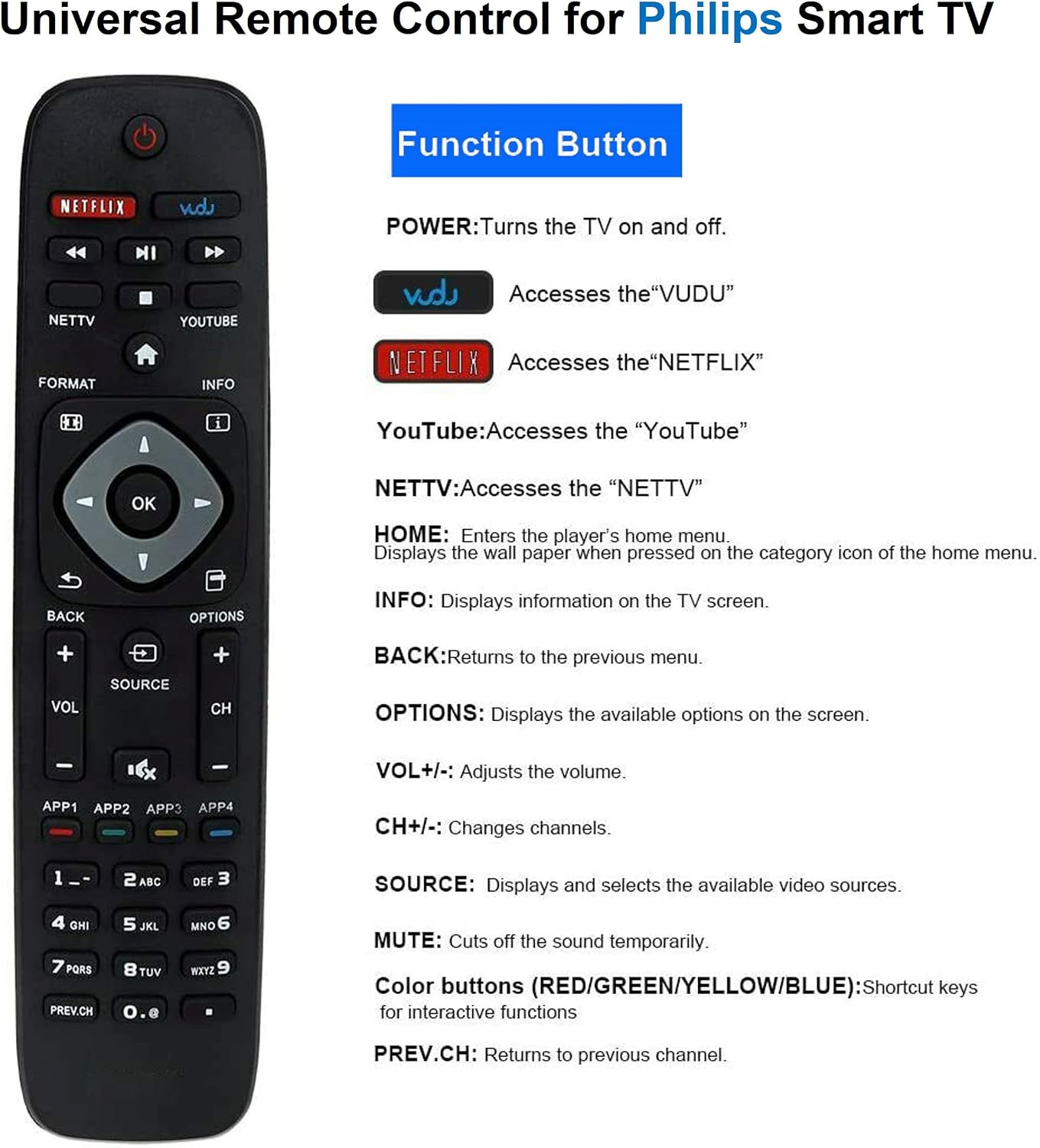
Image: Front view of the remote control with key functions labeled for easy identification.
- POWER: Turns the television on or off.
- NETFLIX: Direct access to the Netflix application.
- VUDU: Direct access to the Vudu application.
- YOUTUBE: Direct access to the YouTube application.
- NETTV: Direct access to the NETTV application.
- HOME: Enters the television's home menu or smart hub.
- INFO: Displays information about the current program or input on the TV screen.
- BACK: Returns to the previous menu or screen.
- OPTIONS: Displays available options or settings on the screen.
- VOL +/-: Adjusts the volume level.
- CH +/-: Changes television channels.
- SOURCE: Displays and allows selection of available video input sources (e.g., HDMI 1, AV).
- MUTE: Toggles sound on or off.
- Color Buttons (RED/GREEN/YELLOW/BLUE): Provide shortcut functions within specific applications or menus, as indicated on the TV screen.
- PREV.CH: Returns to the previously viewed channel.
- Number Pad (0-9): Used for direct channel entry or inputting numbers in menus.
- Navigation Pad (Up, Down, Left, Right, OK): Used to navigate menus and confirm selections.
- Playback Controls (Rewind, Play/Pause, Fast Forward, Stop): Controls media playback.
Compatibility
The Smartby Universal Remote Control (PHI-958) is compatible with a wide range of Philips LCD, LED, 4K UHD Smart TV models. This includes, but is not limited to, the following series and models:
- 4900 Series: 32PFL4902/F7, 32PFL4902/F7B, 40PFL4901/F7, 40PFL4901/F7B, 43PFL4901/F7, 43PFL4901/F7B, 43PFL4902/F7, 50PFL4901/F7, 50PFL4901/F7B
- 5600 Series: 43PFL5602/F7, 50PFL5601/F7, 50PFL5601/F7B, 50PFL5602/F7, 55PFL5602/F7, 65PFL5602/F7
- 5400 Series: 55PFL5402/F7
- 6900 Series: 50PFL6902/F7, 55PFL6902/F7, 65PFL6902/F7
- 6600 Series: 50PFL6602/F7
- Other Compatible Models: NH500UW, NH503UP, NH500UP, 43PFL5603/F7, 55PFL5903/F7, 65PFL5603/F7, 65PFL5703/F7, 65PFL5903/F7, 75PFL5603/F7, 50PFL5601, 65PFL6601, 50PFL5703/F7, 55PFL5603/F7, 50PFL5603/F7, 75PFL5603/F7, 65PFL5903/F7, 65PFL5703/F7, 65PFL5603/F7, 55PFL5903/F7, 55PFL5703/F7, 55PFL5603/F7, 50PFL5903/F7, 50PFL5703/F7, 098TRABD1BTPHR, 19PFL5402, 19PFL5402D/27, 19PFL5402D27, 19PFL5422D, 19PFL5422D/27, 19PFL5422D27, 313923814341, 37PFL5322D, 37PFL5322D/37, 37PFL5322D37, 42PFL5432D/37, 42PFL5432D37, 47PFL5422D/37, 47PFL5422D37L.
If your Philips TV model is not explicitly listed, the remote may still be compatible. Please refer to your TV's original remote or manual for button layout comparison.
Troubleshooting
If you encounter issues with your remote control, please refer to the following common troubleshooting steps:
- Remote Not Responding:
- Ensure batteries are correctly inserted with the correct polarity (+/-).
- Replace old batteries with new ones. Low battery power is a common cause of unresponsiveness.
- Ensure there is a clear line of sight between the remote control and the TV's infrared receiver. Obstructions can block the signal.
- Buttons Require Hard Pressing:
- This can sometimes indicate low battery power. Try replacing the batteries.
- Ensure the remote is pointed directly at the TV.
- Specific Functions Not Working:
- Verify that the TV is powered on and not in a standby mode.
- Some advanced functions or smart TV features may require the TV to be fully updated or connected to the internet.
If problems persist after following these steps, please consult your television's user manual for specific remote control settings or contact customer support.
Specifications
| Feature | Detail |
|---|---|
| Model Number | PHI-958 |
| Brand | Smartby |
| Product Dimensions | 7.8 x 1.7 x 0.5 inches (19.8 x 4.3 x 1.3 cm) |
| Item Weight | 2 ounces (56.7 grams) |
| Color | Black |
| Special Feature | Universal compatibility for specified Philips TVs |
| Max Number of Supported Devices | 1 (Television) |
| Compatible Devices | Philips LCD, LED, 4K UHD Smart Televisions |
Ask a question about this manual
Ask about setup, troubleshooting, compatibility, parts, safety, or missing instructions. Manuals+ will review the question and use this page’s manual context to help answer it.