
1. Introduction
This instruction manual provides comprehensive guidance for the safe and effective use of your Navien 30000405A Fan Motor. This fan motor is designed to provide efficient cooling and heat dissipation for various electronic devices. Please read this manual thoroughly before installation and operation to ensure optimal performance and longevity of the product.
2. Safety Information
WARNING: Electrical Shock Hazard
- Always disconnect power to the device before installing, servicing, or cleaning the fan motor.
- Installation should be performed by qualified personnel to prevent electrical hazards or damage to the product.
- Do not operate the fan motor if it is damaged or if the power connector is frayed.
- Ensure proper ventilation and never block the fan motor's airflow during operation.
- Keep hands and loose clothing away from moving parts during operation.
3. Package Contents
Verify that all items are present in the package:
- 1 x Navien 30000405A Fan Motor
- (Additional components, if any, would be listed here. Please check your product packaging.)
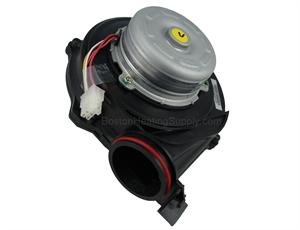
Figure 1: Navien 30000405A Fan Motor. This image displays the fan motor unit, featuring a black housing with a silver motor assembly on top, and a 3-pin connector visible.
4. Setup and Installation
The Navien 30000405A Fan Motor is designed for integration into various electronic devices. Follow these general guidelines for installation:
- Preparation: Ensure the host device is powered off and disconnected from its power source.
- Mounting: Carefully position the fan motor within the designated compartment of your device. The motor measures 4 inches in diameter and 1.5 inches in height, so ensure adequate space.
- Connection: Connect the 3-Pin power connector of the fan motor to the corresponding port on your device's circuit board or power supply. Ensure the connection is secure.
- Airflow: Verify that the fan motor's intake and exhaust vents are unobstructed to allow for optimal airflow and heat dissipation.
- Securing: Secure the fan motor using appropriate fasteners (not included, typically provided by the host device manufacturer) to prevent vibration and ensure stable operation.
- Final Check: Before reassembling the device, double-check all connections and ensure no wires are pinched or obstructing moving parts.
Note: For specific installation instructions, refer to the service manual or documentation of the device into which this fan motor is being installed.
5. Operating Instructions
Once properly installed and connected, the Navien 30000405A Fan Motor operates automatically when power is supplied to the host device. Its primary function is to draw heat away from critical components, maintaining optimal operating temperatures.
- Automatic Operation: The fan motor will activate and adjust its speed as required by the host device's thermal management system.
- Cooling Performance: The motor is capable of reaching a maximum rotational speed of 1500 RPM, providing efficient forced air cooling.
- Noise Level: Under normal operating conditions, the fan motor produces a noise level of approximately 30 decibels, designed for quiet operation.
6. Maintenance
Regular maintenance helps ensure the longevity and efficient performance of your fan motor.
- Dust Removal: Periodically inspect the fan blades and housing for dust accumulation. Use compressed air or a soft brush to gently remove dust and debris. Ensure the device is powered off and unplugged before cleaning.
- Airflow Check: Regularly verify that the air intake and exhaust paths are clear and unobstructed. Blockages can reduce cooling efficiency and potentially damage the motor.
- Inspection: Visually inspect the fan motor for any signs of wear, damage, or loose connections. If any issues are observed, refer to the troubleshooting section or contact support.
7. Troubleshooting
If you encounter issues with your Navien 30000405A Fan Motor, consider the following troubleshooting steps:
- Fan Not Spinning:
- Ensure the host device is powered on.
- Check that the 3-Pin power connector is securely attached.
- Verify that the fan blades are not obstructed by wires or debris.
- Excessive Noise:
- Inspect for loose mounting screws or vibrations.
- Check for debris caught in the fan blades.
- If the noise is a grinding or rattling sound, the motor bearings may be worn. Replacement may be necessary.
- Reduced Cooling Performance:
- Ensure air intake and exhaust vents are clear of obstructions.
- Clean any dust buildup on the fan blades or heatsinks.
- Verify the fan is spinning at its expected speed.
If these steps do not resolve the issue, it is recommended to consult a qualified technician or contact Navien customer support.
8. Specifications
| Feature | Detail |
|---|---|
| Brand | Navien |
| Model Number | 30000405A (Item model number: 8541605855) |
| Product Dimensions | 4"L x 4"W x 1.5"H |
| Power Connector Type | 3-Pin |
| Voltage | 12 Volts |
| Wattage | 3000 watts |
| Cooling Method | Forced Air |
| Compatible Devices | Desktop, Gaming Console, Graphic Cards, Projector, Receiver, Transmission Coolers |
| Noise Level | 30 Decibels |
| Material | Copper |
| Maximum Rotational Speed | 1500 RPM |
9. Warranty Information
Warranty information for the Navien 30000405A Fan Motor is not explicitly provided within this manual. For details regarding warranty coverage, terms, and conditions, please refer to the original product packaging, the purchase receipt, or visit the official Navien website.
10. Customer Support
For technical assistance, troubleshooting guidance beyond what is covered in this manual, or inquiries about replacement parts, please contact Navien customer support. Contact information can typically be found on the manufacturer's official website or on the product packaging.
Always provide your product model number (30000405A) and any relevant purchase details when contacting support.