1. Introduction
The AL-HARAMEEN HA-3011 Azan Clock is a digital clock designed to provide accurate prayer times for most cities worldwide. It features five daily Azan alarms, Hijri and Gregorian calendar displays, temperature display, and a full-screen LED backlight. This manual provides instructions for setting up and operating your Azan clock.

Image 1.1: Front view of the AL-HARAMEEN HA-3011 Azan Clock, displaying time, date, and prayer information.
2. Key Features
- Prayer Time Reminders: Features 5 complete Azan alarms for daily prayers with adjustable volume.
- City Setting: Easy city selection using international dialing telephone codes.
- Calendar Display: Supports both Hijri and Gregorian calendars.
- Daily & Weekend Alarms: Customizable daily and weekend alarm options.
- Temperature Display: Shows current ambient temperature.
- Full Screen LED Light: Provides illumination for easy viewing in low light conditions.
- Snooze Function: Allows for temporary silencing of alarms.
- Volume Control: Adjustable volume for Azan and alarms.
3. Package Contents
Upon opening the package, ensure the following item is present:
- AL-HARAMEEN HA-3011 Azan Clock
Note: Batteries (AA size) and a DC 5V/300mA power adapter are not included and must be purchased separately.
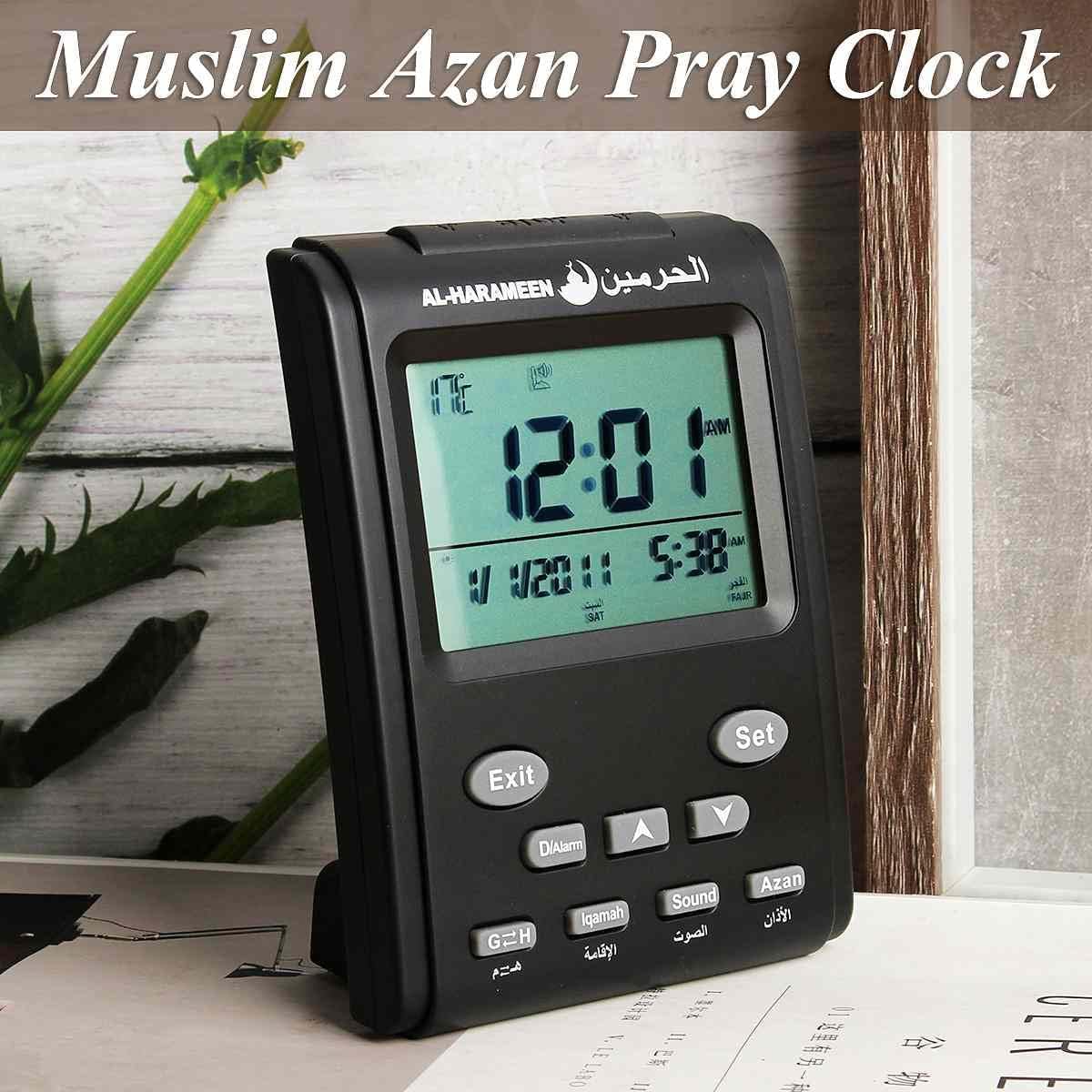
Image 3.1: The Azan Clock positioned on a surface, ready for use.
4. Setup Instructions
4.1 Powering the Clock
- Battery Installation: Open the battery compartment cover on the back of the clock. Insert 2 AA batteries, ensuring correct polarity (+/-).
- AC Adapter (Optional): For continuous power, connect a DC 5V/300mA adapter (not included) to the DC IN port on the side of the clock.

Image 4.1: Rear view of the clock showing the battery compartment.
4.2 Initial Settings (Time, Date, City)
The clock features several buttons on the front and back for configuration:
- Front Buttons: Exit, Set, D/Alarm, Up Arrow (▲), Down Arrow (▼), G=H, Iqamah, Sound, Azan.
- Back Buttons/Switches: City Select, Keys Lock, DST, 12/24, SNZ.

Image 4.2: Rear view of the clock highlighting control buttons and switches.
- Unlock Keys: Ensure the Keys Lock switch on the back is in the unlocked position.
- Set City:
- Press the City Select button on the back of the clock.
- Use the Up Arrow (▲) and Down Arrow (▼) buttons on the front to navigate through city codes. Refer to the provided city code list (usually in a separate leaflet or online) or use your international dialing telephone code for your location.
- Press Set to confirm the city.
- Set Time and Date:
- Press the Set button. The hour display will flash.
- Use the Up Arrow (▲) and Down Arrow (▼) buttons to adjust the hour.
- Press Set again to move to minutes, then year, month, and day. Adjust each value using the arrow buttons.
- Press Exit to save and exit the setting mode.
- Calendar Type: Press the G=H button on the front to switch between Gregorian and Hijri calendar displays.
- Time Format: Use the 12/24 button on the back to toggle between 12-hour and 24-hour time formats.
- Daylight Saving Time (DST): If your region observes DST, press the DST button on the back to activate or deactivate it.
5. Operating Instructions
5.1 Azan Alarms
The clock automatically calculates prayer times based on the set city. You can adjust the Azan sound and reminders:
- Azan Sound On/Off: Press the Azan button on the front to toggle the Azan sound for all prayers on or off.
- Iqamah Reminder: Press the Iqamah button to set a reminder for Iqamah (call to stand for prayer). Follow on-screen prompts to set the delay time.
- Volume Control: Adjust the volume of the Azan and other sounds using the volume slider located on the right side of the clock.
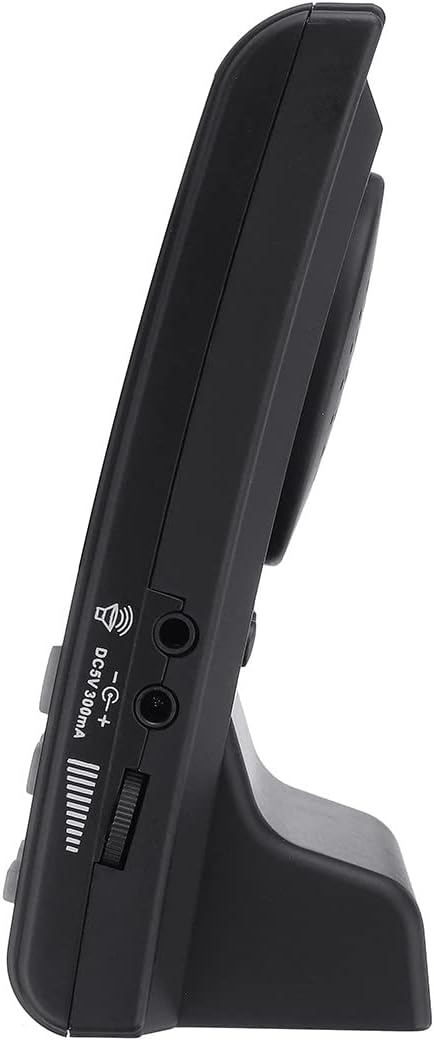
Image 5.1: Side view of the clock, indicating the volume control slider and power input.
5.2 Daily Alarm
In addition to prayer alarms, you can set a regular daily alarm:
- Press the D/Alarm button. The alarm time will flash.
- Use the Up Arrow (▲) and Down Arrow (▼) buttons to set the desired alarm hour and minute.
- Press Set to confirm.
- Press D/Alarm again to activate/deactivate the daily alarm. An alarm icon will appear on the display when active.
5.3 Snooze Function
When an alarm sounds, press the SNZ button on the back of the clock to activate the snooze function. The alarm will temporarily stop and sound again after a few minutes (default snooze time is usually 5-10 minutes, refer to specific model details if available).
5.4 Full Screen LED Light
To illuminate the display in dark environments, press the Stop/Light button located on the top edge of the clock. The backlight will activate for a few seconds.

Image 5.2: The clock display illuminated by its full-screen LED light in a low-light setting.
6. Maintenance
- Cleaning: Wipe the clock with a soft, dry cloth. Do not use abrasive cleaners or solvents.
- Battery Replacement: Replace batteries when the display dims or the clock functions become erratic. Always replace all batteries at the same time with new ones of the same type.
- Storage: If storing the clock for an extended period, remove the batteries to prevent leakage.
7. Troubleshooting
| Problem | Possible Cause | Solution |
|---|---|---|
| Clock not turning on / Display blank | No power; Batteries drained or incorrectly inserted; AC adapter not connected or faulty. | Check battery polarity; Replace batteries; Ensure AC adapter is properly connected and functional. |
| Incorrect prayer times | Incorrect city code; Incorrect date/time; DST setting incorrect; Calculation method needs adjustment. | Verify city code using the City Select button; Re-enter current date and time; Adjust DST setting; Consult the manufacturer's website for advanced prayer time calculation adjustments if needed. |
| Azan sound not playing | Azan sound is turned off; Volume is too low. | Press the Azan button to turn it on; Increase volume using the side slider. |
| Buttons unresponsive | Keys Lock is engaged. | Toggle the Keys Lock switch on the back to the unlocked position. |
8. Specifications
| Feature | Detail |
|---|---|
| Brand | AL-HARAMEEN |
| Model | HA-3011 |
| Color | Gold (variant) |
| Display Type | Digital LCD |
| Dimensions (W x H) | 3.78" x 5.16" (96mm x 131mm) |
| Power Source | Battery Powered (2x AA, not included) / DC 5V/300mA (adapter not included) |
| Material | Plastic |
| Special Features | Alarm, Calendar Display (Hijri & Gregorian), Temperature, Full Screen LED Light, Snooze |
| Mounting Type | Wall Mount |
| Item Weight | 7.7 ounces |

Image 8.1: Diagram illustrating the dimensions of the Azan Clock.
9. Warranty and Support
The AL-HARAMEEN HA-3011 Azan Clock comes with a Two Year Guarantee from the date of purchase. This warranty covers manufacturing defects under normal use. Please retain your proof of purchase for warranty claims.
For technical support, troubleshooting assistance beyond this manual, or warranty inquiries, please contact your retailer or the AL-HARAMEEN customer service department. Contact information can typically be found on the product packaging or the manufacturer's official website.


