
1. Product Overview
The Philips SENSEO Switch HD6592/61 is a versatile 2-in-1 coffee machine designed to brew both single-serve pod coffee and a full pot of filter coffee. This manual provides instructions for safe and efficient use of your appliance.

Image 1.1: The Philips SENSEO Switch coffee machine, showcasing its dual functionality for both pod and filter coffee preparation.
Key Features:
- Dual Brewing System: Prepare single cups of SENSEO pod coffee or a full pot of filter coffee.
- Automatic Shut-off: The machine automatically turns off after a period of inactivity to save energy.
- Easy Water Tank Filling: The water tank features a clear level indication for precise and convenient filling.
- Drip Stop System: Allows you to pause brewing and pour a cup of filter coffee before the full cycle is complete.
- Dishwasher-Safe Parts: The jug and filter holder are designed for easy cleaning in a dishwasher.
2. Safety Information
Read this instruction manual carefully before using the appliance and save it for future reference. Always follow basic safety precautions when using electrical appliances to reduce the risk of fire, electric shock, and personal injury.
- Ensure the voltage indicated on the appliance corresponds to your local mains voltage before connecting.
- Do not immerse the appliance, plug, or power cord in water or any other liquid.
- Keep the appliance out of reach of children.
- Do not operate the appliance if the plug, power cord, or the appliance itself is damaged.
- Place the appliance on a stable, flat, heat-resistant surface, away from hot surfaces or open flames.
- Always unplug the appliance before cleaning or when not in use.
- Do not open the appliance housing. Repairs should only be performed by authorized service personnel.
3. Setup
3.1 Unpacking and Initial Cleaning
- Remove all packaging materials from the coffee machine.
- Wash the removable parts (water reservoir, jug, filter holder, drip tray) with warm water and a mild detergent. Rinse thoroughly and dry.
- Wipe the exterior of the machine with a damp cloth.
3.2 First Use (Rinsing Cycle)
Before brewing coffee for the first time, perform a rinsing cycle to clean the internal system.
- Fill the water reservoir with fresh cold water up to the MAX indication.
- Place the empty jug (for filter coffee) or a cup (for pod coffee) on the drip tray.
- Close the lid of the pod holder (without a pod) or ensure the filter holder is empty and correctly placed.
- Press the power button to turn on the machine.
- Press the button for filter coffee or the 2-cup button for pod coffee to start a brewing cycle with only water.
- Repeat this process once or twice until the water reservoir is empty.

Image 3.1: Rear view of the coffee machine, showing the transparent water reservoir with level indicators and the filter coffee carafe in position.

Image 3.2: The coffee machine with the filter coffee section open, illustrating how to access the filter holder and water inlet for filter coffee brewing.
4. Operating Instructions
4.1 Brewing SENSEO Pod Coffee
- Ensure the water reservoir is filled with fresh cold water.
- Open the lid of the pod holder.
- Place one or two SENSEO coffee pods in the appropriate pod holder. For one cup, use the 1-cup pod holder; for two cups, use the 2-cup pod holder. Ensure the pod is centered.
- Close the lid firmly until it clicks.
- Place one or two cups on the drip tray.
- Press the 1-cup or 2-cup button to start brewing. The machine will automatically stop when the coffee is ready.

Image 4.1: The SENSEO Switch machine actively brewing two cups of pod coffee, demonstrating the pod coffee function.

Image 4.2: A close-up of the machine brewing a single cup of SENSEO pod coffee, highlighting the single-serve capability.
4.2 Brewing Filter Coffee
- Ensure the water reservoir is filled with fresh cold water up to the desired number of cups for filter coffee.
- Open the filter coffee section.
- Place a paper filter (size 1x4 or similar) into the filter holder.
- Add the desired amount of ground filter coffee into the paper filter.
- Close the filter coffee section and ensure the thermal jug is correctly placed on the heating plate.
- Press the filter coffee button to start brewing. The machine will brew the coffee and keep it warm in the thermal jug.
- The drip stop system allows you to remove the jug temporarily to pour a cup before brewing is complete.

Image 4.3: The SENSEO Switch machine configured for filter coffee, featuring the thermal carafe and filter holder.
4.3 Intensity Select
The machine features an Intensity Select function, allowing you to choose between a regular or a strong coffee. Refer to the control panel for specific buttons related to intensity selection.

Image 4.4: Overhead view of the control panel, showing the power button, 1-cup and 2-cup buttons for pod coffee, the filter coffee button, and the Intensity Select option.

Image 4.5: A hand interacting with the control panel, demonstrating the ease of selecting brewing options.
5. Maintenance
5.1 Cleaning
Regular cleaning ensures optimal performance and extends the lifespan of your coffee machine.
- Daily Cleaning: After each use, empty and rinse the water reservoir, drip tray, and pod holder. Wipe the exterior with a damp cloth.
- Dishwasher-Safe Parts: The jug and filter holder can be safely cleaned in the dishwasher.
- Pod Holder: Remove the pod holder and rinse it under running water. Use a small brush if necessary to remove any coffee residue.
- Drip Tray: Empty and clean the drip tray and grid regularly.
5.2 Descaling
Descaling is crucial to prevent limescale buildup, which can affect brewing performance and taste. The frequency of descaling depends on water hardness and usage.
- Use a descaling solution specifically designed for coffee machines. Follow the instructions provided with the descaling agent.
- Typically, the process involves filling the water reservoir with the descaling solution and running several brewing cycles without coffee.
- After descaling, rinse the machine thoroughly by running several cycles with fresh water to remove any descaling residue.
6. Troubleshooting
If you encounter issues with your Philips SENSEO Switch coffee machine, consult the following common troubleshooting steps:
- Machine does not turn on: Check if the power cord is securely plugged into a working electrical outlet.
- Coffee is not brewing: Ensure the water reservoir is filled, the pod holder/filter holder is correctly placed, and the lid is closed properly.
- Coffee tastes weak: Check if you are using the correct amount of coffee (pods or ground coffee) and if the Intensity Select setting is appropriate. Descaling might also be necessary.
- Water leaks: Ensure all removable parts are correctly assembled and seated. Check for any cracks or damage to the water reservoir or other components.
- Limescale indicator light is on: Perform a descaling cycle as described in the Maintenance section.
If the problem persists after attempting these solutions, please contact Philips customer support for further assistance.
7. Specifications
Detailed technical specifications for the Philips SENSEO Switch HD6592/61 coffee machine:
| Specification | Value |
|---|---|
| Brand | PHILIPS |
| Model Number | HD6592/61 |
| Color | Black |
| Product Dimensions (L x W x H) | 28 x 15 x 40 cm |
| Item Weight | 2.4 Kilograms |
| Capacity | 1 Litre |
| Power | 1450 Watts |
| Voltage | 145 Volts |
| Material | Stainless Steel |
| Special Feature | Thermal (for carafe) |
| Coffee Maker Type | Electric filter coffee maker |
| Style | Senseo Switch |
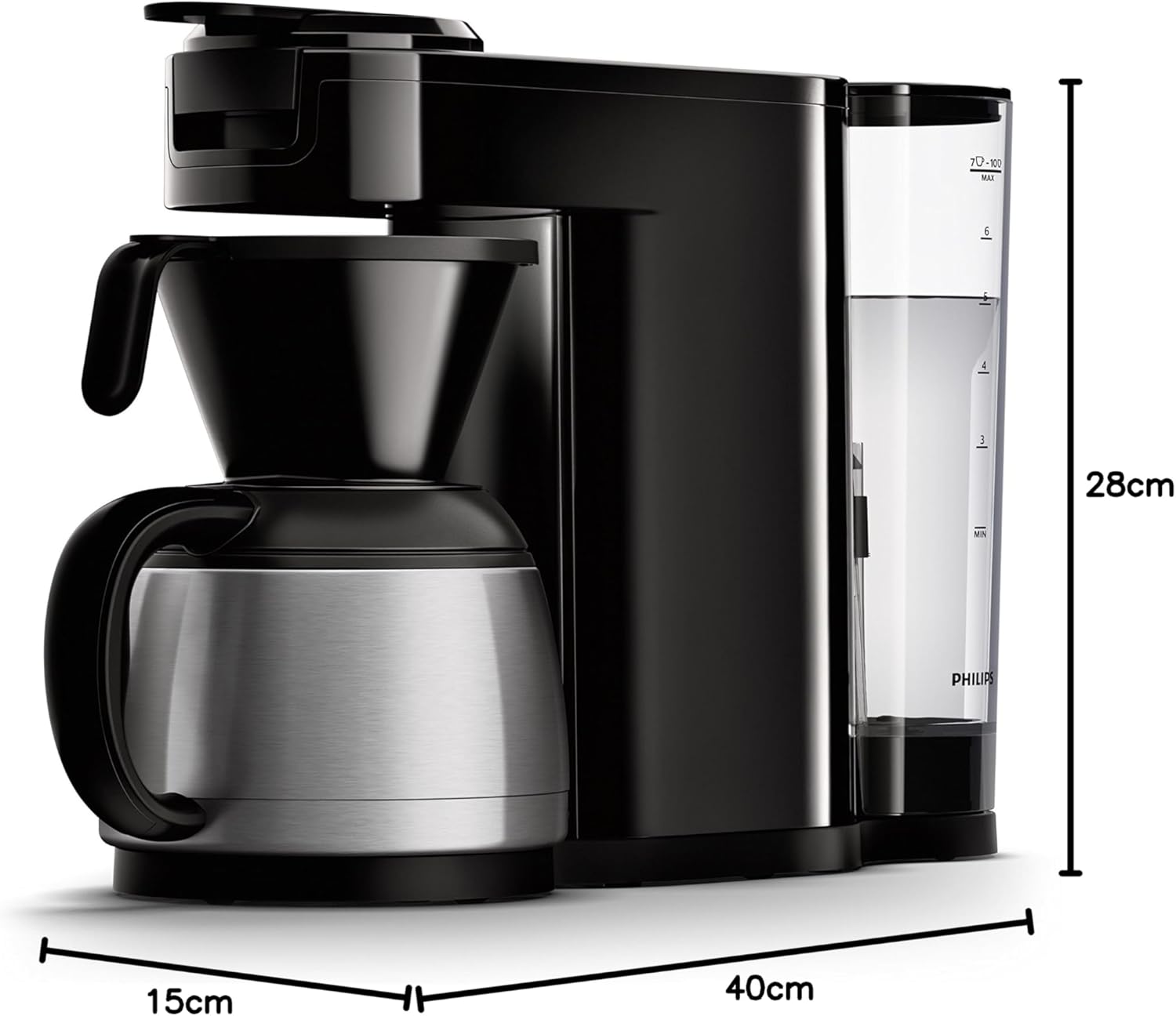
Image 7.1: Diagram illustrating the dimensions of the Philips SENSEO Switch coffee machine.
8. Warranty and Support
This Philips appliance comes with a standard manufacturer's warranty. Please refer to the warranty card included in your product packaging for specific terms and conditions, including warranty period and coverage.
For technical support, service, or to register your product, please visit the official Philips website or contact their customer service department. Keep your proof of purchase for warranty claims.
You can find more information and support at the official Philips website: www.philips.com


