
1. Introduction
Thank you for choosing the Prorelax SONIC Facial Cleanser. This device utilizes innovative sonic technology to provide deep cleansing, gentle exfoliation, and a relaxing massage for your face. With 20,000 acoustic pulses per minute, it effectively removes impurities, refines pores, and promotes healthier-looking skin. Please read this manual carefully before first use to ensure proper operation and maintenance.
2. Package Contents
Please check the package for the following items:
- Prorelax SONIC Facial Cleanser Device
- 1 x Brush Head for Normal Skin (soft bristles)
- 1 x Peeling Brush Head (small fibers for exfoliation)
- Charging Station
- Micro-USB Charging Cable
- Travel Case
- User Manual

Image: All components of the Prorelax SONIC Facial Cleanser package, including the main device, two brush heads, charging base, USB cable, and travel case.
3. Safety Information
To ensure safe operation, please observe the following safety guidelines:
- Do not use the device on irritated, damaged, or broken skin.
- Avoid using the device on open wounds, sunburns, or areas with severe acne.
- If you have a skin condition or medical concerns, consult a dermatologist before use.
- Keep the device out of reach of children.
- The device is suitable for use in the shower but should not be fully submerged in water.
- Use only the provided charging cable and station.
- Do not attempt to disassemble or repair the device yourself. Contact customer support for assistance.
4. Setup
4.1 Charging the Device
- Connect the Micro-USB charging cable to the charging station and then to a suitable USB power adapter (not included).
- Place the Prorelax SONIC Facial Cleanser device onto the charging station.
- The charging indicator lights will illuminate to show that the device is charging.
- A full charge provides approximately 1.5 hours of continuous use.
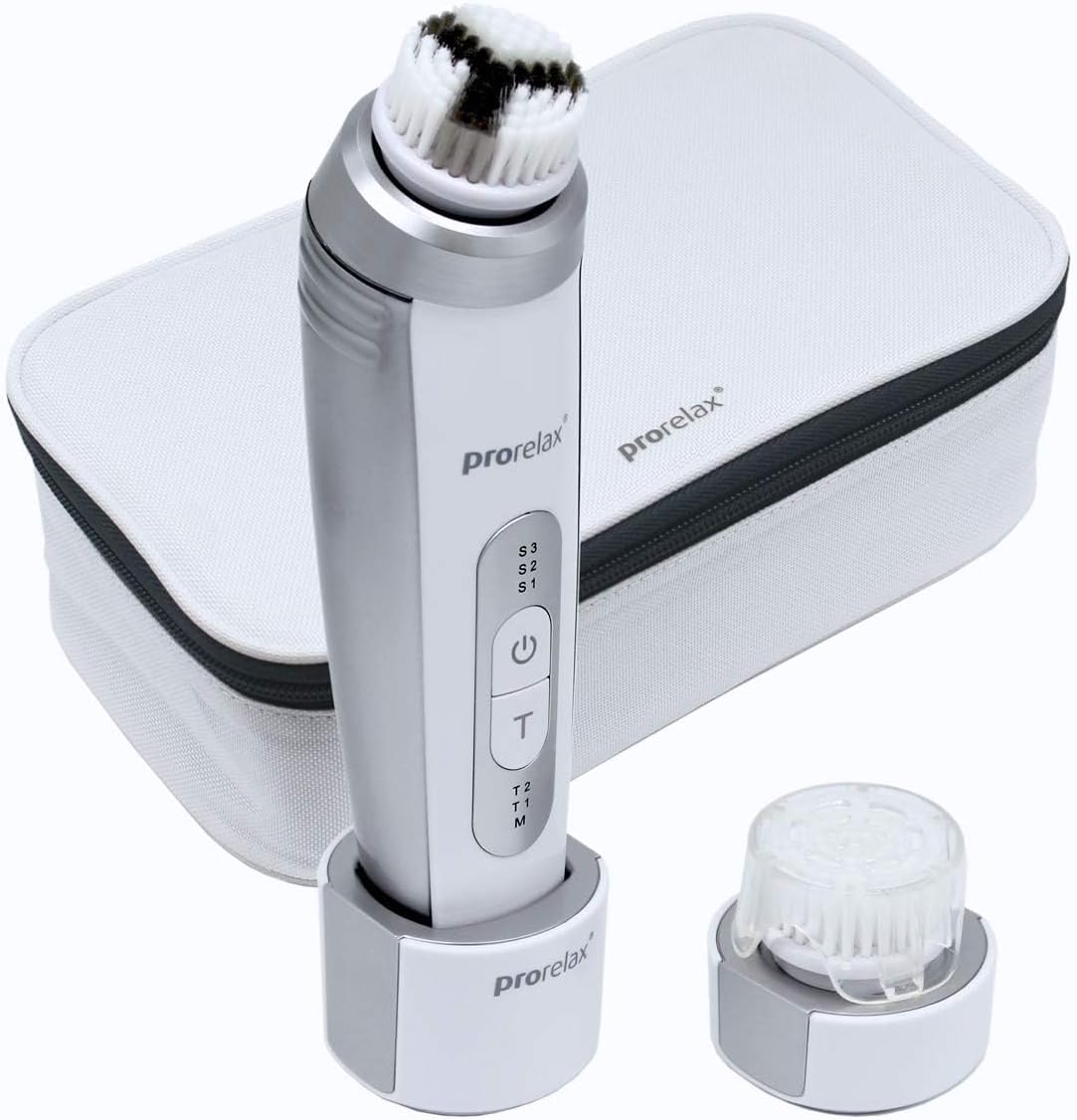
Image: The Prorelax SONIC Facial Cleanser device placed in its charging stand, ready for charging.
4.2 Attaching a Brush Head
- Select the desired brush head (normal or peeling).
- Align the brush head with the connector on the top of the device.
- Press down firmly until the brush head clicks into place.
- To remove, gently pull the brush head upwards.
5. Operating Instructions
5.1 Basic Operation
- Prepare your skin: Dampen your face and the brush head with water. Apply a small amount of your preferred facial cleanser directly to the brush head or your face.
- Power On: Press the power button (U) to turn on the device. The device will start in the default mode.
- Select Speed/Mode: Press the power button (U) repeatedly to cycle through the available speeds: S1 (Gentle), S2 (Normal), S3 (Deep Cleaning/Massage). The corresponding indicator light will illuminate.
- Use on Face: Gently move the brush in small, circular motions across your face. Avoid pressing too hard.
- Timer Function: The device features a built-in timer (T) for optimal cleansing. Press the timer button (T) to select T1 (1 minute), T2 (2 minutes), or M (Manual). The device will automatically pause or stop after the selected time.
- Power Off: Press and hold the power button (U) for a few seconds to turn off the device.

Image: A woman demonstrating the use of the Prorelax SONIC Facial Cleanser on her cheek, showing the gentle circular motion.
5.2 Recommended Usage
- For daily cleansing, use the normal brush head with a gentle or normal speed setting.
- For deeper exfoliation, use the peeling brush head once or twice a week with a normal or deep cleaning speed.
- The massage function can be used with any brush head for a relaxing facial massage.
- The device is waterproof and can be safely used in the shower.
6. Maintenance and Care
6.1 Cleaning the Brush Heads
It is important to clean the brush heads regularly to maintain hygiene and effectiveness.
- After each use, rinse the brush head thoroughly under running water.
- Weekly, clean the brush heads with warm, soapy water. Gently rub the bristles to remove any residue.
- Rinse again and allow the brush head to air dry completely before storing.
- Replace brush heads every 3 months or sooner if bristles become worn or damaged.
6.2 Cleaning the Device
- Wipe the main device body with a damp cloth. Do not use abrasive cleaners or solvents.
- Ensure the charging port is dry before placing the device on the charging station.
6.3 Storage
Store the device and its accessories in the provided travel case in a cool, dry place when not in use.

Image: The Prorelax SONIC Facial Cleanser and its various components, including brush heads and charging cable, organized within its white travel case.
7. Troubleshooting
If you encounter any issues with your Prorelax SONIC Facial Cleanser, please refer to the following common solutions:
- Device not turning on: Ensure the device is fully charged. Connect it to the charging station and allow it to charge for at least 2 hours.
- Brush head not spinning: Check if the brush head is securely attached. Remove and reattach it, ensuring it clicks into place. If the issue persists, try a different brush head.
- Device not charging: Verify that the USB cable is properly connected to both the charging station and the power adapter. Ensure the power adapter is working. Clean the charging contacts on both the device and the station if they appear dirty.
- Reduced performance: The brush head may be worn out. Replace it with a new one. Ensure the device is fully charged.
If these steps do not resolve the issue, please contact customer support.
8. Specifications
- Brand: Prorelax
- Model Name: Prorelax SONIC Facial Cleanser
- Color: White
- Material: Fibres (for brush heads)
- Power Source: Wireless (Rechargeable Lithium-ion Battery)
- Operating Mode: Automatic
- Product Benefits: Cleansing, Exfoliation, Massage
- Skin Type: All
- UPC: 752830532670
9. Warranty and Support
The Prorelax SONIC Facial Cleanser comes with a standard manufacturer's warranty. Please refer to the warranty card included in your package for specific terms and conditions.
For technical support, warranty claims, or any questions regarding your device, please contact Prorelax customer service through their official website or the contact information provided in your product packaging.