1. Introduction
This manual provides comprehensive instructions for the operation and maintenance of your QUIKCELL Morso Mini Portable Wireless Speaker. Please read this manual carefully before using the device to ensure proper function and longevity.
Key Features:
- IPX-4 Splash Proof Rating
- Built-in Microphone for Hands-free Calls
- 2 Watt Speaker with Enhanced Bass
- Up to 5 Hours Playback Time
- Up to 24 Hours Standby Time
2. What's in the Box
Upon unboxing, please verify that all components are present:
- Morso Mini Portable Wireless Speaker (Red)
- Charging Cable
- User Manual (this document)
Note: The "Included Components" specification lists "Portable Mp3 Player Wireless Speaker Systems". This refers to the speaker unit itself.
3. Product Overview
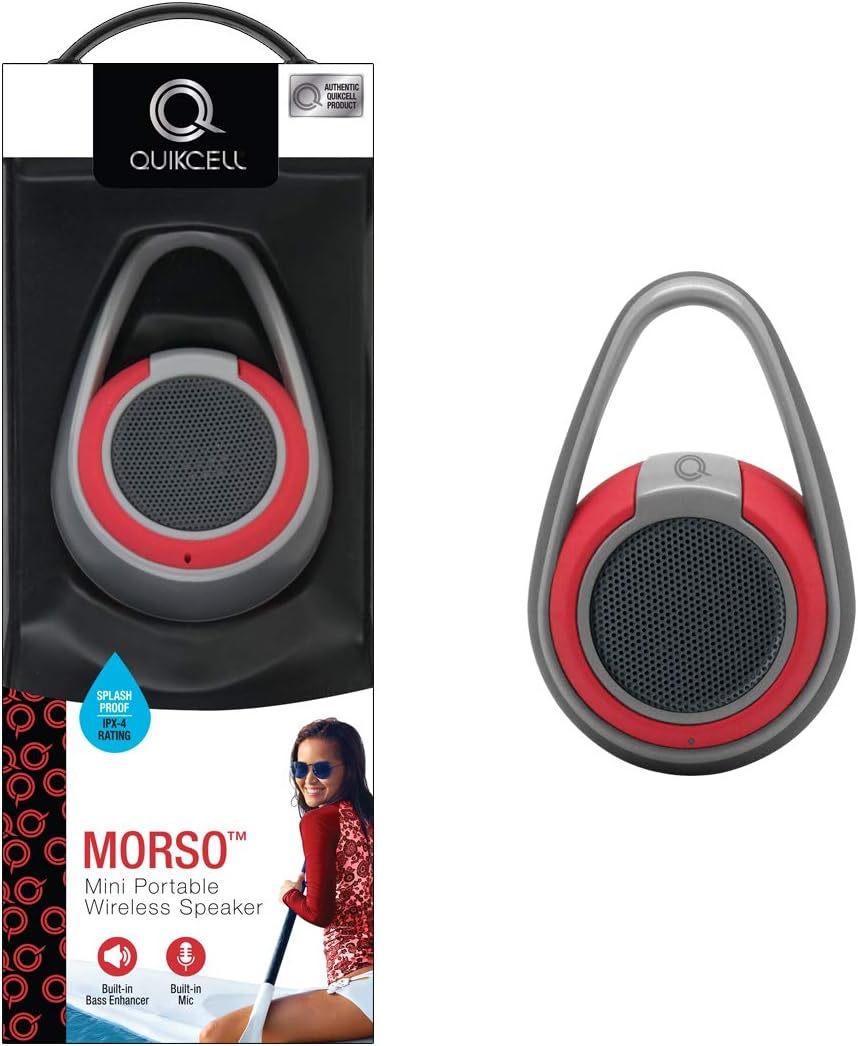
Figure 3.1: The Morso Speaker shown alongside its retail packaging, highlighting its compact design and integrated carrying loop.

Figure 3.2: A side profile view of the Morso Speaker, illustrating its ergonomic shape and the robust design of the carrying handle.
4. Setup
4.1. Charging the Speaker
Before first use, fully charge the Morso Speaker. Locate the charging port (usually covered by a rubber flap for water resistance) and connect the provided charging cable to a USB power source. The charging indicator light will illuminate during charging and turn off or change color when fully charged.
4.2. Powering On/Off
- To Power On: Press and hold the power button (usually marked with a power symbol) for approximately 3 seconds until you hear an audible tone or see an indicator light.
- To Power Off: Press and hold the power button again for approximately 3 seconds until the indicator light turns off and an audible tone confirms shutdown.
5. Operating Instructions
5.1. Bluetooth Pairing
- Ensure the Morso Speaker is powered on and in pairing mode (indicated by a blinking blue LED, for example). If it doesn't automatically enter pairing mode, you may need to press a dedicated Bluetooth button.
- On your mobile device (smartphone, tablet, computer), navigate to the Bluetooth settings.
- Enable Bluetooth and search for available devices.
- Select "MORSO" or "QUIKCELL MORSO" from the list of found devices.
- Once paired, the speaker will emit a confirmation tone, and the LED indicator will typically turn solid blue.
Note: The speaker will automatically attempt to reconnect to the last paired device when powered on.
5.2. Playing Audio
After successful pairing, you can play audio from your connected device. Use your device's volume controls to adjust the playback volume. The speaker may also have its own volume buttons.
5.3. Answering Calls (Built-in Mic)
When a call comes in while connected via Bluetooth:
- To Answer: Briefly press the multi-function button (often the power button or a dedicated call button).
- To End Call: Briefly press the multi-function button again.
- To Reject Call: Press and hold the multi-function button for approximately 2 seconds.
Your voice will be picked up by the speaker's built-in microphone.
6. Maintenance
6.1. Cleaning
To clean the speaker, use a soft, dry, lint-free cloth. For stubborn dirt, a slightly damp cloth can be used. Do not use abrasive cleaners, alcohol, or chemical solvents, as these may damage the surface or internal components.
6.2. Water Resistance (IPX-4)

Figure 6.1: The Morso Speaker demonstrating its IPX-4 splash-proof capability, shown with water droplets on its surface, suitable for outdoor use near water.
The Morso Speaker has an IPX-4 splash-proof rating, meaning it is resistant to splashing water from any direction. It is not designed to be submerged in water. Ensure all port covers are securely closed before exposing the speaker to water. Do not expose the speaker to salt water or other chemicals.
6.3. Storage
When not in use for extended periods, store the speaker in a cool, dry place away from direct sunlight and extreme temperatures. It is recommended to charge the speaker periodically (e.g., every 3 months) to maintain battery health.
7. Troubleshooting
| Problem | Possible Cause | Solution |
|---|---|---|
| Speaker does not power on. | Low battery. | Charge the speaker fully. |
| Cannot pair with device. | Speaker not in pairing mode; Bluetooth off on device; device too far. | Ensure speaker is in pairing mode. Turn Bluetooth on/off on device. Move device closer to speaker. |
| No sound or low volume. | Volume too low on speaker or device; speaker not connected. | Increase volume on both speaker and connected device. Re-pair the speaker. |
| Call quality is poor. | Interference; speaker too far from user. | Move closer to the speaker. Reduce interference from other electronic devices. |
8. Specifications
| Feature | Detail |
|---|---|
| Model Number | MORSO- RED |
| Brand | QUIKCELL |
| Color | Red |
| Dimensions (L x W x H) | 2.2 x 2.8 x 7.2 inches |
| Item Weight | 2.76 pounds |
| Speaker Output | 2 Watt with enhanced bass |
| Waterproof Rating | IPX-4 (Splash Proof) |
| Power Source | Battery Powered |
| Playback Time | Up to 5 hours |
| Standby Time | Up to 24 hours |
| Built-in Features | Microphone for calls |
| UPC | 846537050664 |
9. Warranty and Support
For warranty information and customer support, please refer to the warranty card included with your product or visit the official QUIKCELL website. Keep your proof of purchase for any warranty claims.
Manufacturer: Quikcell
Date First Available: July 12, 2018
For further assistance, please contact Quikcell customer service.


