
Vokkero Squadra Set of 3
Vokkero Squadra Referee Headset System User Manual
Model: Squadra Set of 3
1. Introduction
Welcome to the Vokkero Squadra Referee Headset System. This manual provides essential information for the proper setup, operation, and maintenance of your Vokkero Squadra communication system. Designed for clear and reliable communication in dynamic environments, the Squadra system ensures seamless interaction among team members. Please read this manual thoroughly before using the device to ensure optimal performance and longevity.
2. Package Contents
The Vokkero Squadra Set of 3 typically includes the following components. Please verify all items are present upon unboxing.

Figure 2.1: Overview of the Vokkero Squadra Set of 3 components, including three communication units, three armbands, three headsets, and two multi-unit charging stations.
- 3 x Vokkero Squadra Communication Units
- 3 x Professional Headsets (earpiece with microphone)
- 3 x Armbands for securing communication units
- 2 x Multi-Unit Charging Stations (each capable of charging multiple units)
- 1 x Carrying Bag (for transport and storage)
- 1 x USB Charging Cable (for charging stations)
- 1 x User Manual (this document)
3. Setup
3.1 Initial Charging
Before first use, fully charge all Vokkero Squadra communication units.
- Connect the USB charging cable to the multi-unit charging station and plug it into a power source.
- Place each Squadra communication unit into an available slot on the charging station.
- The charging indicator light on each unit will illuminate (e.g., red for charging, green for fully charged).
- Allow approximately 3-4 hours for a full charge.
3.2 Attaching the Headset
Connect the professional headset to the communication unit.
- Locate the headset port on the Vokkero Squadra communication unit.
- Align the headset connector with the port and gently push until it clicks into place. Ensure a secure connection.
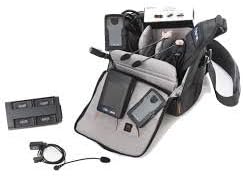
Figure 3.1: A Vokkero Squadra communication unit with a headset connected, ready for use. The unit is shown with an armband for wearing.
3.3 Wearing the System
The Vokkero Squadra unit can be worn comfortably using the provided armband.
- Slide the communication unit into the pouch on the armband.
- Secure the armband around your upper arm, ensuring it is snug but not too tight.
- Position the headset earpiece comfortably in your ear and adjust the microphone boom towards your mouth for optimal voice pickup.
4. Operating Instructions
4.1 Powering On/Off
- To power on: Press and hold the Power button (usually located on the side or front) until the display illuminates.
- To power off: Press and hold the Power button until the display turns off.
4.2 Volume Control
Adjust the listening volume using the dedicated volume buttons (typically '+' and '-') on the side of the unit.
4.3 Mute Function
The Squadra system features a push-to-talk (PTT) or always-on voice activation mode. Refer to the unit's display or specific button for muting your microphone.
- Temporary Mute: Press and hold the Mute button (if available) to temporarily mute your microphone. Release to unmute.
- Toggle Mute: Press the Mute button once to toggle mute on/off. A mute icon will typically appear on the display when active.
4.4 Communication Range
The effective communication range of the Vokkero Squadra system varies depending on environmental conditions, obstacles, and interference. For optimal performance, maintain line of sight where possible and avoid dense obstructions.
5. Maintenance and Care
5.1 Cleaning
- Wipe the communication units and charging stations with a soft, damp cloth.
- Do not use harsh chemicals, solvents, or abrasive cleaners.
- For headsets, gently clean earpieces and microphone foam with a mild disinfectant wipe. Ensure no liquid enters the electronic components.
5.2 Storage
- Store the Vokkero Squadra system in a cool, dry place away from direct sunlight and extreme temperatures.
- Use the provided carrying bag for organized and protected storage.
- If storing for extended periods, ensure units are partially charged (around 50%) to preserve battery health.
5.3 Battery Care
- Avoid completely draining the batteries regularly.
- Charge units after each use to ensure they are ready for the next event.
- If a unit will not be used for several weeks, perform a full charge cycle (charge to 100%, then discharge to 50%) every few months.
6. Troubleshooting
| Problem | Possible Cause | Solution |
|---|---|---|
| No sound from headset | Headset not properly connected; Volume too low; Unit not powered on; Battery drained. | Ensure headset is securely plugged in; Increase volume; Power on the unit; Charge the unit. |
| Poor communication quality | Out of range; Obstructions; Interference; Microphone not positioned correctly. | Move closer to other units; Reduce obstructions; Check for sources of interference; Adjust microphone position. |
| Unit not charging | Charging cable or station faulty; Unit not seated correctly in charger. | Check cable and power source; Ensure unit is properly seated in the charging slot; Try a different charging slot or cable if available. |
| Short battery life | Battery not fully charged; Old battery; Extreme temperatures. | Ensure full charge before use; Batteries degrade over time, consider replacement if very old; Operate within recommended temperature range. |
7. Specifications
The following are key specifications for the Vokkero Squadra system:
- Model: Vokkero Squadra Set of 3
- ASIN: B07FQP9W36
- Age Category: Adult
- Material Type: Faux Leather (for certain components like armbands)
- Communication Type: Full Duplex Wireless
- Typical Usage: Referee communication, sports officiating, team coordination
- Power Source: Rechargeable internal battery
8. Warranty and Support
Vokkero products are designed for durability and performance. For specific warranty terms and conditions, please refer to the warranty card included with your product or visit the official Vokkero website.
For technical support, troubleshooting assistance beyond this manual, or spare parts, please contact Vokkero customer service or your authorized dealer.
- Official Website: www.vokkero.com (Please note: This is a placeholder URL, replace with actual if known)
- Customer Service: Refer to the contact information provided on the Vokkero website or product packaging.
Related documentsSquadra Set of 3

Ask a question about this manual
Ask about setup, troubleshooting, compatibility, parts, safety, or missing instructions. Manuals+ will review the question and use this page’s manual context to help answer it.