
1. Introduction
Thank you for purchasing the BLOW BT910 Portable Bluetooth Speaker. This manual provides essential information for the safe and efficient operation of your device. Please read it thoroughly before use and keep it for future reference.
2. Safety Information
- Do not expose the device to extreme temperatures, direct sunlight, or high humidity.
- Keep the speaker away from water and other liquids.
- Do not attempt to disassemble or repair the device yourself. Refer all servicing to qualified personnel.
- Use only the provided charging cable and adapter.
- Keep out of reach of children.
- Avoid prolonged listening at high volumes to prevent hearing damage.
3. Package Contents
Ensure all items are present in the package:
- BLOW Bazooka 30-331 Speaker (Black)
- Charging Cable
- Audio Cable
- User Manual
4. Product Overview
Familiarize yourself with the components of your BLOW BT910 speaker.
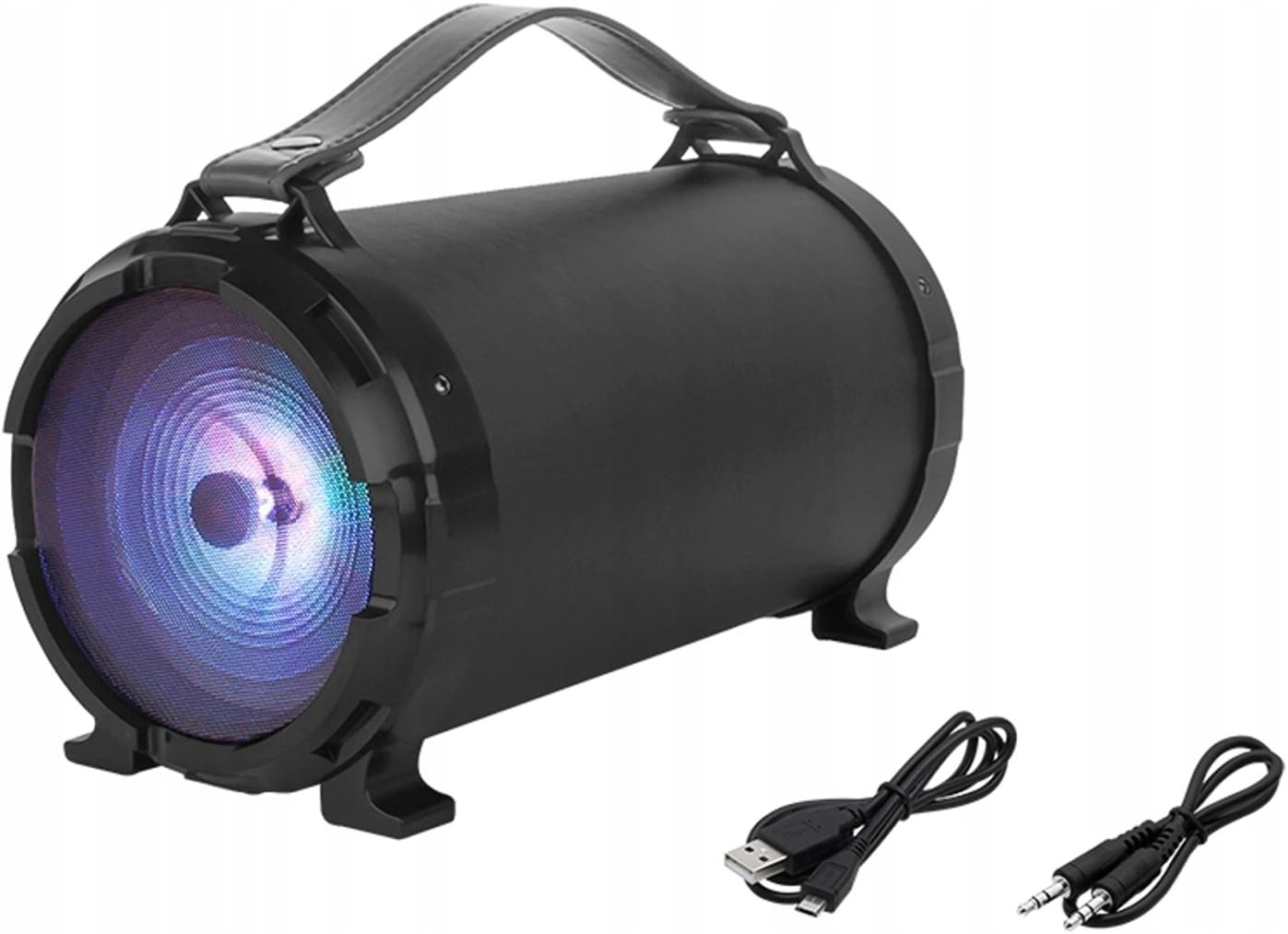
Image 1: Front view of the BLOW BT910 Portable Bluetooth Speaker, showing the main speaker grille and included charging and audio cables.

Image 2: Rear view of the BLOW BT910 Portable Bluetooth Speaker, highlighting the BLOW brand logo.

Image 3: The BLOW BT910 Portable Bluetooth Speaker shown within its retail packaging, displaying key features.

Image 4: Diagram illustrating the dimensions of the BLOW BT910 Portable Bluetooth Speaker: 34cm length, 17cm width, and 18cm height.
Controls and Ports:
- Power Button: Turns the speaker On/Off.
- Mode Button (M): Switches between Bluetooth, FM Radio, USB, SD, and AUX modes.
- Play/Pause Button: Plays or pauses audio. Also answers/ends calls in Bluetooth mode.
- Volume Up (+)/Next Track: Short press for volume up, long press for next track.
- Volume Down (-)/Previous Track: Short press for volume down, long press for previous track.
- LED Light Button: Controls LED lighting modes.
- USB Port: For USB flash drive playback.
- SD Card Slot: For SD card playback.
- AUX Input: For connecting external audio devices via 3.5mm audio cable.
- Microphone Input: For karaoke function.
- Charging Port: For charging the speaker's internal battery.
5. Setup
5.1 Charging the Speaker
- Connect the charging cable to the speaker's charging port.
- Plug the other end of the charging cable into a compatible USB power adapter (not included) or a USB port.
- The LED indicator will show charging status. It will typically turn off or change color once fully charged.
5.2 Power On/Off
- To Power On: Press and hold the Power button for a few seconds until you hear an audible prompt or see the LED indicators light up.
- To Power Off: Press and hold the Power button again for a few seconds until you hear an audible prompt or the LED indicators turn off.
6. Operating Instructions
6.1 Bluetooth Pairing
- Ensure the speaker is powered on and in Bluetooth mode (indicated by a flashing blue LED). If not, press the Mode button to switch to Bluetooth mode.
- Enable Bluetooth on your smartphone, tablet, or other Bluetooth-enabled device.
- Search for available Bluetooth devices and select "BT910" from the list.
- Once paired, the speaker will emit an audible confirmation, and the blue LED will stop flashing and remain solid.
- You can now play audio from your device through the speaker.
6.2 FM Radio Mode
- Press the Mode button to switch to FM Radio mode.
- Press the Play/Pause button once to automatically scan and save available FM stations.
- Use the Next Track/Previous Track buttons to navigate between saved stations.
6.3 USB/SD Card Playback
- Insert a USB flash drive or SD card (with MP3 files) into the respective port/slot.
- The speaker will automatically switch to USB or SD mode and begin playing music. If not, press the Mode button to select the correct mode.
- Use the Play/Pause, Next Track, and Previous Track buttons to control playback.
6.4 AUX Input Mode
- Connect one end of a 3.5mm audio cable (AUX cable) to the speaker's AUX input port.
- Connect the other end of the audio cable to the audio output jack of your external device.
- Press the Mode button to switch to AUX mode.
- Control audio playback from your external device.
6.5 Karaoke Function
- Connect a microphone (not included) to the microphone input port.
- Adjust the microphone volume and echo effects using the dedicated controls on the speaker (if available).
- Play music through any of the available modes and sing along.
6.6 LED Lighting Control
- Press the LED Light button to cycle through different lighting modes or to turn the lights off.
6.7 Volume and Track Control
- Volume Up: Short press the '+' button.
- Volume Down: Short press the '-' button.
- Next Track: Long press the '+' button.
- Previous Track: Long press the '-' button.
6.8 Video Demonstrations
No relevant product videos from the seller were found for the BLOW BT910 speaker (ASIN: B07FPH955W).
7. Maintenance
- Clean the speaker with a soft, dry cloth. Do not use abrasive cleaners or solvents.
- Store the speaker in a cool, dry place when not in use.
- Avoid dropping the speaker or subjecting it to strong impacts.
8. Troubleshooting
| Problem | Possible Solution |
|---|---|
| Speaker does not power on. | Ensure the battery is charged. Connect the speaker to a power source and try again. |
| Cannot pair via Bluetooth. | Make sure the speaker is in Bluetooth pairing mode. Ensure your device's Bluetooth is on and within range. Forget previous pairings on your device and try again. |
| No sound from speaker. | Check the volume level on both the speaker and your connected device. Ensure the correct input mode is selected. |
| FM radio reception is poor. | Extend the antenna (if available) or reposition the speaker for better signal. |
9. Specifications
| Feature | Detail |
|---|---|
| Brand | Blow |
| Model Number | IN-ACT-AKGBLOGLO0016 |
| Speaker Type | Portable |
| Connectivity Technology | Auxiliary, Bluetooth, USB |
| Maximum Speaker Output Power | 50 Watts |
| Audio Output Mode | Stereo |
| Compatible Devices | Cellphone |
| Surround Sound Channel Configuration | 2.0 |
| Color | Multicolour |
| Product Dimensions | 10f. x 48an. x 50al. centimeters (2.79 x 24.64 x 16.51 cm; 2 kg) |
| Item Weight | 2 Kilograms |
| Impedance | 4 Ohms |
| Waterproof | False |
| Maximum Range | 10 Meters |
| Control Method | Push Button, Touch |
| Wireless Communication Technology | Wi-Fi (Note: Bluetooth is the primary wireless audio connection) |
| Speaker Size | 5 Inches |
| Power Source | Battery (1 Lithium Ion battery required) |
| Special Feature | Bass Boost, Bluetooth |
| Recommended Uses | For smartphones or tablets |
10. Warranty and Support
This product comes with a standard return policy of 30 days for refund/replacement. For specific warranty details and support, please refer to the documentation included in your product packaging or contact the seller directly. The manufacturer is BLOW.
