1. Introduction
This manual provides essential information for the safe and efficient operation of your Pyle 40 Inch LED TV with Built-in CD/DVD Player, Model PTVDLED40.5. Please read this manual thoroughly before using the product and retain it for future reference.

Image: Front view of the Pyle 40 Inch LED TV, showing the screen displaying a landscape, a remote control, and a hand inserting a disc into the side-loading DVD player.
2. Safety Information
WARNING: TO REDUCE THE RISK OF ELECTRIC SHOCK, DO NOT REMOVE COVER (OR BACK). NO USER-SERVICEABLE PARTS INSIDE. REFER SERVICING TO QUALIFIED SERVICE PERSONNEL.
- Read these instructions.
- Keep these instructions.
- Heed all warnings.
- Follow all instructions.
- Do not use this apparatus near water.
- Clean only with a dry cloth.
- Do not block any ventilation openings. Install in accordance with the manufacturer's instructions.
- Do not install near any heat sources such as radiators, heat registers, stoves, or other apparatus (including amplifiers) that produce heat.
- Do not defeat the safety purpose of the polarized or grounding-type plug. A polarized plug has two blades with one wider than the other. A grounding-type plug has two blades and a third grounding prong. The wide blade or the third prong are provided for your safety. If the provided plug does not fit into your outlet, consult an electrician for replacement of the obsolete outlet.
- Protect the power cord from being walked on or pinched, particularly at plugs, convenience receptacles, and the point where they exit from the apparatus.
- Only use attachments/accessories specified by the manufacturer.
- Use only with the cart, stand, tripod, bracket, or table specified by the manufacturer, or sold with the apparatus. When a cart is used, use caution when moving the cart/apparatus combination to avoid injury from tip-over.
- Unplug this apparatus during lightning storms or when unused for long periods of time.
- Refer all servicing to qualified service personnel. Servicing is required when the apparatus has been damaged in any way, such as power-supply cord or plug is damaged, liquid has been spilled or objects have fallen into the apparatus, the apparatus has been exposed to rain or moisture, does not operate normally, or has been dropped.
3. Package Contents
Verify that all items listed below are included in your package:
- Pyle 40 Inch HD LED TV (Model PTVDLED40.5)
- Full Function Remote Control
- (2) AAA Batteries for Remote Control
- (2) Base Stands
- Mounting Screws for Base Stands
- Power Cord

Image: Included accessories for the Pyle 40 Inch LED TV, showing the remote control, power cord, two base stands, and screws.
4. Product Overview
4.1 Front View
Image: Front view of the Pyle 40 Inch LED TV, showcasing the screen and the Pyle logo.
- Screen Display: 40-inch D-LED Backlight display.
- Pyle Logo: Indicates brand.
- IR Sensor: For remote control signals.
- Power Indicator: LED light indicating power status.
4.2 Side Panel Controls

Image: Close-up of the side panel controls on the Pyle 40 Inch LED TV, showing buttons for volume, channel, menu, input, and power.
- VOL +/-: Adjusts volume level.
- CH +/-: Changes channels.
- MENU: Accesses the on-screen menu.
- INPUT: Selects input source (HDMI, AV, etc.).
- POWER: Turns the TV on or off.
4.3 Rear Panel Connections

Image: Rear view of the Pyle 40 Inch LED TV, highlighting the various input and output ports.

Image: Detailed close-up of the input/output ports on the Pyle 40 Inch LED TV, including HDMI, VGA, PC Audio, RF, Earphone, USB, Coaxial, Audio Out, Mini YPbPr, and Video/Audio In (RCA).
- HDMI (x3): High-Definition Multimedia Interface inputs for digital audio/video.
- YPbPr (Component Video): Analog video input (green, blue, red) for high-quality analog video.
- RCA (L/R Audio, Video): Analog audio (white, red) and composite video (yellow) inputs.
- VGA/PC: Video Graphics Array input for connecting a computer.
- PC Audio: Audio input for VGA connection.
- RF (Antenna): Input for connecting an antenna or cable TV.
- Optical (Digital) Audio Out: Digital audio output for connecting to a soundbar or receiver.
- Headphones: 3.5mm audio output for headphones.
- USB: For service or media playback (check manual for specific functionality).
- Coaxial: Digital audio output.
4.4 Built-in CD/DVD Player
The TV features a side-loading CD/DVD player. Insert discs gently into the slot located on the side of the television.
Image: Side view of the Pyle 40 Inch LED TV, clearly showing the slot for the built-in CD/DVD player.
5. Setup
5.1 Attaching the Base Stands
- Carefully place the TV screen-down on a soft, clean surface to prevent scratches.
- Align each base stand with the corresponding slots on the bottom of the TV.
- Secure each stand using the provided screws. Ensure they are tightened firmly.

Image: The Pyle 40 Inch LED TV shown with its two base stands securely attached, ready for placement on a flat surface.
5.2 Wall Mounting (Optional)
The TV is VESA mounting compatible (200mm x 200mm). Remove the base stands if you intend to wall mount the television. Use a VESA-compatible wall mount kit (sold separately) and follow the instructions provided with the wall mount.
WARNING: Wall mounting should be performed by qualified personnel to prevent injury or damage.
5.3 Connecting Power
- Connect the power cord to the AC input on the back of the TV.
- Plug the other end of the power cord into a standard electrical outlet (100-240V, 50/60Hz).
5.4 Connecting External Devices
Refer to the "Rear Panel Connections" section for port locations.
- HDMI Devices: Connect HDMI cables from your devices (e.g., Blu-ray player, game console) to the HDMI ports on the TV.
- Component Video (YPbPr) Devices: Connect component video cables (green, blue, red) and RCA audio cables (white, red) from your device to the corresponding inputs.
- Composite Video (RCA) Devices: Connect composite video cable (yellow) and RCA audio cables (white, red) from your device to the corresponding inputs.
- Antenna/Cable: Connect an RF coaxial cable from your antenna or cable wall outlet to the RF input.
- PC Connection: Connect a VGA cable from your computer to the VGA port and an audio cable from your computer's audio output to the PC Audio input.
6. Operation
6.1 Power On/Off
Press the POWER button on the remote control or the side panel to turn the TV on or off.
6.2 Remote Control
Insert two 'AAA' batteries into the remote control, observing polarity. Point the remote control towards the TV's IR sensor.
Image: The full-function remote control for the Pyle 40 Inch LED TV, showing various buttons for power, input, volume, channel, menu, and media playback.
- POWER: Turns the TV on/off.
- INPUT: Selects the input source.
- VOL +/-: Adjusts volume.
- CH +/-: Changes channels.
- MENU: Opens the main menu.
- Navigation Buttons (Up/Down/Left/Right/OK): Navigate menu options.
- EXIT/BACK: Exits current menu or goes back.
- MUTE: Mutes/unmutes sound.
- DVD Controls: Play, Pause, Stop, Fast Forward, Rewind, Next/Previous Track.
- V-CHIP: Accesses V-Chip settings for parental control.
- CC (Closed Caption): Toggles closed captions on/off.
- SLEEP: Sets the sleep timer.
6.3 Selecting Input Source
Press the INPUT button on the remote control to cycle through available input sources (TV, HDMI1, HDMI2, HDMI3, YPbPr, AV, VGA, DVD).
6.4 Using the Built-in CD/DVD Player
- Ensure the TV is powered on.
- Gently insert a compatible disc (DVD, DVD+/-R, DVD+/-RW, CD, CD-R, CD-RW, JPEG) into the side-loading slot with the label facing up.
- The TV should automatically switch to DVD mode. If not, press the INPUT button and select "DVD".
- Use the DVD control buttons on the remote control (Play, Pause, Stop, etc.) to manage playback.
6.5 Menu Functions
Press the MENU button to access the on-screen display (OSD) menu. Use the navigation buttons to select and adjust settings.
- Picture Settings: Adjust brightness, contrast, color, sharpness, and picture modes (Standard, Dynamic, Movie, User).
- Sound Settings: Adjust bass, treble, balance, and sound modes (Standard, Music, Movie, User).
- Channel Settings: Auto scan for channels, manual tuning, channel list.
- Time Settings: Set current time, sleep timer, auto power off.
- Option Settings: Language, V-Chip (parental control), Closed Caption, display modes (16:9, 4:3, Zoom, Cinema).
7. Maintenance
- Cleaning the Screen: Gently wipe the screen with a soft, lint-free cloth. For stubborn marks, dampen the cloth with a small amount of screen cleaner specifically designed for electronics. Do not spray cleaner directly onto the screen.
- Cleaning the Cabinet: Wipe the TV cabinet with a soft, dry cloth. Avoid using abrasive cleaners or solvents.
- Ventilation: Ensure the ventilation openings on the back of the TV are not blocked to prevent overheating.
- Power Cord: Regularly check the power cord for any damage. If damaged, discontinue use and contact qualified service personnel.
8. Troubleshooting
| Problem | Possible Cause | Solution |
|---|---|---|
| No power | Power cord not connected; no power from outlet. | Ensure power cord is securely plugged in. Check if the outlet is working by plugging in another device. |
| No picture, but sound is present | Incorrect input source selected; loose video cable. | Press the INPUT button to select the correct source. Check video cable connections. |
| No sound, but picture is present | Volume is muted or too low; incorrect audio cable connection. | Press the MUTE button or increase volume. Check audio cable connections. |
| Remote control not working | Batteries are dead or incorrectly inserted; obstruction between remote and TV. | Replace batteries. Ensure correct polarity. Remove any obstructions. Point remote directly at the TV's IR sensor. |
| DVD player not reading disc | Disc is dirty, scratched, or incompatible format; disc inserted incorrectly. | Clean the disc. Try a different, known-good disc. Ensure disc is inserted with the label facing up. |
| Poor picture quality from antenna | Weak signal; antenna not positioned correctly. | Adjust antenna position. Perform an auto channel scan. Consider a stronger antenna or signal amplifier. |
9. Specifications
| Feature | Detail |
|---|---|
| Model Number | PTVDLED40.5 |
| Screen Size | 40.0 inches (Diagonal) |
| Display Type | D-LED Backlight |
| Display Resolution | 1920 x 1080 (Full HD 1080p) |
| Signal Support | 1080p, 1080i, 720p, 480p, 480i |
| Display Modes | 16:9, 4:3, Zoom, Cinema |
| Viewing Angle | 178° Vertical, 178° Horizontal |
| Speaker Power | (2) x 8 Watt, 8Ω |
| Refresh Rate | 60Hz |
| TV Tuner | ATSC/NTSC |
| Response Time | 6ms |
| Max. Color | 16.7M |
| Contrast | 5000:1 (50,000:1 Dynamic) |
| Brightness | 250 cd/m2 |
| CD/DVD Disc Support | DVD, DVD+/-R, DVD+/-RW, CD, CD-R, CD-RW, JPEG |
| VESA Mounting | 200mm x 200mm |
| Power | 100-240V, 50/60Hz |
| Dimensions (L x W x H) | 36.5'' x 3.5'' x 21.9'' (Panel Only) |
| Item Weight | 16.32 pounds |
| Included Components | 40'' HD LED TV, Full Function Remote Control |
| Connectivity Technology | HDMI |
| Energy Efficiency | Estimated Yearly Energy Cost: $11.52 |
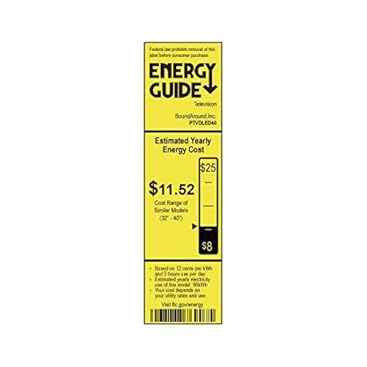
Image: Energy Guide label for the Pyle PTVDLED40 TV, showing an estimated yearly energy cost of $11.52.
10. Warranty & Support
For warranty information and technical support, please refer to the warranty card included with your product or visit the official Pyle website. Keep your purchase receipt as proof of purchase for any warranty claims.
For customer support inquiries, you may also refer to the Amazon Customer Support page.


