
Calor SV8055C0
Calor Express Anti-Calc Steam Generator Iron User Manual
Model: SV8055C0
1. Introduction
Thank you for choosing the Calor Express Anti-Calc Steam Generator Iron. This manual provides essential information for the safe and efficient use, maintenance, and troubleshooting of your appliance. Please read it thoroughly before first use and keep it for future reference.
The Calor Express Anti-Calc steam generator iron is designed to deliver fast and reliable ironing results with powerful steam output. Its removable scale collector ensures easy maintenance and long-lasting performance. The No-Setting system allows for safe ironing sessions across various fabrics without the risk of burns, complemented by an advanced soleplate for impeccable glide.
2. Safety Instructions
- Always plug the appliance into a grounded socket.
- Do not leave the iron unattended while it is switched on.
- Keep the iron and its cord out of reach of children and pets when it is switched on or cooling down.
- Do not immerse the appliance in water or any other liquid.
- Never touch the hot soleplate or steam with your hands.
- Unplug the iron before filling the water tank or performing any maintenance.
- Use only tap water. Do not use scented water, water from tumble dryers, or demineralized water, as these can damage the appliance.
- If the power cord is damaged, it must be replaced by the manufacturer, its service agent, or similarly qualified persons to avoid a hazard.
3. Product Components
Familiarize yourself with the main parts of your steam generator iron:

Figure 3.1: Overview of the Calor Express Anti-Calc Steam Generator Iron.
- Iron Unit: The handheld part with the soleplate.
- Steam Hose: Connects the iron unit to the base.
- Water Tank: Removable tank for filling water.
- Base Unit: Houses the boiler, controls, and water tank.
- Control Panel: Buttons for Eco, Normal, Vertical Steam modes, and Anti-Calc indicator.
- Removable Scale Collector: For easy descaling.
- Locking System: Secures the iron to the base for transport.
4. Setup
Before using your steam generator iron for the first time, follow these steps:
- Unpack the Appliance: Remove all packaging materials and ensure all components are present.
- Fill the Water Tank:

Figure 4.1: Removing the large capacity water tank.
Remove the removable water tank from the base unit. Fill it with clean tap water up to the 'MAX' level indicated on the tank. Reinsert the water tank firmly into the base unit until it clicks into place.
Video 4.1: Demonstrating how to remove and reinsert the water tank for filling.
- Connect to Power: Plug the power cord into a suitable grounded electrical outlet.
- Initial Heating: Press the power button. The iron will begin to heat up. The indicator light will flash and then remain steady when the iron is ready for use (approximately 2 minutes).
5. Operating Instructions
Your Calor Express Anti-Calc iron features a "No-Setting" system, meaning it automatically adjusts to all ironable fabrics, eliminating the need for manual temperature adjustments.
5.1 Ironing with Steam
- Prepare Garment: Place the garment on your ironing board.
- Select Mode: On the control panel, select your desired mode:
- Eco Mode: For energy saving with efficient steam.
- Normal Mode: Standard steam output for everyday ironing.
- Boost Mode: For maximum steam output (press and hold the 'Mode' button for 2 seconds).
- Start Ironing: Press the steam trigger located under the handle of the iron unit to release steam. Glide the iron over the fabric.

Figure 5.1: Ironing with powerful steam output.

Figure 5.2: The advanced soleplate ensures easy glide.
5.2 Vertical Steaming
The iron can also be used for vertical steaming of hanging garments or curtains.
- Hang Garment: Hang the garment on a hanger.
- Select Vertical Steam: Press the 'Vertical Steam' button on the control panel.
- Steam: Hold the iron a few centimeters away from the fabric and press the steam trigger. Move the iron up and down over the creases.

Figure 5.3: The iron is suitable for all types of ironable fabrics.
6. Maintenance
Regular maintenance ensures optimal performance and extends the lifespan of your iron.
6.1 Cleaning the Soleplate
- Allow the iron to cool down completely.
- Wipe the soleplate with a damp cloth. Do not use abrasive cleaners or scouring pads.
6.2 Descaling (Anti-Calc System)
Your iron is equipped with a removable scale collector to prevent limescale build-up. The 'Anti-Calc' indicator light will illuminate when it's time to clean the collector.
- Ensure Iron is Cold: Make sure the iron is unplugged and completely cold.
- Remove Collector: Locate the removable scale collector on the side of the base unit. Twist and pull it out.

Figure 6.1: Removing the anti-calc collector for cleaning.
- Clean Collector: Rinse the collector under running water to remove any limescale deposits.
- Reinsert Collector: Reinsert the clean collector back into the base unit and twist to secure it.
7. Troubleshooting
| Problem | Possible Cause | Solution |
|---|---|---|
| No steam is coming out. | Water tank is empty. Iron not hot enough. Steam trigger not pressed. | Fill the water tank. Wait for the iron to reach operating temperature (indicator light steady). Press the steam trigger firmly. |
| Water droplets are coming from the soleplate. | Iron not hot enough for steam. Using vertical steam horizontally. | Wait for the iron to heat up completely. Use vertical steam only when the iron is in a vertical position. |
| The "Anti-Calc" light is on. | Scale collector needs cleaning. | Clean the removable scale collector as described in Section 6.2. |
| Iron is not heating up. | Not plugged in. Power button not pressed. | Ensure the iron is securely plugged into a working outlet. Press the power button on the base unit. |
8. Specifications
| Feature | Detail |
|---|---|
| Brand | Calor |
| Model | SV8055C0 |
| Color | Black / White |
| Product Dimensions | 24.9 x 21.1 x 35.1 cm |
| Item Weight | 450 grams |
| Water Tank Capacity | 1.8 Liters |
| Steam Boost | Up to 450 g/min |
| Pressure | Up to 6.5 Bar |
| Soleplate Technology | Durilium AirGlide |
| Special Features | DURILIUM SOLEPLATE, ANTI-CALC SYSTEM, Steam Function, Locking System, POWERFUL, SILENT PUMP |
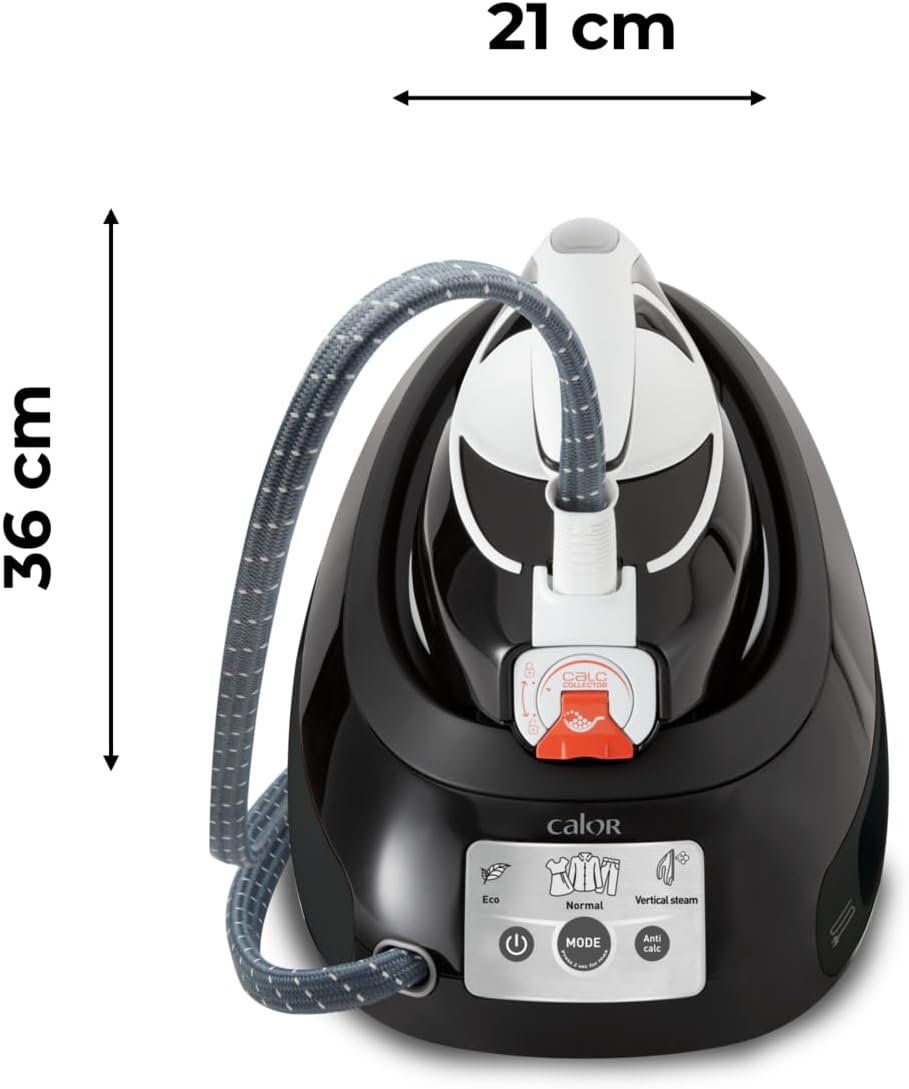
Figure 8.1: Product dimensions for storage and placement.
9. Warranty & Support
Your Calor Express Anti-Calc Steam Generator Iron is covered by a manufacturer's warranty. Please refer to the warranty card included in your product packaging for specific terms and conditions.
For technical assistance, spare parts, or repair services, please contact Calor customer support. Contact details can typically be found on the official Calor website or on your product's packaging.
Keep your purchase receipt as proof of purchase for warranty claims.
Ask a question about this manual
Ask about setup, troubleshooting, compatibility, parts, safety, or missing instructions. Manuals+ will review the question and use this page’s manual context to help answer it.