
iTOMA CKS708
iTOMA CKS708 Alarm Clock Radio User Manual
Model: CKS708
Introduction
Thank you for choosing the iTOMA CKS708 Alarm Clock Radio. This versatile device combines multiple functions including a digital alarm clock, FM radio, Bluetooth speaker, night light, and USB charging port. Designed for ease of use and optimal readability, this manual will guide you through its features and operations.

The iTOMA CKS708 Alarm Clock Radio, featuring a clear blue LED display and integrated night light.
Official product overview video for the iTOMA CKS708 Alarm Clock Radio, highlighting its key features and design.
Key Features
- Large 1.4-inch Ice Blue LED Display: Provides clear and easy-to-read time from a distance.
- Digital Tuning FM Radio: Features 20 programmable preset stations and an external wire antenna for enhanced reception.
- Dual Alarm System: Allows setting two independent alarms for different wake-up times.
- Snooze Function: Provides extra sleep time with a simple tap.
- Night Light: One-touch ON/OFF warm ice blue night light for ambient illumination.
- Dimmer Control: 4-level manual dimmer and auto-dimmer function to adjust display brightness.
- USB Charging Output: 1A/5V USB port for convenient charging of mobile devices.
- Bluetooth Speaker: Built-in Bluetooth for wireless audio streaming from compatible devices.
- Sleep Timer: Allows you to fall asleep to music with a set timer.
- Battery Backup: Ensures time and alarm settings are maintained during power outages.
Product Components and Controls
Familiarize yourself with the various parts and controls of your iTOMA CKS708.

Top panel controls, including the multi-function knob for volume, mode, and tuning.

Rear panel connections: Earphone Hole, FM Antenna, USB Charging Port, and Backup Battery compartment.
Setup Guide
Follow these steps to set up your iTOMA CKS708 for the first time.
Detailed video guide on setting up the time and alarm functions of the iTOMA CKS708.
1. Setting the Time
- Press and hold the TIME SET button for 2 seconds until the hours/minutes blink.
- Press the ▲/▼ buttons (VOL+/VOL-) to adjust the hours.
- Press the TU+/- buttons (SNOOZE/▼/II/STO.) to adjust the minutes.
2. Setting the Date
- Press TIME SET again to enter month/day setup (blinking).
- Press ▲/▼ buttons to set the day.
- Press TU+/- buttons to set the month.
3. Setting the Year
- Press TIME SET button again to enter year setup (blinking).
- Press TU+/- buttons to adjust the year.
4. 12/24-Hour Format
- Press TIME SET button again to toggle between 12-hour or 24-hour format.
- Press TU+/- to select your preference.
5. Confirm Settings
- Press TIME SET again to save all settings.
Operating Instructions
Demonstration of the iTOMA CKS708's various operational features, including radio, volume, and light controls.
1. FM Radio Operation
- Turn On Radio: In STANDBY mode, press TU+/- button briefly to turn FM radio on.
- Tune Manually: Press TU+/- button briefly to adjust the frequency.
- Auto-Scan Stations: Press and hold TU+/- button for 2 seconds to auto-search for available stations.
- Save a Station: Press and hold the STO button for 2 seconds until the memory slot blinks (e.g., P01-P20). Press TU+/- button to select a slot (P01-P20). Press STO button briefly to save the current frequency.
- Recall Saved Stations: Press the MEM button to access saved stations. Press TU+/- button to cycle through stored slots (P01-P20). Leave it 2 seconds to view the FM frequency; after 2 more seconds, the display will return to the time display.

The FM radio function allows listening to your favorite stations, with an earphone jack for private listening.
2. Alarm Setup
- View/Enable Alarms: Briefly press AL1/AL2 button to check the setting alarm time or enable/disable an alarm.
- Set Alarm Time: Press and hold AL1/AL2 button for 2 seconds until the hours/minutes blink. Press TU+/- button to adjust minutes. Press ▲/▼ button to adjust hours.
- Adjust Volume: Press AL1/AL2 button again to enter volume setup (blinking). Press ▲/▼ button to set the alarm volume.
- Alarm Repeat Days: Press AL1/AL2 button again to enter days of the week setup (blinking). Press TU+/- button to choose which days the alarm repeats:
1. Monday to Sunday
2. Monday to Friday
3. Saturday to Sunday
4. Single day - Confirm: Press AL1/AL2 button to save all alarm settings.
3. Dimmer Control and Night Light
- Manual Dimmer: Press the DIMMER button to cycle through 3 brightness levels (L-3, L-2, L-1) and OFF.
- Auto Dimmer: The display can automatically adjust its brightness based on ambient light conditions.
- Night Light: Press the LED button to turn the night light ON/OFF.

Adjust the display brightness manually or let the auto-dimmer function optimize it for your environment.
4. Bluetooth Speaker
- To activate Bluetooth mode, press the MODE button until 'BT' appears on the display.
- On your mobile device, search for 'iTOMA CKS708' in your Bluetooth settings and pair.
- Once paired, you can stream audio wirelessly through the clock's speaker.

Stream your favorite music directly from your smartphone to the iTOMA CKS708 via Bluetooth.
5. USB Charging
- Connect your mobile device's USB charging cable to the USB output port (5V/1A) on the back of the clock.
- The clock will provide power to charge your device.
Maintenance
- Clean the unit with a soft, dry cloth. Do not use abrasive cleaners or solvents.
- Keep the unit away from direct sunlight, heat sources, and excessive moisture.
- Ensure proper ventilation around the unit.
- Replace the backup battery (if applicable) periodically to ensure time and alarm settings are retained during power interruptions.
Troubleshooting
| Problem | Solution |
|---|---|
| No power/display off | Ensure the power adapter is securely plugged into a working outlet and the clock. Check the power outlet with another device. |
| Alarm does not sound | Verify the alarm time is set correctly and the alarm is enabled (alarm icon visible on display). Check alarm volume settings. |
| Poor FM radio reception | Extend and adjust the position of the FM wire antenna for better signal. Try auto-scanning for stations again. |
| Bluetooth pairing issues | Ensure the clock is in Bluetooth mode ('BT' blinking). Make sure your device's Bluetooth is on and within range. Forget the device on your phone and try pairing again. |
| USB charging not working | Check if the USB cable is properly connected to both the clock and your device. Ensure the device is compatible with 5V/1A charging. |
Specifications
| Feature | Detail |
|---|---|
| Brand | iTOMA |
| Model | CKS708 |
| Display Type | 1.4-inch Ice Blue LED |
| Product Dimensions | 15.75 x 5.84 x 8.89 cm |
| Item Weight | 560 g |
| Material | Plastic |
| Power Source | AC Power (with battery backup) |
| USB Output | 5V/1A (Type A) |
| Special Features | FM Radio, Bluetooth Speaker, Adjustable Brightness & Volume, Memory Battery Backup, Dual Alarm with Snooze, Ice Blue Night Light |
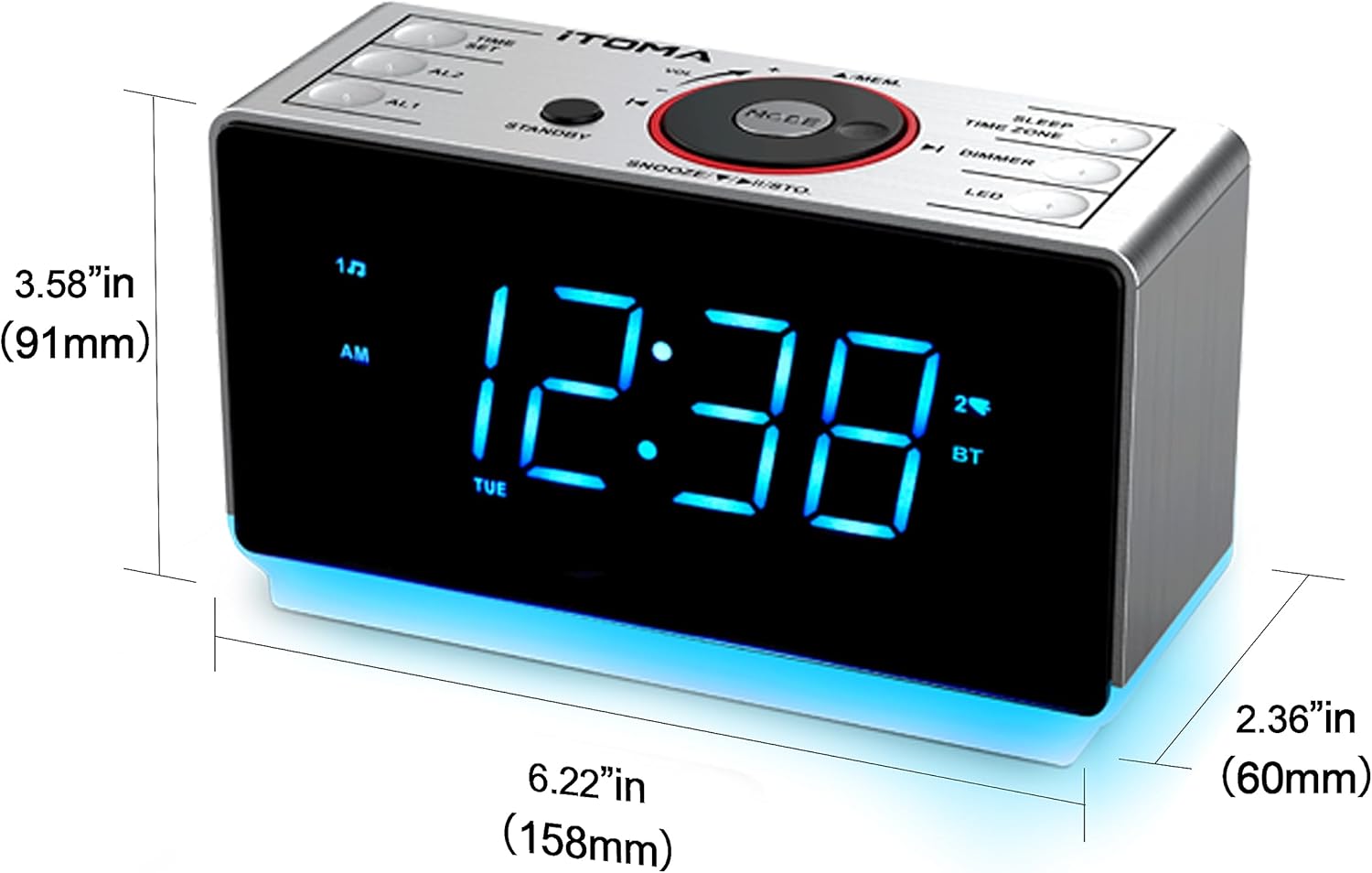
Product dimensions for easy placement.
Warranty and Support
iTOMA products are designed for reliability and performance. For warranty information and technical support, please refer to the contact details provided with your product packaging or visit the official iTOMA website.
For further assistance, you may also contact the seller directly through your purchase platform.
Related documentsCKS708


Ask a question about this manual
Ask about setup, troubleshooting, compatibility, parts, safety, or missing instructions. Manuals+ will review the question and use this page’s manual context to help answer it.