
Sensormatic ZLAMT6008-5
Sensormatic AM Optical Tag Super Lock 5kG Instruction Manual
Model: ZLAMT6008-5
1. Product Overview
The Sensormatic AM Optical Tag Super Lock 5kG is an advanced anti-theft solution designed specifically for eyewear. This tag provides maximum security for high-value and high-theft eyewear items while ensuring a seamless shopper experience by not impeding the ability to try on glasses. Its small, discreet design minimizes impact on displayed merchandise, promoting open merchandising strategies for increased sales.

Image 1.1: Angled view of the Sensormatic AM Optical Tag Super Lock 5kG. This black, rectangular tag features a small, integrated locking mechanism designed to secure eyewear frames.
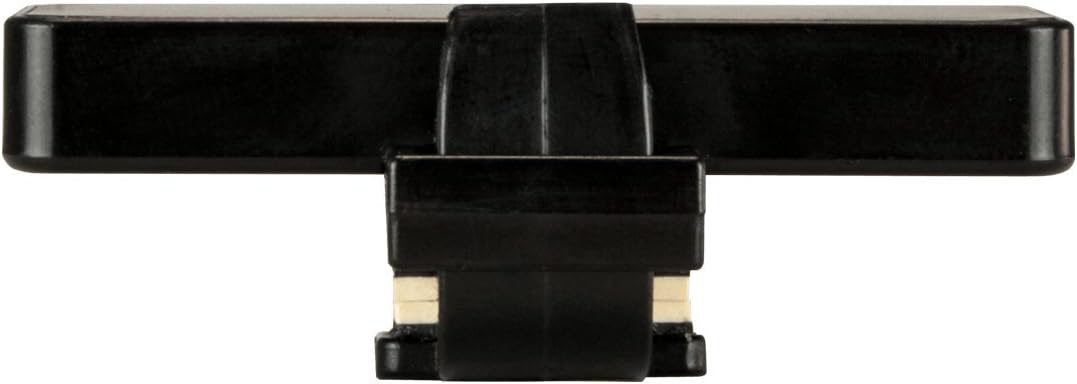
Image 1.2: Side view of the Sensormatic AM Optical Tag, showing its slim profile and the mechanism that attaches to eyewear.
2. Setup and Installation
The Sensormatic AM Optical Tag is designed for quick and secure attachment to eyewear. Proper installation ensures effective loss prevention.
2.1 Attaching the Tag to Eyewear
- Identify the Eyewear Frame: Select a sturdy part of the eyewear frame, typically the temple arm, that will not obstruct the shopper's view or comfort.
- Open the Tag Mechanism: Using a compatible detacher (sold separately), open the locking mechanism of the optical tag.
- Position the Tag: Carefully slide the open tag onto the chosen section of the eyewear frame. Ensure the tag is securely seated and does not slide freely.
- Close the Tag: Press the two halves of the tag together firmly until you hear a distinct click, indicating that the lock is engaged. Verify that the tag cannot be easily removed without the detacher.
Important: Always use the correct Sensormatic detacher for tag removal to prevent damage to the tag or the eyewear.
3. Operating Instructions
Once attached, the Sensormatic AM Optical Tag operates passively as part of an Acousto-Magnetic (AM) Electronic Article Surveillance (EAS) system. When an item with an active tag passes through an EAS detection system (e.g., pedestals at an exit), an alarm will sound.
3.1 Tag Deactivation/Removal
To deactivate the tag for legitimate purchase or removal from display:
- Position the Tag on Detacher: Place the optical tag onto a compatible Sensormatic detacher. The detacher's magnetic field will release the internal locking mechanism.
- Remove the Tag: Once the lock is released, gently slide the tag off the eyewear frame.
- Verify Deactivation: Ensure the tag is fully removed from the eyewear before the customer leaves the store to prevent false alarms.

Image 3.1: Top view of the Sensormatic AM Optical Tag, showing the smooth surface and the integrated locking mechanism.

Image 3.2: Diagram illustrating the dimensions of the Sensormatic AM Optical Tag, showing its compact size of approximately 1.97 inches in length and 0.98 inches in width.
4. Maintenance
The Sensormatic AM Optical Tag requires minimal maintenance to ensure its longevity and effectiveness.
- Cleaning: Wipe the tags periodically with a soft, dry cloth to remove dust and grime. Avoid using harsh chemicals or abrasive cleaners, as these can damage the plastic material.
- Storage: Store unused tags in a clean, dry environment away from extreme temperatures and direct sunlight.
- Inspection: Regularly inspect tags for any signs of damage, such as cracks, deformities, or issues with the locking mechanism. Damaged tags should be replaced immediately to maintain security integrity.
5. Troubleshooting
This section addresses common issues you might encounter with the Sensormatic AM Optical Tag.
| Problem | Possible Cause | Solution |
|---|---|---|
| Tag does not lock securely. | Debris in locking mechanism, damaged tag, or incorrect application. | Ensure no debris is present. Inspect tag for damage; replace if necessary. Re-apply the tag, ensuring a firm click. |
| Tag is difficult to remove. | Incorrect detacher used, detacher malfunction, or tag damage. | Verify you are using a compatible Sensormatic detacher. Ensure the detacher is functioning correctly. If tag is damaged, it may require specialized removal. |
| False alarms at EAS pedestals. | Tag not properly deactivated/removed, or interference. | Ensure all tags are removed from purchased items. Check for other active tags nearby. Consult your EAS system provider if issues persist. |
6. Specifications
Detailed technical specifications for the Sensormatic AM Optical Tag Super Lock 5kG.
- Model Number: ZLAMT6008-5
- Brand: Sensormatic
- Manufacturer: Tyco Integrated Security
- Technology: Acousto-Magnetic (AM)
- Color: Black
- Material: Plastic
- Shape: Rectangular
- Item Weight: Approximately 0.3 ounces (8.5 grams)
- Product Dimensions: Approximately 1.97 x 0.98 x 0.79 inches (50 x 25 x 20 mm)
- Quantity per Pack: 100 tags
- Security Level: 5kG (Super Lock)
7. Warranty and Support
For warranty information and technical support regarding your Sensormatic AM Optical Tags, please contact your authorized Sensormatic distributor or visit the official Sensormatic website. Ensure you have your product model number (ZLAMT6008-5) and purchase details available when seeking support.
Sensormatic Official Store: Visit the Sensormatic Store on Amazon
Ask a question about this manual
Ask about setup, troubleshooting, compatibility, parts, safety, or missing instructions. Manuals+ will review the question and use this page’s manual context to help answer it.