
1. Introduction
This instruction manual provides comprehensive information for the Zerone RM-L1162 Universal Remote Control. It covers product features, setup procedures, operating instructions, maintenance guidelines, and troubleshooting tips to ensure optimal performance and longevity of your remote control. This remote is designed as a replacement for most LG LCD LED Smart TVs.
2. Safety Information
- Do not expose the remote control to direct sunlight, high temperatures, or high humidity.
- Avoid dropping or subjecting the remote control to strong impacts.
- Do not attempt to disassemble or modify the remote control. This will void the warranty and may cause damage.
- Keep batteries out of reach of children. If swallowed, seek immediate medical attention.
- Dispose of used batteries according to local regulations. Do not dispose of batteries in fire.
- If the remote control will not be used for an extended period, remove the batteries to prevent leakage.
3. Product Overview
The Zerone RM-L1162 is a high-quality universal remote control designed for ease of use and durability. It offers stable performance and low power consumption, making it an efficient replacement for your original TV remote.

Figure 3.1: Front view of the Zerone RM-L1162 Universal Remote Control, showcasing its button layout and sleek black design.
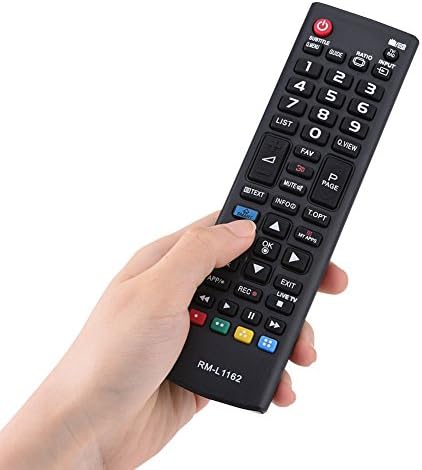
Figure 3.2: A hand holding the Zerone RM-L1162 remote control, demonstrating its ergonomic design and comfortable grip.

Figure 3.3: Close-up of the remote control's surface, highlighting the high-grade ABS material used in its construction, which contributes to its durability.

Figure 3.4: Diagram illustrating the dimensions of the Zerone RM-L1162 remote control, measuring approximately 17cm (6.7in) in length and 4.7cm (1.9in) in width.
Key Features:
- High Performance: Offers a long transmission distance with stable performance.
- High Quality Material: Constructed from durable ABS material, ensuring portability and long-term use.
- Universal Compatibility: Suitable for most LG LCD LED Smart TVs.
- Low Power Consumption: Designed for energy efficiency.
- Easy to Use: No programming or pairing required; simply insert batteries.
4. Setup
The Zerone RM-L1162 remote control is designed for immediate use without complex setup procedures. Simply install the batteries, and it is ready to operate your compatible LG LCD LED Smart TV.
Battery Installation:
- Locate the battery compartment on the back of the remote control.
- Slide the battery cover downwards or press the latch to open it.
- Insert two (2) AAA batteries (not included) into the compartment, ensuring the positive (+) and negative (-) terminals align correctly with the markings inside.
- Close the battery cover by sliding it back into place until it clicks securely.

Figure 4.1: View of the open battery compartment on the back of the RM-L1162 remote, showing where to insert two AAA batteries.
Once batteries are installed, the remote control is ready for use.
5. Operating Instructions
The Zerone RM-L1162 remote control functions identically to your original LG TV remote. Point the remote control directly at your television and press the desired buttons to control its functions.

Figure 5.1: The RM-L1162 remote control in use, demonstrating its compatibility and effective range with an LG LCD TV.
Basic Functions:
- Power Button (●): Turns the TV on or off.
- Number Buttons (0-9): Selects channels directly.
- Volume Up/Down (+/-): Adjusts the volume level.
- Channel Up/Down (CH+/-): Changes channels sequentially.
- Mute: Mutes or unmutes the TV sound.
- Input/Source: Cycles through available input sources (HDMI, AV, etc.).
- Navigation Buttons (Up, Down, Left, Right, OK): Navigates menus and confirms selections.
- Back/Exit: Returns to the previous screen or exits a menu.
- Smart/Home: Accesses the Smart TV home screen or main menu.
For specific advanced functions, refer to your television's original user manual, as the remote replicates the standard functions of compatible LG TV remotes.
6. Maintenance
Proper maintenance ensures the longevity and optimal performance of your remote control.
- Cleaning: Use a soft, dry cloth to wipe the surface of the remote control. For stubborn dirt, slightly dampen the cloth with water or a mild, non-abrasive cleaner. Do not use harsh chemicals or abrasive materials.
- Battery Replacement: Replace batteries when the remote control's response becomes sluggish or it stops functioning. Always replace both batteries at the same time with new ones of the same type (AAA).
- Storage: Store the remote control in a cool, dry place away from direct sunlight and extreme temperatures. If storing for an extended period, remove the batteries.

Figure 6.1: The RM-L1162 remote control positioned in a typical home environment, emphasizing its durable and wear-resistant design for everyday use.
7. Troubleshooting
If you experience issues with your Zerone RM-L1162 remote control, refer to the following common problems and solutions:
| Problem | Possible Cause | Solution |
|---|---|---|
| Remote control not working. | Dead or incorrectly installed batteries. | Replace batteries with new AAA batteries, ensuring correct polarity (+/-). |
| Remote control range is poor. | Weak batteries; Obstruction between remote and TV; Infrared sensor on TV is blocked. | Replace batteries. Ensure a clear line of sight to the TV's infrared sensor. Remove any obstructions. |
| Certain buttons do not respond. | Button malfunction; Remote control damage. | Clean the remote control surface. If the problem persists, the remote may be damaged and require replacement. |
| Remote control does not control TV. | Incompatible TV model; TV is off. | Ensure your TV is an LG LCD LED Smart TV. Check if the TV is powered on. |
If the problem persists after trying these solutions, contact customer support for further assistance.
8. Specifications
| Model Name | RM-L1162 |
| Brand | Zerone |
| Color | Black |
| Connectivity Technology | Infrared |
| Compatible Devices | Most LG LCD LED Smart TVs |
| Maximum Range | 8 Meters (approx. 26 feet) |
| Number of Buttons | 20 |
| Material | High-grade ABS |
| Power Source | 2 x AAA Batteries (not included) |
9. Warranty and Support
For information regarding warranty coverage and customer support, please refer to the documentation provided with your purchase or contact the seller directly. Zerone aims to provide high-quality products and support to its customers.
Seller: Xinyu UK