
Andoer TB81X
Andoer TB81X Tripod Ball Head Instruction Manual
1. Product Overview
The Andoer TB81X Tripod Ball Head is designed to provide versatile and stable camera positioning for various photography and videography needs. Constructed from durable aluminum alloy, it features a 360° panoramic base, dual spirit levels, and multiple adjustment knobs for precise control.
Key Features:
- Universal Compatibility: Equipped with a 1/4" thread quick shoe plate screw and a 3/8" thread tripod mount screw. Includes three 1/4" to 3/8" screw adapters for broad compatibility.
- Durable Construction: Made from aluminum alloy using a precision CNC machining process for robustness and longevity.
- Precise Adjustments: Anodized metal locking knobs and a dual-level design with three adjustment knobs allow for accurate positioning across all angles.
- Secure Camera Mounting: 4x5cm quick release plate with a 1/4" screw and anti-slip rubber pad ensures secure attachment for various cameras.
- High Load Capacity: Features a 36mm large diameter damping ball, supporting a maximum load of 8kg (17.64 lbs).
- Panoramic Functionality: 49mm diameter base with a 360° panorama scale for precise panoramic photography.
2. Setup Instructions
2.1 Unpacking and Contents Check
Carefully remove all components from the packaging. Ensure the following items are present:
- Andoer TB81X Tripod Ball Head
- Quick Release Plate
- 3 x 1/4" to 3/8" Screw Adapters
- User Manual (this document)
2.2 Attaching the Quick Release Plate to Your Camera
Locate the quick release plate. It has a 1/4" screw. Align this screw with the tripod mounting hole on the bottom of your camera. Turn the screw clockwise until the plate is securely fastened to your camera. Ensure the anti-slip rubber pads on the plate are in contact with the camera body for maximum stability.
2.3 Mounting the Ball Head to a Tripod, Monopod, or Slider
The base of the ball head features a 3/8" screw thread. Most standard tripods, monopods, and sliders use a 3/8" screw. If your mounting device uses a 1/4" screw, use one of the provided 1/4" to 3/8" screw adapters. Screw the ball head firmly onto your chosen support device.

Figure 2.3: Attaching the ball head to a tripod and the quick release plate to a camera.

Figure 2.4: The 3/8" bottom screw of the ball head and included 1/4" to 3/8" screw adapters.
2.4 Attaching Your Camera to the Ball Head
With the quick release plate attached to your camera, ensure the Quick-Shoe Knob on the ball head is loosened. Slide the quick release plate (with your camera attached) into the clamp on the ball head. Once positioned, tighten the Quick-Shoe Knob firmly to secure the camera in place.
3. Operating Instructions
3.1 Understanding the Controls
The Andoer TB81X features several knobs for precise control:

Figure 3.1: Labeled components of the Andoer TB81X Tripod Ball Head.
- Quick-Shoe Knob: Located on the side of the quick release plate clamp. Loosen to insert/remove the camera, tighten to secure.
- Coarse Adjustment Knob: The largest knob, typically used for quickly loosening or tightening the main ball for major angle adjustments.
- Vernier Adjustment Knob: A smaller knob, used for fine-tuning the tension of the ball movement, allowing for smoother, more controlled adjustments.
- Base Dial Knob: Located at the very bottom of the ball head, this knob locks and unlocks the 360° panoramic rotation of the base.
- Spirit Levels: Two integrated spirit levels (one on the quick release plate, one on the ball head body) help ensure your camera is perfectly level horizontally and vertically.
3.2 Adjusting Camera Position
- Tilt and Swivel: Loosen the Coarse Adjustment Knob and/or Vernier Adjustment Knob to free the ball. Adjust your camera to the desired tilt or swivel angle. Once set, tighten the knobs firmly to lock the position.
- 360° Panoramic Rotation: Loosen the Base Dial Knob. The entire ball head and camera assembly can now rotate 360° horizontally. Use the degree markings on the base for precise panoramic shots. Tighten the Base Dial Knob to lock the rotation.
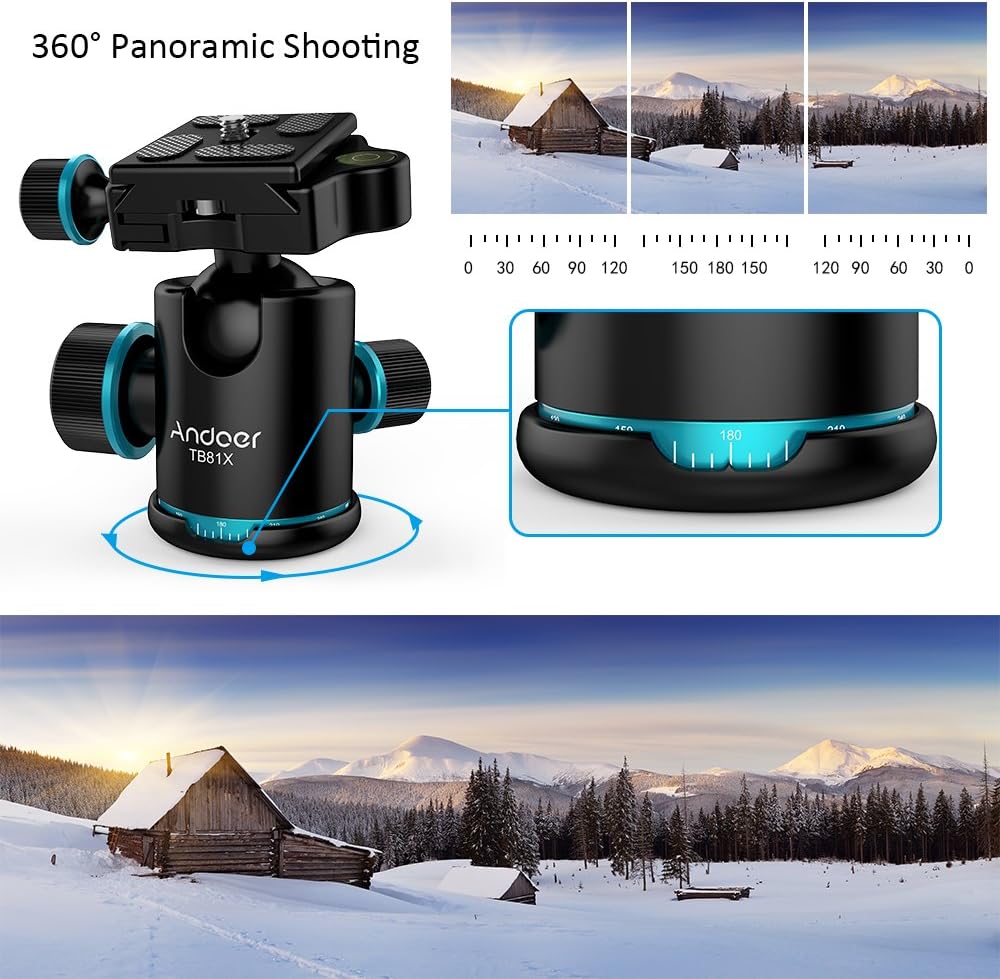
Figure 3.2: Utilizing the 360° panoramic base for rotational adjustments.
3.3 Using the Spirit Levels
The integrated spirit levels are crucial for achieving perfectly level shots. Adjust your tripod/monopod and the ball head's tilt/swivel until the bubble in the spirit level(s) is centered. This ensures your horizon is straight and your vertical lines are true.

Figure 3.3: Different perspectives of the ball head, highlighting adjustment points and spirit levels.
4. Maintenance
Proper maintenance ensures the longevity and optimal performance of your Andoer TB81X Tripod Ball Head.
- Cleaning: Use a soft, dry cloth to wipe down the ball head after each use. For stubborn dirt, a slightly damp cloth can be used, followed by immediate drying. Avoid abrasive cleaners or solvents.
- Storage: Store the ball head in a dry, dust-free environment. If possible, keep it in its original packaging or a protective bag to prevent scratches and dust accumulation.
- Lubrication: The internal mechanisms are factory-lubricated. Do not attempt to lubricate the ball head yourself unless specifically instructed by Andoer, as this may attract dust and impair performance.
- Inspection: Periodically check all screws and knobs to ensure they are tight. If any part appears damaged or loose, discontinue use and contact customer support.
5. Troubleshooting
If you encounter any issues with your Andoer TB81X Tripod Ball Head, refer to the following common solutions:
- Camera Not Securely Attached:
- Ensure the quick release plate is firmly screwed onto the camera.
- Verify the Quick-Shoe Knob on the ball head is fully tightened after inserting the camera.
- Difficulty Adjusting Ball Head Angle:
- Make sure both the Coarse Adjustment Knob and Vernier Adjustment Knob are sufficiently loosened.
- Check for any debris or obstructions around the ball mechanism.
- Stiff Panoramic Rotation:
- Ensure the Base Dial Knob is completely loosened.
- Clean the panoramic base to remove any dust or grit.
- Wobbly Setup:
- Confirm the ball head is securely mounted to your tripod/monopod/slider.
- Ensure your camera is properly attached to the quick release plate and the plate is locked into the ball head.
- Check the stability of your tripod/monopod itself.
6. Specifications
| Specification | Detail |
|---|---|
| Model | TB81X |
| Main Material | Aluminum |
| Maximum Load | 8kg / 17.64 lbs |
| Ball Head Diameter | 36mm |
| Base Diameter | 49mm |
| Quick Release Plate Size | 4 x 5cm / 1.57 x 1.97 in |
| Item Size (Base D * H) | Approx. 4.9 x 10cm / 1.9 x 3.9 in |
| Item Weight | 374g / 13.2 oz (0.88 Pounds) |
| UPC | 702894198589 |
7. Warranty and Support
The Andoer TB81X Tripod Ball Head comes with a manufacturer's warranty. Please refer to the warranty card included in your product packaging or visit the official Andoer website for detailed warranty terms and conditions.
For technical support, product inquiries, or assistance with troubleshooting, please contact Andoer customer service through their official website or the contact information provided in your product documentation.
Related documentsTB81X

Ask a question about this manual
Ask about setup, troubleshooting, compatibility, parts, safety, or missing instructions. Manuals+ will review the question and use this page’s manual context to help answer it.