
TOSING 008
TOSING 008 Wireless Bluetooth Karaoke Microphone User Manual
Model: 009
1. Introduction
Thank you for choosing the TOSING 008 Wireless Bluetooth Karaoke Microphone. This device combines a microphone and a speaker, offering a portable solution for karaoke and entertainment. This manual provides detailed instructions for its setup, operation, and maintenance to ensure optimal performance and longevity.
2. Product Overview
The TOSING 008 features a durable design with integrated controls and dual speakers for a rich audio experience.
2.1. Components and Controls
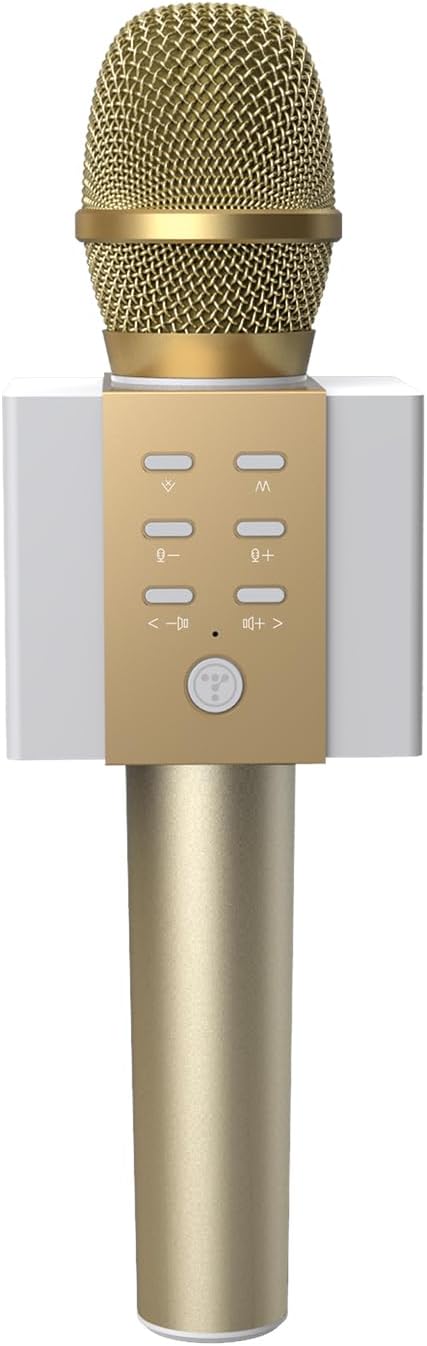

The control panel includes buttons for:
- Power Button: Press and hold to turn on/off. Short press to switch modes.
- Volume Controls (+/-): Adjust microphone volume.
- Echo Controls (M+/-): Adjust echo effect level.
- Track Navigation (<-/->): Skip to previous/next track (in Bluetooth mode).
- Original Vocal Elimination Button: Toggles the original vocal elimination feature.
The bottom of the microphone features a 3.5mm audio jack for AUX-IN connection, a TF card slot for playing music directly, and a micro USB port for charging.
3. Setup
3.1. Charging the Microphone
Before first use, fully charge the microphone. Connect the provided micro USB cable to the charging port on the bottom of the microphone and the other end to a USB power source (e.g., computer, USB wall adapter). The charging indicator light will illuminate during charging and turn off when fully charged.
3.2. Bluetooth Pairing
To connect the microphone wirelessly to your smartphone, tablet, or other Bluetooth-enabled device:
- Turn on the microphone by pressing and holding the power button. A voice prompt will indicate it is in Bluetooth pairing mode.
- Enable Bluetooth on your device and search for available devices.
- Select "TOSING 008" (or similar name) from the list of devices.
- Once connected, a voice prompt will confirm successful pairing. You can now play music from your device through the microphone's speakers and sing along.

3.3. AUX-IN Connection
For devices without Bluetooth or for a wired connection:
- Connect one end of the 3.5mm audio cable (included) to the AUX-IN jack on the bottom of the microphone.
- Connect the other end of the 3.5mm audio cable to the audio output jack of your device (e.g., computer, TV).
- The microphone will automatically switch to AUX-IN mode.
4. Operating Instructions
4.1. Basic Functions
- Power On/Off: Press and hold the power button for approximately 3 seconds.
- Adjust Microphone Volume: Use the '+' and '-' buttons on the control panel.
- Adjust Echo Effect: Use the 'M+' and 'M-' buttons to increase or decrease the echo level.
- Music Playback (Bluetooth/TF Card Mode): Use the '<-' and '->' buttons to navigate between tracks.
4.2. Original Vocal Elimination
The TOSING 008 features a function to eliminate original vocals from music tracks, allowing you to sing along more effectively.
- Ensure the microphone is connected to your music source (Bluetooth or AUX-IN).
- Play a music track.
- Press the dedicated original vocal elimination button on the control panel (often indicated by a microphone icon or similar).
- The microphone will attempt to reduce or remove the lead vocals from the playing track. Press the button again to restore original vocals.

4.3. Using with Music Applications
The TOSING 008 is compatible with various music and karaoke applications on smartphones, tablets, and PCs. Simply connect the microphone via Bluetooth or AUX-IN, and use your preferred application for music playback and singing.

5. Maintenance
5.1. Cleaning
Wipe the microphone's exterior with a soft, dry cloth. Do not use harsh chemicals or abrasive cleaners. Avoid getting moisture into the microphone grille or ports.
5.2. Battery Care
- Charge the battery regularly, even if not in frequent use, to maintain battery health.
- Avoid fully discharging the battery frequently.
- Do not expose the microphone to extreme temperatures.
5.3. Storage
Store the microphone in a cool, dry place away from direct sunlight and moisture. If storing for an extended period, ensure the battery is partially charged (around 50%).
6. Troubleshooting
- No Power: Ensure the microphone is charged. Connect it to a power source and try again.
- Cannot Connect via Bluetooth:
- Ensure the microphone is in pairing mode.
- Turn off and on Bluetooth on your device.
- Move the microphone closer to your device.
- Forget the device in your Bluetooth settings and try pairing again.
- No Sound from Speakers:
- Check the microphone's volume level.
- Check the volume level on your connected device.
- Ensure the music source is playing.
- If using AUX-IN, ensure the cable is securely connected.
- Poor Sound Quality/Distortion:
- Reduce the microphone or device volume.
- Adjust the echo level.
- Ensure there are no obstructions between the microphone and the connected device (for Bluetooth).
7. Specifications
| Feature | Specification |
|---|---|
| Brand | TOSING |
| Model Number | 009 |
| Connectivity Technology | Bluetooth 4.2, 3.5mm Jack (AUX-IN), USB |
| Speaker Output | 2 x 5W Stereo Drivers (10W total) |
| Power Source | Battery-Powered (Lithium-ion Polymer) |
| Battery Life | Up to 8 hours singing time (at 2/3 max volume) |
| Charging Voltage | 5V DC |
| Compatible Devices | Smartphones, Tablets, PCs (Windows 7/8/10), Chromebooks, TVs |
| Included Components | 3.5mm Audio Cable |
| Microphone Form Factor | Handheld |
| Special Features | Bluetooth, Rechargeable, Original Vocal Elimination |
| Package Dimensions | 28 x 11 x 9 cm |
| Package Weight | 500 g |
8. Warranty and Support
The TOSING 008 Wireless Bluetooth Karaoke Microphone comes with a 180-day product warranty. If you encounter any issues or have questions regarding the product, please contact TOSING customer support for assistance.
Related documents008


Ask a question about this manual
Ask about setup, troubleshooting, compatibility, parts, safety, or missing instructions. Manuals+ will review the question and use this page’s manual context to help answer it.