
Introduction
This manual provides essential instructions for the setup, operation, and maintenance of your Easytry123 replacement remote control. This remote is designed to be compatible with various Mitsubishi air conditioner models, including MSZ-GC25VA, MSZ-GA25VA-A1, MSZ-GA35VA-A1, MSZ-FA35VA-E3, MSZ-FA35VA-A2, MSZ-FA35VA-E2, MSZ-FA25VA-A2, KM09D, KM09E, and KM09F. It functions as a direct replacement without requiring any programming.
Key Features:
- Infrared (IR) replacement remote.
- No setup or programming required.
- Easy to use with familiar button layout.
Setup
Your Easytry123 replacement remote control requires two AAA batteries (not included) for operation. No programming or pairing is necessary; simply insert the batteries, and the remote will be ready to use with compatible Mitsubishi air conditioner units.
Battery Installation
- Locate the battery compartment on the back of the remote control.
- Slide the battery compartment cover downwards and remove it.
- Insert two new AAA batteries, ensuring the positive (+) and negative (-) terminals align correctly with the markings inside the compartment.
- Replace the battery compartment cover by sliding it back into place until it clicks securely.
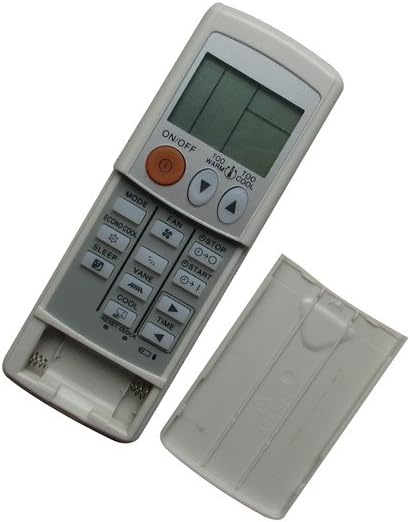
Image: The remote control with its battery cover removed, revealing the two AAA battery slots. This illustrates where to insert the batteries.
Operating Instructions
To operate your air conditioner, point the remote control directly at the indoor unit's receiver. Ensure there are no obstructions between the remote and the air conditioner.

Image: The remote control with its battery cover securely in place, ready for normal operation. This shows the remote's complete appearance.
Common Functions:
- ON/OFF Button: Press to turn the air conditioner unit on or off.
- MODE Button: Cycles through operating modes such as Cool, Heat, Fan, Dry, and Auto.
- FAN Button: Adjusts the fan speed (e.g., Low, Medium, High, Auto).
- Temperature Adjustment Buttons (▲ / ▼): Increases or decreases the desired temperature setting.
- SLEEP Button: Activates or deactivates the sleep mode for comfortable nighttime operation.
- VANE Button: Adjusts the direction of the airflow vanes.
- TIME Buttons: Used for setting timer functions (e.g., ON/OFF timer).
- ECONO COOL Button: Activates energy-saving cooling mode.
- TOO WARM / TOO COOL Buttons: Provides quick adjustments to temperature.
Maintenance
Proper care ensures the longevity and reliable performance of your remote control.
Cleaning:
- Wipe the remote control with a soft, dry cloth.
- For stubborn dirt, lightly dampen the cloth with water or a mild, non-abrasive cleaner.
- Do not use harsh chemicals, solvents, or abrasive cleaning pads, as these can damage the remote's surface or internal components.
Battery Replacement:
- Replace batteries when the remote's range decreases or if the air conditioner does not respond consistently.
- Always replace both batteries at the same time with new AAA batteries.
- Remove batteries if the remote will not be used for an extended period to prevent leakage.
Troubleshooting
If you experience issues with your remote control, refer to the following common solutions:
- Remote not responding:
- Check if the batteries are inserted correctly with the correct polarity.
- Replace old batteries with new AAA batteries.
- Ensure there is a clear line of sight between the remote and the air conditioner's receiver.
- Verify that the remote is pointed directly at the air conditioner unit.
- Air conditioner not responding to commands:
- Confirm that your air conditioner model is listed as compatible with this remote.
- Try operating the air conditioner manually from its control panel to ensure the unit itself is functioning correctly.
- Buttons not working:
- Ensure the remote is clean and free from debris that might obstruct button presses.
- If only specific buttons are not working, the remote may be damaged and require replacement.
This remote control does not require programming. If the air conditioner does not respond after following these steps, the remote may be incompatible with your specific unit or faulty.
Specifications
| Brand | Easytry123 |
| Model | Easytry1642 |
| Connectivity Technology | Infrared (IR) |
| Controller Type | Button Control |
| Special Features | No Programming Required, Not Universal |
| Batteries Required | 2 x AAA (not included) |
| Material | ABS Plastic |
Warranty and Support
This product is a replacement remote control. For any issues or support inquiries, please contact the seller, Easytry123, directly through your purchase platform. Refer to your purchase details for information regarding return policies, which typically include a 30-day refund or replacement period.