
Introduction
This manual provides comprehensive instructions for the setup, operation, maintenance, and troubleshooting of your ZdalaMit BN59-01289A replacement remote control. This remote is designed to be compatible with a wide range of Samsung Smart TV models, offering a direct replacement experience without the need for programming or pairing.
Product Overview
Remote Control Layout

Figure 1: Front view of the BN59-01289A remote control. Key buttons include Power, Source, Number Pad, Volume, Channel, Mute, E-Manual, Settings, Info, Return, Exit, and colored function buttons.
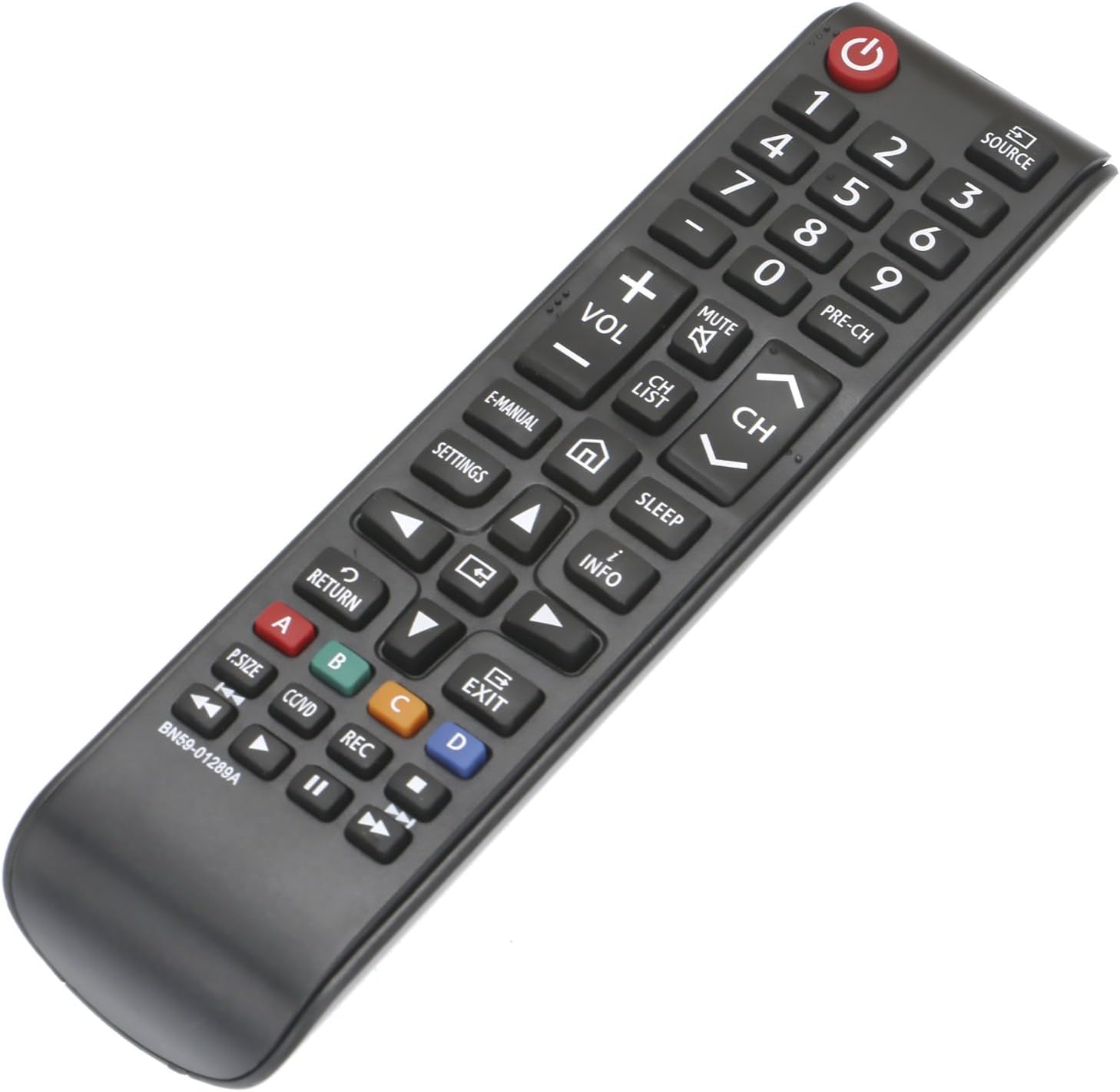
Figure 2: Angled view of the BN59-01289A remote control, illustrating its ergonomic shape for comfortable handling.
Package Contents
- 1 x ZdalaMit BN59-01289A Replacement Remote Control
Note: Batteries and user manual are not included in the package.
Setup
Installing Batteries
The remote control requires two (2) 1.5V AAA batteries for operation. Ensure correct polarity when inserting batteries.
- Locate the battery compartment on the back of the remote control.
- Slide the battery cover downwards to open the compartment.
- Insert two (2) AAA batteries, matching the (+) and (-) indicators inside the compartment.
- Slide the battery cover back into place until it clicks securely.

Figure 3: Rear view of the remote control with the battery cover removed, illustrating the battery insertion points.
Once batteries are installed, the remote is ready for use with compatible Samsung TVs without any programming or pairing.
Operating Instructions
Basic Functions
- Power (⑂): Turns the TV on or off.
- Source: Selects the input source (e.g., HDMI, AV, TV).
- Number Pad (0-9): Directly enters channel numbers.
- PRE-CH: Returns to the previous channel.
- VOL (+/-): Adjusts the volume level.
- MUTE (⑁): Mutes or unmutes the TV sound.
- CH (⌃/⌄): Changes channels up or down.
- CH LIST: Displays the channel list.
Advanced Functions
- E-MANUAL: Accesses the electronic user manual on your TV.
- SETTINGS: Opens the TV's settings menu.
- HOME (⌂): Returns to the Smart Hub or Home screen.
- SLEEP: Sets a sleep timer for the TV.
- INFO (i): Displays information about the current program or input.
- Navigation Buttons (◀, ▲, ►, ▼): Navigates through menus and options.
- ENTER (●): Confirms selections.
- RETURN (↶): Returns to the previous screen or menu.
- EXIT (↹): Exits the current menu or application.
- Color Buttons (A, B, C, D): Provides access to specific functions within certain applications or menus, as indicated on the TV screen.
- P.SIZE: Adjusts the picture size/aspect ratio.
- CC/VD: Toggles Closed Captions or Video Description.
- REC (●): Initiates recording (if supported by TV and connected device).
- Playback Controls (◀◀, ▶▶, ▣, ▶▶): Controls media playback (Rewind, Fast Forward, Play/Pause, Stop).
Compatible TV Models
This remote control is compatible with, but not limited to, the following Samsung TV models:
- UN58MU6071FXZA
- UN40NU7100
- UN40NU7100AFXZA
- UN43NU7100
- UN43NU7100AFXZA
- UN50NU7100F
- UN75MU6290FXZA
- UN55FH6200f
- UN65MU1290
- UN55MU6071F
- UN55MU6071FXZA
- UN58MU6071F
- UN55MU6290F
- UN55MU6290FXZA
- UN65MU6070F
- UN40MU6290
- UN40MU6290FXZA
- UN75MU6290F
- UN50NU7100FXZA
- UN55NU7100
- UN55NU7100AFXZA
- UN55MU6490F
- UN55MU6490FXZA
- UN65NU7100
- UN65NU7100AFXZA
- UN75NU7100
- UN75NU7100AFXZA
- UN58MU6100
- UN58MU6100FXZA
Maintenance
To ensure the longevity and optimal performance of your remote control, follow these maintenance guidelines:
- Cleaning: Wipe the remote control regularly with a soft, dry cloth. Avoid using abrasive cleaners or solvents, as they may damage the surface or internal components.
- Battery Replacement: Replace batteries when the remote's responsiveness decreases or it stops functioning. Always replace both batteries at the same time with new ones of the same type (AAA).
- Storage: If the remote control will not be used for an extended period, remove the batteries to prevent leakage and potential damage. Store in a cool, dry place.
Troubleshooting
If you encounter issues with your remote control, refer to the following table for common problems and solutions:
| Problem | Possible Cause | Solution |
|---|---|---|
| Remote is not responding. | Dead or incorrectly inserted batteries. Obstruction between remote and TV. Remote is out of range. | Replace batteries with new AAA batteries, ensuring correct polarity. Remove any obstructions. Move closer to the TV. |
| Buttons are sticky or unresponsive. | Dirt or debris under buttons. | Clean the remote surface with a soft, dry cloth. Avoid liquid cleaners. |
| Remote works intermittently. | Low battery power. Infrared sensor on TV is blocked or dirty. | Replace batteries. Ensure the TV's infrared sensor is clean and unobstructed. |
Specifications
| Feature | Detail |
|---|---|
| Model Number | BN59-01289A |
| Item Model Number (Internal) | 8541713037 |
| Power Supply | 2 x 1.5V AAA Batteries (not included) |
| Product Dimensions | 6 x 1.5 x 0.6 inches |
| Item Weight | 2 ounces |
| Color | Black |
| Special Feature | Ergonomic design |
| Compatible Devices | Television (Samsung Smart TVs) |
| Manufacturer | ZdalaMit Factory |
| Country of Origin | China |
Warranty and Support
For information regarding warranty coverage for your ZdalaMit BN59-01289A replacement remote control, please refer to the terms and conditions provided by your retailer or the seller at the time of purchase. Warranty details can vary based on the point of sale.
If you have any questions, concerns, or require technical assistance with your remote control, please contact the seller directly through the platform where the purchase was made. They will be able to provide the most accurate and timely support.

