
Introduction
Welcome to the instruction manual for your new MVMT Voyager D-MV01-S2 Multifunction Quartz Men's Watch. This guide provides essential information on setting up, operating, and maintaining your timepiece to ensure its longevity and accurate performance. Please read this manual thoroughly before using your watch.
Product Overview
The MVMT Voyager D-MV01-S2 is a sophisticated multifunction quartz watch designed for versatility and style. It features a durable stainless steel case and band, a black round dial with dual time and 24-hour sub-dials, and is water-resistant up to 10 ATM (100 meters). This watch is equipped with a reliable quartz movement for precise timekeeping.
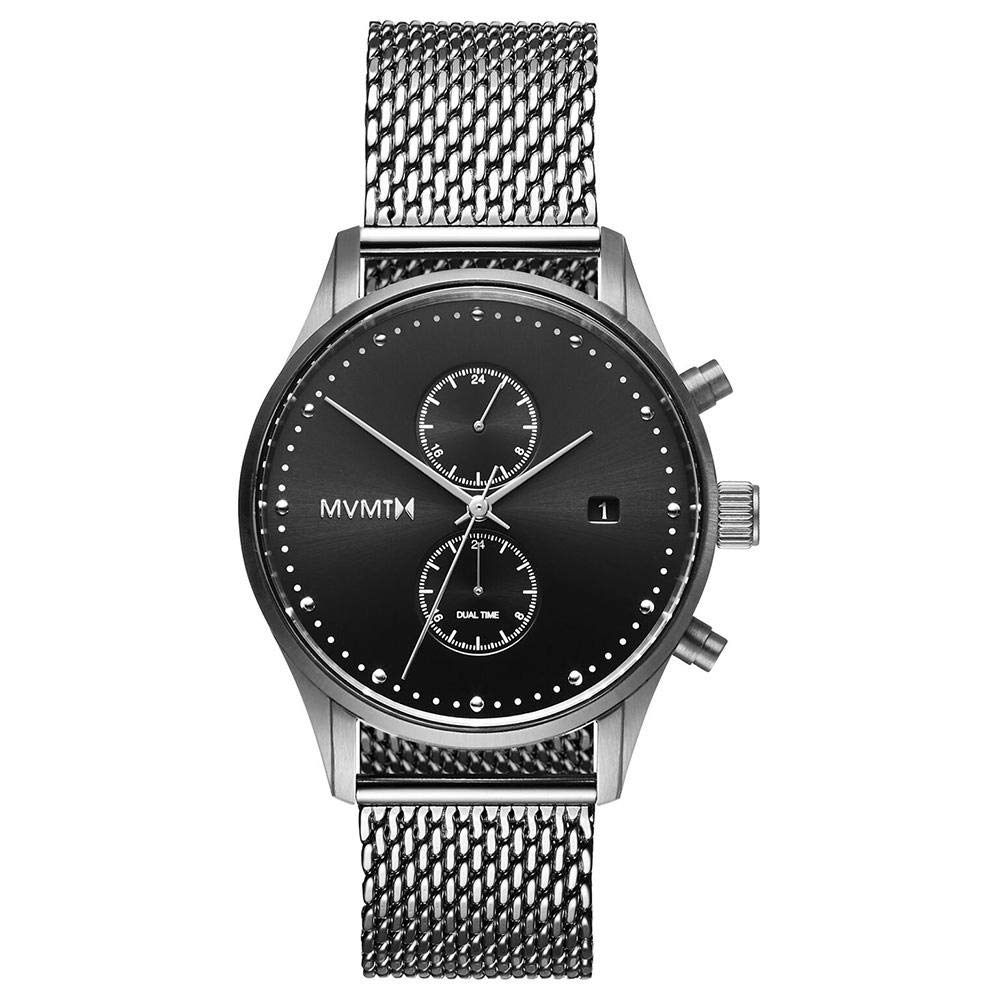
Figure 1: Front view of the MVMT Voyager D-MV01-S2 watch, showcasing the black dial, sub-dials, and silver mesh band.

Figure 2: Angled view of the watch, highlighting the crown and pusher buttons on the side of the case.
Setup
Initial Inspection
Upon unboxing, carefully inspect your watch for any signs of damage. Ensure all protective films are removed from the crystal and case back.

Figure 3: The MVMT Voyager D-MV01-S2 watch presented in its original black box.
Battery Activation
Your MVMT Voyager watch comes with a pre-installed Lithium Ion battery. If the watch is not running, gently pull the crown out to position 2 (time setting position) and push it back in firmly. This should activate the battery and start the watch. If the watch still does not operate, refer to the Troubleshooting section.
Operating Instructions
Setting the Main Time
- Pull the crown out to position 2. The second hand will stop.
- Turn the crown to set the hour and minute hands to the desired time. Ensure you set the correct AM/PM by observing the 24-hour sub-dial (if applicable, or by advancing past 12 o'clock to see if the date changes).
- Push the crown back into position 0 to start the watch.
Setting the Date
- Pull the crown out to position 1.
- Turn the crown clockwise or counter-clockwise (depending on the movement) to set the date.
- Once the correct date is displayed, push the crown back into position 0.
Using the Dual Time Function
The MVMT Voyager features a dedicated sub-dial for a second time zone. This allows you to track time in a different location simultaneously.
- Identify the dual time sub-dial on your watch face. This sub-dial typically has its own small crown or pusher for adjustment. (Note: For specific adjustment methods, refer to the detailed diagram in your watch's packaging or contact support if no dedicated control is visible. Often, the dual time is linked to the main time setting or adjusted via a recessed pusher.)
- Adjust the dual time sub-dial to the desired second time zone.
Using the Chronograph Function
Your watch is equipped with a chronograph (stopwatch) function, indicated by the presence of pushers above and below the main crown.
- Start: Press the top pusher (A) to start the chronograph. The chronograph second hand will begin to move.
- Stop: Press the top pusher (A) again to stop the chronograph. The elapsed time will be displayed on the chronograph sub-dials.
- Reset: Press the bottom pusher (B) to reset the chronograph hands to their zero positions. This can only be done when the chronograph is stopped.
Maintenance
Cleaning
Wipe your watch regularly with a soft, dry cloth to remove dust and smudges. For stainless steel bands, a slightly damp cloth can be used, followed by immediate drying. Avoid using harsh chemicals or abrasive materials.
Water Resistance
Your MVMT Voyager watch is water-resistant up to 10 ATM (100 meters). This means it is suitable for swimming, snorkeling, and showering. However, it is not suitable for high-impact water sports or diving. Always ensure the crown is fully pushed in before exposing the watch to water. Do not operate the crown or pushers while the watch is wet or submerged.
Battery Replacement
The watch uses a Silver Oxide battery. When the battery runs low, the second hand may start to skip seconds or stop entirely. Battery replacement should be performed by a qualified watch technician to ensure proper sealing and maintain water resistance.
Strap Care
The stainless steel mesh band is designed for durability. Avoid excessive bending or twisting of the mesh. Clean the band as described in the cleaning section. If you wish to change the strap, ensure you use a compatible 21mm interchangeable watch band.

Figure 4: Rear view of the MVMT Voyager D-MV01-S2 watch, displaying the case back and the clasp mechanism of the mesh band.
Troubleshooting
- Watch Not Running: Ensure the crown is fully pushed in. If it still doesn't run, the battery may need replacement.
- Incorrect Time/Date: Follow the operating instructions to reset the time and date. Check if the crown was accidentally pulled out.
- Condensation Under Crystal: This indicates a loss of water resistance. Immediately take the watch to a professional for inspection and repair to prevent internal damage.
- Chronograph Hands Not Resetting to Zero: If the chronograph hands do not return to the 12 o'clock position after resetting, consult a watch technician.
Specifications
| Feature | Specification |
|---|---|
| Brand | MVMT |
| Model | D-MV01-S2 |
| Model Name | Voyager |
| Display Type | Analog |
| Special Features | Chronograph, Dual Time |
| Movement | Quartz |
| Power Source | Battery Powered |
| Battery Type | Lithium Ion (included), Silver Oxide (cell composition) |
| Water Resistance | 10 ATM (100 meters) |
| Case Diameter | 42 Millimeters |
| Product Dimensions | 2.1 x 4.2 x 1.1 cm |
| Item Weight | 114 g |
| Country of Origin | Hong Kong |
Warranty Information
Your MVMT Voyager D-MV01-S2 watch comes with a Two-Year Guarantee from the date of purchase. This warranty covers manufacturing defects in materials and workmanship under normal use. It does not cover damage resulting from improper handling, accidents, unauthorized repairs, or normal wear and tear (e.g., battery, strap, crystal damage). Please retain your proof of purchase for warranty claims.
Support
For further assistance, technical support, or warranty claims, please contact MVMT customer service through their official website or the retailer from whom you purchased the watch. Provide your watch model number (D-MV01-S2) and proof of purchase for efficient service.
You can visit the official MVMT store for more information: MVMT Store on Amazon


