
1. Introduction
The Moretti GAYA 2.0 RP540 Aluminum Rollator is a versatile mobility aid designed to provide support and assistance for individuals requiring walking assistance. It features a lightweight aluminum frame, a comfortable seat, and a reversible backrest for dual functionality as a rollator and a transport chair. This manual provides essential information for the safe and effective use, setup, operation, and maintenance of your rollator.
2. Safety Information and Warnings
Before using the Moretti GAYA 2.0 RP540 Rollator, please read all instructions carefully. Failure to follow these instructions may result in injury or damage to the product.
- Always ensure all locking mechanisms are engaged before use.
- Do not exceed the maximum weight capacity of 136 kg (299 lbs).
- Ensure the brakes are fully engaged when sitting on the seat or when the rollator is stationary.
- Use caution when navigating uneven surfaces or inclines.
- The product packaging may contain information different from that shown on our website. Please always read the label, warnings, and instructions provided with the product before use or consumption.
- Regularly inspect the rollator for any signs of wear, damage, or loose components.
3. Product Components
The Moretti GAYA 2.0 RP540 Rollator includes the following key components:
- Lightweight Aluminum Frame
- Comfortable Seat
- Foldable Footrests with Plastic Footpads and Foot Strap
- Four PU Wheels (Ø 20 cm) - Swiveling Front, Fixed Rear
- Dual-Function Brakes on Rear Wheels
- Height-Adjustable Anatomical Handles with Reflective Elements
- Reversible Backrest (for rollator and transport chair function)
- Cane/Crutch Holder
- Storage Bag
4. Setup
4.1 Unfolding the Rollator
The rollator is designed for easy folding and unfolding. To unfold, gently pull the sides of the frame apart until the locking mechanisms engage and the frame is fully extended. Ensure the seat is securely in place.

Figure 1: Moretti GAYA 2.0 RP540 Rollator in its folded configuration, showing its compact design for storage and transport.
4.2 Adjusting Handle Height
Adjust the anatomical handles to a comfortable height. When standing upright with your arms relaxed at your sides, the top of the handles should align with your wrists. This ensures your elbows are slightly bent when holding the handles, promoting proper posture and reducing strain. Secure the adjustment mechanism firmly after setting the desired height.
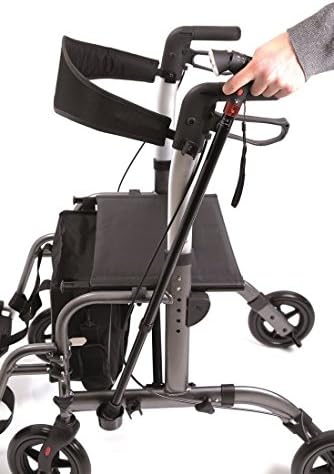
Figure 2: A hand demonstrating the adjustment of the ergonomic handle on the Moretti GAYA 2.0 RP540 Rollator, highlighting the height adjustment feature.
4.3 Deploying Footrests
If using the transport chair function, deploy the foldable footrests by swinging them down and ensuring they lock into position. The plastic footpads and foot strap should be securely in place to support the user's feet.
5. Operating Instructions
5.1 Walking with the Rollator
Use the rollator for support while walking. Push the rollator slightly ahead of you, maintaining a comfortable distance. Ensure all four wheels are on the ground and the brakes are disengaged for smooth movement.
5.2 Using the Brakes
The rear wheels are equipped with dual-function brakes:
- To Slow Down or Stop: Squeeze the brake levers on the handles. Release to resume movement.
- To Engage Parking Brake: Push the brake levers down until they lock into place. This will prevent the rollator from moving. Always engage the parking brake when sitting or when the rollator is stationary.
5.3 Using the Seat
To use the seat, first engage the parking brakes on both rear wheels to ensure stability. Ensure the rollator is on a level surface. The reversible backrest can be positioned for comfort. Sit down slowly and carefully.
5.4 Converting to Transport Chair Function
The Moretti GAYA 2.0 RP540 can function as a transport chair. To convert:
- Ensure the parking brakes are engaged.
- Deploy the footrests and ensure they are securely locked.
- Reverse the backrest so it faces forward, providing support for the seated user.
- The user should be seated with their feet placed on the footrests.
- An attendant should push the rollator from behind using the handles.
5.5 Folding for Storage or Transport
To fold the rollator, disengage the parking brakes. Follow the manufacturer's specific instructions to collapse the frame, which typically involves pulling a strap or lever located on the seat. Once folded, ensure it is compact and secure for storage or transport.
6. Maintenance
Regular maintenance ensures the longevity and safe operation of your rollator.
- Cleaning: Clean the aluminum frame and plastic components with a damp cloth and mild, non-abrasive detergent. Avoid harsh chemicals that could damage the finish.
- Wheel Inspection: Regularly check the wheels for wear and tear, especially the tire tread. Ensure they rotate freely and are free of debris such as hair or lint.
- Brake Check: Periodically test the brakes to ensure they are functioning correctly and provide adequate stopping power. If the brakes feel loose or do not engage properly, they may need adjustment by a qualified technician.
- Fasteners: Check all screws, bolts, and other fasteners for tightness. Tighten if necessary, but do not overtighten.
- Storage: Store the rollator in a dry, clean environment when not in use.
7. Troubleshooting
If you encounter any issues with your Moretti GAYA 2.0 RP540 Rollator, refer to the following common troubleshooting tips:
- Brakes Not Engaging Properly: Check the brake cables for tension and damage. Ensure the brake levers are fully depressed to engage the parking brake. If issues persist, consult a technician.
- Difficulty Folding/Unfolding: Ensure no obstructions are preventing the frame from collapsing or expanding. Check that all locking mechanisms are disengaged before attempting to fold and engaged when unfolding.
- Rollator Feels Unstable: Verify that all components are securely assembled and that the handle height is correctly set and locked. Ensure all four wheels are in contact with the ground.
- Wheels Not Rolling Smoothly: Check for debris caught in the wheels or axles. Clean as necessary. Inspect wheels for damage or excessive wear.
8. Specifications
Key technical specifications for the Moretti GAYA 2.0 RP540 Rollator:
| Feature | Specification |
|---|---|
| Model Number | RP540 |
| Material | Aluminum |
| Wheel Diameter | 20 cm (PU) |
| Product Weight | 9.6 kg (21.16 lbs) |
| Maximum Weight Capacity | 136 kg (299 lbs) |
| Recommended User Height (Max) | 175 cm (5 ft 9 in) |
| Seat Dimensions (Width x Depth) | 45 cm x 31 cm (17.7 in x 12.2 in) |
| Foldable | Yes |

Figure 3: Technical specifications and dimensions of the Moretti GAYA 2.0 RP540 Rollator.
9. Warranty Information
Moretti products typically come with a standard manufacturer's warranty covering defects in materials and workmanship. The specific terms, conditions, and duration of the warranty may vary. Please refer to the warranty card included with your product packaging or contact Moretti customer support for detailed information regarding your product's warranty coverage.
10. Support and Contact
For further assistance, spare parts, technical support, or any questions not covered in this manual, please contact Moretti customer service. Refer to the contact information provided in your product packaging or on the official Moretti website.
Manufacturer: Moretti
Model: GAYA 2.0 RP540