
DOUBLE E E521
Double Eagle E521 RC Forklift Instruction Manual
Model: E521 | Brand: DOUBLE E
Introduction
This manual provides comprehensive instructions for the safe and effective operation, setup, and maintenance of your Double Eagle E521 RC Forklift. This remote-controlled forklift is a fully functional and ready-to-use machine, capable of moving forward, backward, and sideways, as well as remotely lifting and lowering goods. It features realistic sounds, working headlights, and a demonstration mode with pre-programmed actions. The toy also includes an automatic shutdown feature for prolonged inactivity to conserve battery life.
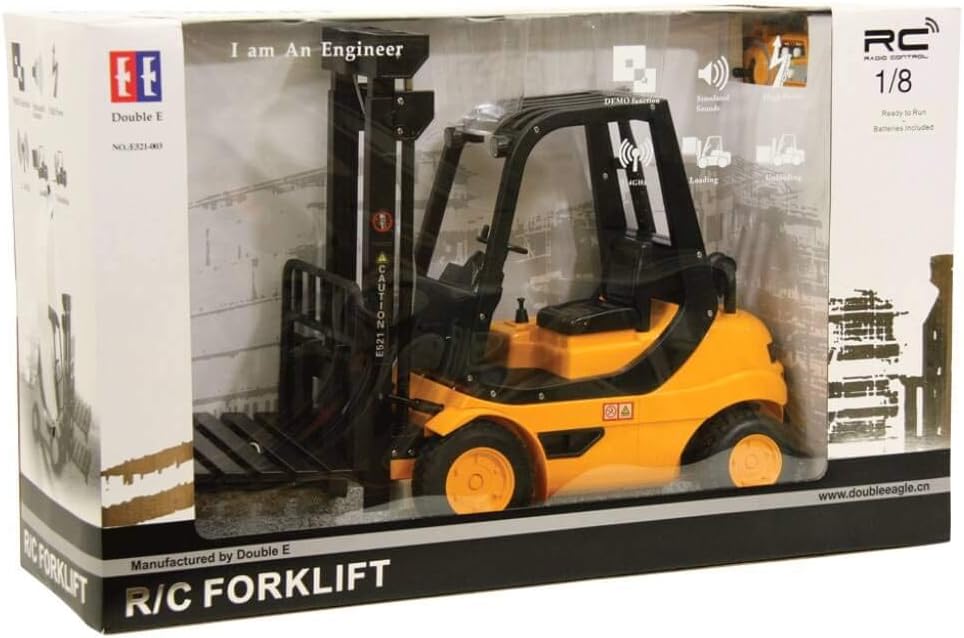
Image: The Double Eagle E521 RC Forklift displayed in its retail box, highlighting its features and remote control capabilities.
Safety Warnings
- Keep away from open fire and direct heat sources.
- Not suitable for children under 8 years old due to small parts and functional sharp points. Adult supervision is recommended.
- Do not operate near people, pets, or fragile objects to prevent injury or damage.
- Ensure all battery compartments are securely closed before operation.
- Do not mix old and new batteries, or different types of batteries.
- Remove batteries from the toy and remote control if not used for a long period.
Package Contents
Please check the package contents to ensure all items are present and in good condition.
- 1 x Double Eagle E521 RC Forklift
- 1 x Remote Control
- 1 x Pallet (1:20 scale)
- Required Batteries (AA)
- Instruction Manual

Image: The Double Eagle E521 RC Forklift, showcasing its design and the included pallet.
Setup
1. Battery Installation
The Double Eagle E521 RC Forklift requires AA batteries for both the forklift and the remote control. Batteries are included with the product.
- Forklift Battery: Locate the battery compartment on the underside of the forklift. Open the cover, insert the required AA batteries, ensuring correct polarity (+/-). Close the cover securely.
- Remote Control Battery: Locate the battery compartment on the back of the remote control. Open the cover, insert the required AA batteries, ensuring correct polarity (+/-). Close the cover securely.
2. Power On
- Turn on the power switch on the forklift.
- Turn on the power switch on the remote control.
- The forklift and remote control will automatically pair. A light indicator on both devices will confirm successful pairing.
Operating Instructions
Basic Movement
- Forward/Backward: Use the left joystick (or designated control) to move the forklift forward or backward.
- Turning (Left/Right): Use the right joystick (or designated control) to steer the forklift left or right.
- Sideways Movement: Some models may support lateral movement. Refer to the remote control diagram for specific controls.
Lifting and Lowering Goods
- Lifting Forks: Use the designated button or lever on the remote control to raise the forklift's forks.
- Lowering Forks: Use the designated button or lever on the remote control to lower the forklift's forks.
- Handling Pallets: Carefully maneuver the forklift to slide the forks under the included pallet. Once secured, you can lift and transport the pallet.
Special Features
- Sounds: The forklift produces realistic sounds during operation. These may include engine sounds, horn, or operational noises.
- Working Headlights: The forklift is equipped with working headlights that illuminate during operation.
- Demonstration Mode: Press the "Demo" button on the remote control to activate a pre-programmed sequence of actions, showcasing the forklift's capabilities.
Maintenance
Cleaning
- Wipe the forklift and remote control with a soft, dry cloth.
- Do not use harsh chemicals or abrasive cleaners.
- Avoid exposing the product to water or excessive moisture.
Storage
- Store the forklift and remote control in a cool, dry place away from direct sunlight.
- Remove batteries from both devices if storing for extended periods to prevent leakage.
Battery Care
- Always use the correct type of batteries (AA).
- Ensure batteries are inserted with correct polarity.
- Do not recharge non-rechargeable batteries.
- Exhausted batteries should be removed from the toy.
- Do not short-circuit the supply terminals.
Troubleshooting
| Problem | Possible Cause | Solution |
|---|---|---|
| Forklift does not respond to remote control. |
|
|
| Forks do not lift/lower. |
|
|
| Short operating time. |
|
|
Specifications
| Model Number | E521 |
| Brand | DOUBLE E |
| Product Dimensions (L x W x H) | 45 x 16 x 32 cm (17.7 x 6.3 x 12.6 inches) |
| Weight | 1.97 kilograms (4.34 lbs) |
| Recommended Age | 8 years and up |
| Main Material | Plastic |
| Batteries Required | Yes (AA) |
| Batteries Included | Yes |
| Assembly Required | No |
Warranty and Support
Specific warranty information for the Double Eagle E521 RC Forklift is not provided within this manual. For details regarding warranty coverage, spare parts availability, or technical support, please contact the manufacturer, DOUBLE E, or the retailer from whom you purchased the product.
Please retain your proof of purchase for any warranty claims.
Ask a question about this manual
Ask about setup, troubleshooting, compatibility, parts, safety, or missing instructions. Manuals+ will review the question and use this page’s manual context to help answer it.