
1. Important Safety Instructions
Please read all instructions carefully before using the Rowenta EP1120 Easy Touch Epilator. Keep this manual for future reference.
- This appliance is intended for household use only.
- Do not use the appliance near water, in a bathtub, shower, or over a filled basin.
- Ensure your hands are dry before handling the appliance or charger.
- Do not use the epilator on irritated skin, varicose veins, moles, or wounds. Consult a doctor if you have any skin conditions or concerns.
- Keep the appliance out of reach of children.
- Only use the charger supplied with the appliance.
- Unplug the appliance from the power supply before cleaning.
2. Product Overview
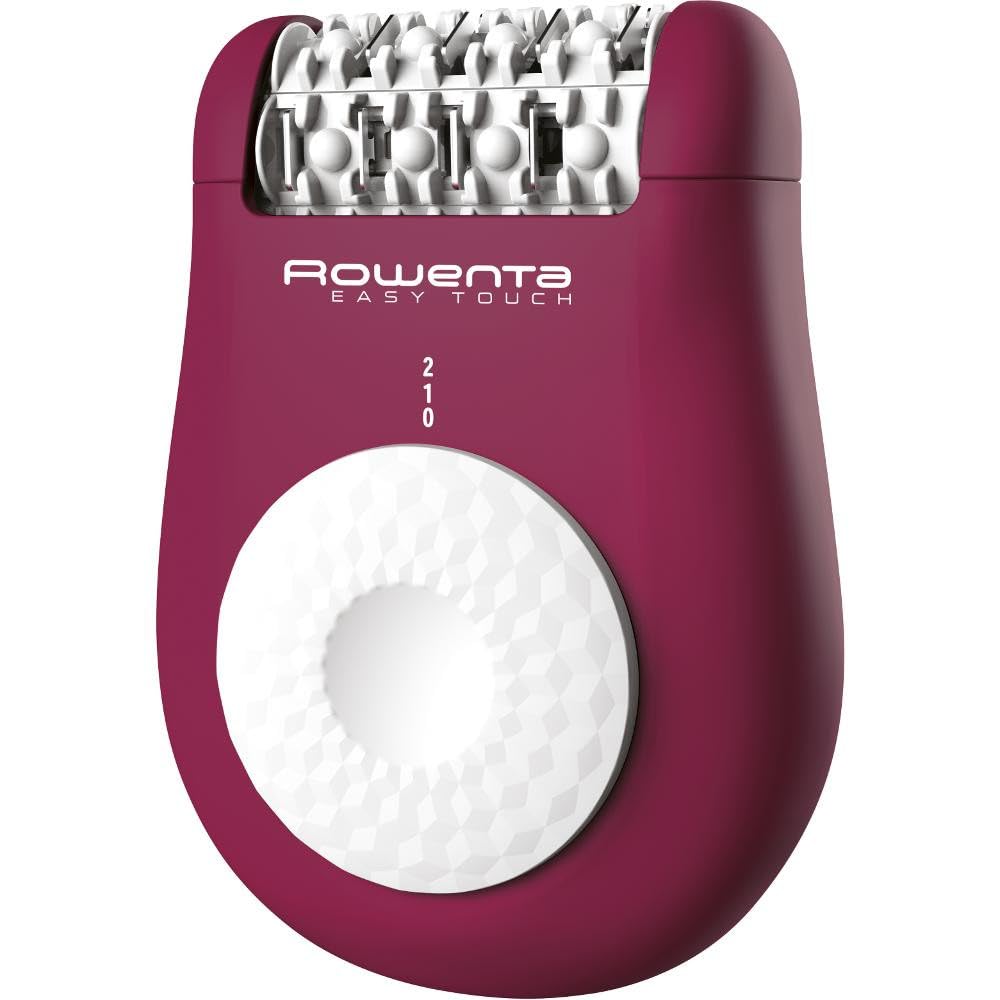
Image: The Rowenta EP1120 Easy Touch Epilator. This image displays the compact design of the epilator, highlighting its ergonomic shape and epilation head.
The Rowenta EP1120 Easy Touch epilator is designed for efficient and gentle hair removal. It features 24 high-precision tweezers and offers two speed settings to adapt to different hair types and sensitive areas.
Included Components:
- Rowenta EP1120 Easy Touch Epilator Unit
- Cleaning Brush
- Instruction Manual
3. Setup
Charging the Epilator:
- Ensure the epilator is switched off.
- Connect the charger to the epilator's charging port.
- Plug the charger into a suitable electrical outlet.
- Allow the epilator to charge fully before its first use. The charging indicator light (if present) will show the charging status.
Preparing for Use:
- Ensure your skin is clean and dry before epilation.
- For best results, exfoliate your skin a day or two before epilation to prevent ingrown hairs.
4. Operating Instructions
Turning On/Off and Speed Settings:
- To turn on the epilator, slide the power switch to the desired speed setting.
- The Rowenta EP1120 offers two speed settings: Speed 1 for gentle epilation and sensitive areas, and Speed 2 for faster and more efficient hair removal on larger areas.
- To turn off the epilator, slide the power switch back to the '0' (off) position.
Epilation Technique:
- Hold the epilator at a 90-degree angle to your skin.
- Stretch your skin taut with your free hand to ensure the hairs stand upright.
- Move the epilator slowly against the direction of hair growth.
- Do not press too hard; let the epilator glide gently over the skin.
- For optimal results, ensure the epilation head is in full contact with the skin.
5. Maintenance and Cleaning
Regular cleaning ensures optimal performance and hygiene of your epilator.
Cleaning the Epilation Head:
- Ensure the epilator is switched off and unplugged from the charger.
- Remove the epilation head from the main body of the appliance (refer to the diagram in the full manual for specific removal instructions).
- Use the provided cleaning brush to remove any trapped hairs from the tweezers and the epilation head.
- The epilation head can be rinsed under running water. Ensure it is completely dry before reattaching it to the epilator body.
- Do not immerse the main body of the epilator in water.
Storage:
- Store the epilator in a clean, dry place, away from direct sunlight and extreme temperatures.
- Keep the protective cap on the epilation head when not in use.
6. Troubleshooting
If you encounter any issues with your Rowenta EP1120 epilator, please refer to the following common problems and solutions:
- Epilator not turning on:
- Ensure the epilator is fully charged.
- Check that the power switch is in the '1' or '2' position.
- Poor hair removal performance:
- Ensure the epilation head is clean and free of hair.
- Verify that you are holding the epilator at a 90-degree angle and moving it against the direction of hair growth.
- Ensure your skin is taut during epilation.
- Skin irritation after epilation:
- This can be normal for first-time users. Apply a soothing lotion after epilation.
- Ensure you are not pressing too hard on the skin.
- If irritation persists, discontinue use and consult a dermatologist.
7. Specifications
| Feature | Detail |
|---|---|
| Model Name | EP1120 Easy Touch |
| Brand | Rowenta |
| Number of Tweezers | 24 |
| Speed Settings | 2 |
| Power Source | Battery-powered |
| Included Components | Cleaning Brush, Instruction Manual |
| ASIN | B07F93D22G |
| International Article Code (EAN/UPC) | 03121040068236 |
8. Warranty and Support
This Rowenta product is manufactured to high-quality standards. For specific warranty details, please refer to the warranty card included in your product packaging or visit the official Rowenta website.
- Return Policy: Products purchased may be eligible for return within 30 days of receipt, subject to the retailer's return policy.
- Manufacturer Support: For technical assistance, spare parts, or warranty claims, please contact Rowenta customer service directly. Contact information can typically be found on the official Rowenta website or in your product documentation.


