
ELECDER i37
ELECDER i37 Kids Headphones User Manual
Model: i37 | Brand: ELECDER
Introduction
Thank you for choosing the ELECDER i37 Kids Headphones. These headphones are designed to provide a comfortable and enjoyable audio experience for children, teens, and even adults. Featuring a foldable design, adjustable headband, and a durable tangle-free cord, the i37 headphones are ideal for various uses, including school, travel, and everyday listening. This manual provides essential information on setup, operation, maintenance, and troubleshooting to ensure optimal performance and longevity of your headphones.
What's in the Box
Upon opening the package, please ensure all the following items are present:
- ELECDER i37 Kids Headphone
- User Manual (this document)

Figure 1: Packaging of the ELECDER i37 Kids Headphones, showing the headphones and the box.
Product Overview
The ELECDER i37 headphones are designed for comfort and durability. Key features include:
- Excellent Sound: Stereo bass headphone with clear audio output.
- Durable and Tangle-Free Cord: The 4.9 ft (1.5m) cord is made of high-quality cloth to prevent tangling and ensure longevity.
- Adjustable Headband: The headband can be adjusted to fit various head sizes, suitable for children, teens, and many adults.
- Foldable Design: The headphones can be folded for convenient storage and portability.
- Soft Ear Cushions: Designed for comfort during extended use.

Figure 2: Front view of the ELECDER i37 Kids Headphones, showcasing the black and blue design.

Figure 3: A child wearing the ELECDER i37 headphones, demonstrating their comfortable fit during use with a laptop.

Figure 4: The headphones in their folded configuration, highlighting the compact design for easy storage and portability.
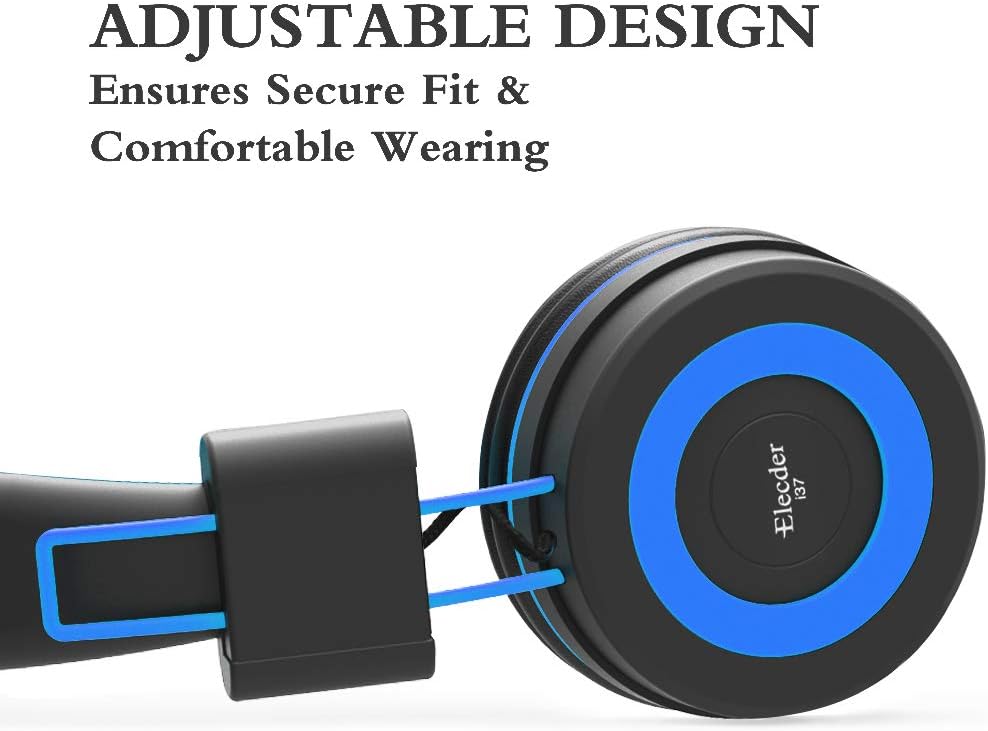
Figure 5: Detail of the adjustable slider on the headband, which allows for a secure and comfortable fit for various head sizes.

Figure 6: A view of the soft, noise-isolating ear pads, designed to provide comfort and reduce external distractions.
Setup Instructions
- Unpack the Headphones: Carefully remove the headphones and any included accessories from the packaging.
- Connect to Device: Insert the 3.5mm audio jack firmly into the headphone port of your audio device (e.g., smartphone, tablet, computer, MP3/4 player, Kindle).
Note: For devices like iPhone 7 and newer, or iPad Pro 11 and above, a lightning to 3.5mm jack adapter (not included) is required.
- Adjust the Headband: Gently slide the earcups up or down along the headband to achieve a comfortable and secure fit on the user's head. Ensure both earcups sit comfortably over the ears.
Operating Instructions
The ELECDER i37 headphones are designed for simple plug-and-play operation.
- Audio Playback: Once connected to your device, audio will be routed through the headphones. Control playback (play, pause, skip) and volume directly from your connected device.
- Volume Control: Please note that these headphones do not feature an inline microphone, remote, or volume control. All volume adjustments must be made on the connected audio source.
Care and Maintenance
- Cleaning: Use a soft, dry cloth to wipe the exterior surfaces of the headphones. Do not use liquid cleaners or abrasive materials.
- Storage: When not in use, fold the headphones to their compact size and store them in a clean, dry place away from direct sunlight and extreme temperatures. This helps protect the headphones and prevents the cord from tangling.
- Cord Care: Avoid sharply bending or pulling the audio cable to prevent internal damage. The cloth-braided cord is designed to be durable and tangle-resistant, but proper handling will extend its lifespan.
Troubleshooting
| Problem | Possible Cause | Solution |
|---|---|---|
| No sound or low volume |
|
|
| Sound distortion or poor quality |
|
|
| Headphones do not fit comfortably |
|
|
Specifications
| Feature | Detail |
|---|---|
| Model Name | i37 |
| Brand | ELECDER |
| Connectivity Technology | Wired |
| Headphones Jack | 3.5 mm Jack |
| Cable Feature | Retractable (Durable, Tangle-Free Cloth) |
| Earpiece Shape | On Ear |
| Material | Plush |
| Item Weight | 5.6 Ounces (approx. 158.76 grams) |
| Product Dimensions | 8.9 x 2.8 x 6.1 inches |
| Frequency Range | 20 Hz - 20,000 Hz |
| Control Type | Volume Control (via connected device) |
| Noise Control | Sound Isolation |
| Compatible Devices | Smartphone, computer, laptops, PCs, Kindle, MP3/4, tablets, etc. (Adapter needed for iPhone 7/iPad Pro 11 and above) |
Warranty and Support
Warranty Information
The ELECDER i37 Kids Headphones come with a 1 Year Hassle-Free-Protection warranty. This warranty covers manufacturing defects and ensures your satisfaction with the product. Please retain your proof of purchase for warranty claims.
Customer Support
For any questions, concerns, or assistance with your ELECDER i37 headphones, please do not hesitate to contact our customer service team.
- Via Amazon: You can contact us at any time via Amazon email through your order details.
- Refer to Instructions: Additional contact information may be available on the physical instructions included with your product.
Ask a question about this manual
Ask about setup, troubleshooting, compatibility, parts, safety, or missing instructions. Manuals+ will review the question and use this page’s manual context to help answer it.