
Introduction
Thank you for choosing the MAVERICK XR-40 Wireless Digital Meat Thermometer. This device is designed to provide precise temperature monitoring for grilling, smoking, and other cooking applications, allowing you to achieve perfect results from up to 500 feet away. Please read this manual thoroughly before using your new thermometer to ensure proper operation and longevity.
Safety Information
- Probe Handling: The probe tips are sharp. Handle with care to avoid injury.
- High Temperatures: Probes and wires are rated up to 716°F (380°C). Do not expose the main unit or receiver to direct heat or flames.
- Cleaning: Hand wash probes only. Do not immerse the transmitter or receiver units in water.
- Battery Safety: Use only specified AAA batteries. Do not mix old and new batteries or different types of batteries. Dispose of batteries properly.
- Children: Keep the device and its components out of reach of children.
Package Contents
Verify that all items are present in your package:
- 1 x MAVERICK XR-40 Transmitter Unit
- 1 x MAVERICK XR-40 Receiver Unit
- 2 x Dual-Purpose Waterproof Meat Probes with Wires
- 4 x AAA Batteries (included)
- 2 x Grill Clips for Ambient Probe Attachment
Product Overview
The MAVERICK XR-40 consists of a transmitter and a receiver, designed for wireless temperature monitoring. The transmitter stays near your cooking appliance, sending temperature data to the portable receiver.
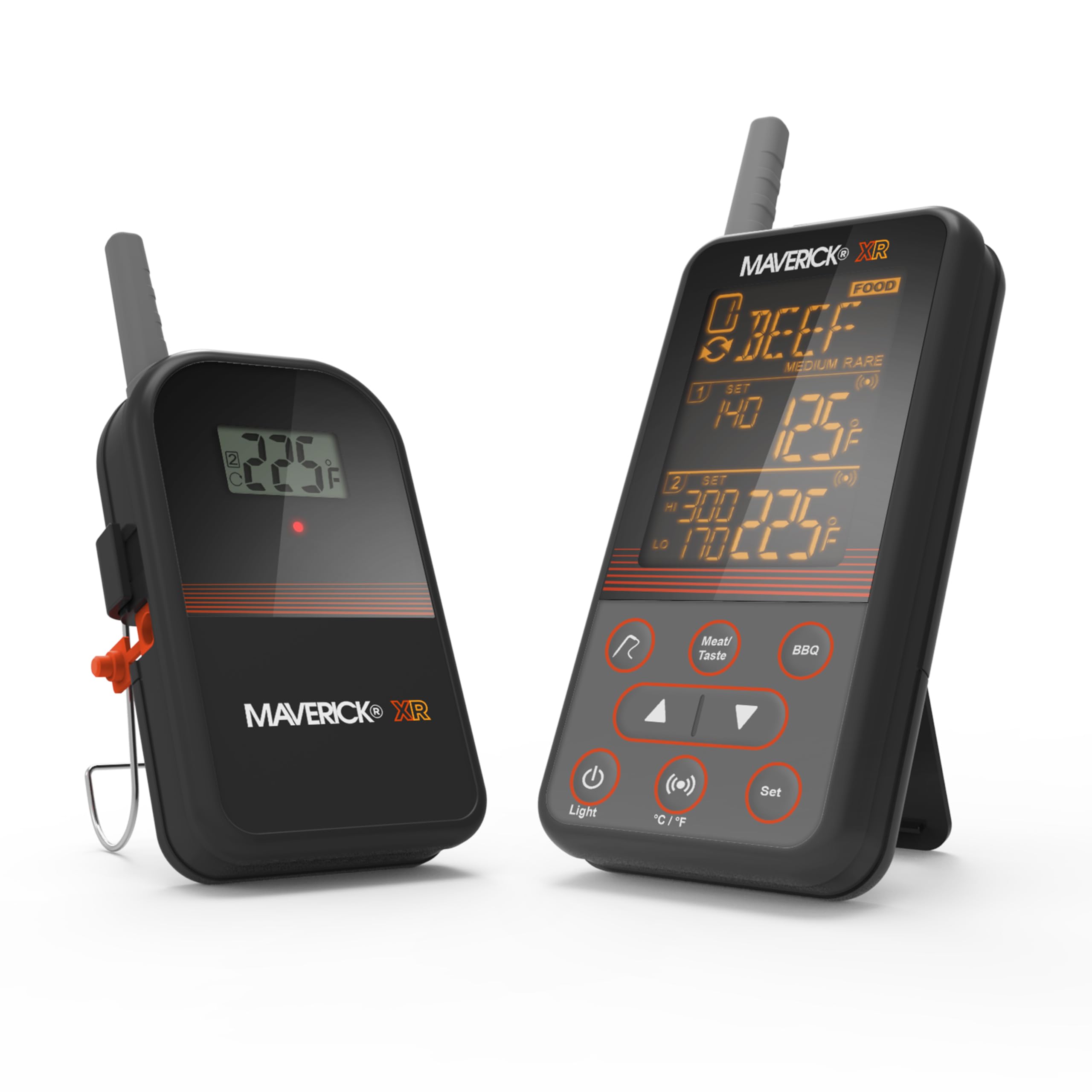
Image: The MAVERICK XR-40 transmitter and receiver units displaying temperature information. The transmitter is on the left, and the receiver is on the right, showing various temperature readings and settings.
Key Features:
- Extended Wireless Range: Monitor temperatures from up to 500 feet away.
- Dual Probe System: Includes two waterproof probes for monitoring two different temperatures simultaneously (e.g., two cuts of meat or one meat and one ambient grill temperature).
- Programmable Alerts: Set custom high/low temperature alerts for both meat and ambient temperatures.
- Pre-programmed Settings: Features pre-programmed temperature settings for fifteen types of meat.
- INSTA-SYNC® Technology: Transmitter and receiver update instantly with every temperature change.
- Audible and Visual Alerts: Notifies you when temperatures reach, fall below, or exceed set points with audible alarms and screen flashes.
- Easy-to-Read Display: Improved LCD screen with orange reverse text for clear readings in various lighting conditions.
- Versatile Placement: Transmitter includes a removable wire stand that doubles as a hanger.
- Lost Signal Alert: Ensures you are always connected to your cook.
Setup
1. Battery Installation
- Locate the battery compartments on both the transmitter and receiver units.
- Open the battery covers.
- Insert two AAA batteries into each unit, ensuring correct polarity (+/-).
- Close the battery covers securely.
2. Power On and Pairing
- Press the power button on both the transmitter and receiver units.
- The units should automatically pair. A successful connection will be indicated on the receiver's display. If pairing fails, ensure both units are within range and try restarting them.
3. Probe Connection
- Connect the two meat probes into the designated ports on the transmitter unit.
- Ensure the connections are firm.
Operating Instructions
1. Placing the Probes
- For meat temperature, insert the probe into the thickest part of the meat, avoiding bone or gristle.
- For ambient temperature, use a grill clip to attach a probe to the grill grate, away from direct heat sources.

Image: The MAVERICK XR-40 transmitter and receiver positioned next to a grill, monitoring the temperature of pork. The receiver shows a reading of 63 degrees.
2. Setting Target Temperatures
- On the receiver, press the 'Meat/Taste' button to select the desired meat type or 'BBQ' for ambient temperature.
- Use the 'Up' and 'Down' arrow buttons to adjust the target temperature.
- Press 'Set' to confirm your selection.
- The thermometer offers pre-programmed settings for 15 types of meat. You can also set custom temperatures.
3. Monitoring and Alerts
- The receiver will continuously display the current temperature from both probes.
- When the temperature reaches, falls below, or exceeds your set points, the receiver will emit an audible alarm and the screen will flash.
- The INSTA-SYNC® technology ensures real-time temperature updates.
- If the signal is lost between the transmitter and receiver, an alert will sound. Move the receiver closer to the transmitter to re-establish connection.

Image: A person holding the MAVERICK XR-40 receiver unit, smiling, indicating satisfaction with the cooking process. A grill is visible in the background.
4. Temperature Unit Selection
Press the '°C/°F' button on the receiver to switch between Celsius and Fahrenheit display modes.
Maintenance and Care
- Cleaning Probes: After each use, hand wash the probes with warm soapy water. Rinse thoroughly and dry completely before storage. Do not put probes in a dishwasher.
- Cleaning Units: Wipe the transmitter and receiver units with a damp cloth. Do not immerse them in water or use abrasive cleaners.
- Storage: Store the thermometer and probes in a dry place at room temperature when not in use.
- Battery Replacement: Replace batteries when the low battery indicator appears on the display. Remove batteries if the device will not be used for an extended period.
Troubleshooting
| Problem | Possible Cause | Solution |
|---|---|---|
| No display on receiver/transmitter | Dead or incorrectly installed batteries. | Replace batteries, ensuring correct polarity. |
| No signal/Lost signal alert | Receiver too far from transmitter; Obstructions between units. | Move receiver closer to transmitter. Ensure no large metal objects or walls are blocking the signal. |
| Incorrect temperature readings | Probe not fully inserted; Damaged probe; Probe tip touching bone/gristle. | Re-insert probe into the thickest part of the meat, away from bone. Test probe in boiling water (212°F/100°C) or ice water (32°F/0°C) for accuracy. Replace if damaged. |
| Alerts not sounding | Alert volume off; Temperature settings incorrect. | Check receiver settings for alert volume. Verify target temperatures are set correctly. |
Specifications
- Model Name: XR-40
- Brand: MAVERICK
- Connectivity Technology: Wireless (Bluetooth compatible)
- Display Type: LCD with orange reverse text
- Power Source: Battery Powered (4 AAA batteries included)
- Included Components: 2 Meat Probes
- Outer Material: Stainless Steel
- Upper Temperature Rating: 716°F (380°C)
- Response Time: 0.5 seconds
- Wireless Range: Up to 500 feet (line of sight)
- Product Care Instructions: Hand Wash Only (probes)
- Indoor/Outdoor Usage: Indoor, Outdoor
Warranty and Support
MAVERICK products are designed for quality and durability. For specific warranty details and customer support, please refer to the warranty card included with your product or visit the official MAVERICK website. If you encounter any issues not covered in this manual, please contact MAVERICK customer service for assistance.


