
Altec Lansing IMW478s
Altec Lansing IMW478s Mini LifeJacket-3 Bluetooth Speaker User Manual
Model: IMW478s | Brand: Altec Lansing
Introduction
This manual provides essential information for the safe and effective operation of your Altec Lansing IMW478s Mini LifeJacket-3 Bluetooth Speaker. The Mini LifeJacket-3 is a rugged, compact, and waterproof portable speaker designed for various environments. It features Bluetooth wireless connectivity, True Wireless Stereo Plus pairing, an onboard microphone for hands-free communication, and a built-in power bank.
Please read this manual thoroughly before using the speaker and retain it for future reference.
Package Contents
- Altec Lansing IMW478s Mini LifeJacket-3 Bluetooth Speaker
- USB Charging Cable
- Auxiliary (AUX) Cable
- Mounting Bracket
- Quick Start Guide (not included in this manual)
Product Overview
Speaker Layout

Figure 1: Front view of the Altec Lansing IMW478s Mini LifeJacket-3 Bluetooth Speaker, showcasing its rugged design and speaker grilles.
Controls and Indicators

Figure 2: Top view of the speaker, illustrating the control buttons. These typically include Power, Bluetooth Pairing, Volume Up/Next Track, Volume Down/Previous Track, and Play/Pause/Call Answer buttons.
- Power Button: Press and hold to turn the speaker On or Off.
- Bluetooth Button: Press to enter Bluetooth pairing mode.
- Volume Up (+)/Next Track Button: Press to increase volume; press and hold to skip to the next track.
- Volume Down (-)/Previous Track Button: Press to decrease volume; press and hold to go to the previous track.
- Play/Pause/Call Button: Press to play or pause audio; press to answer or end a call.
- LED Indicator: Displays power status, charging status, and Bluetooth pairing status.
Ports
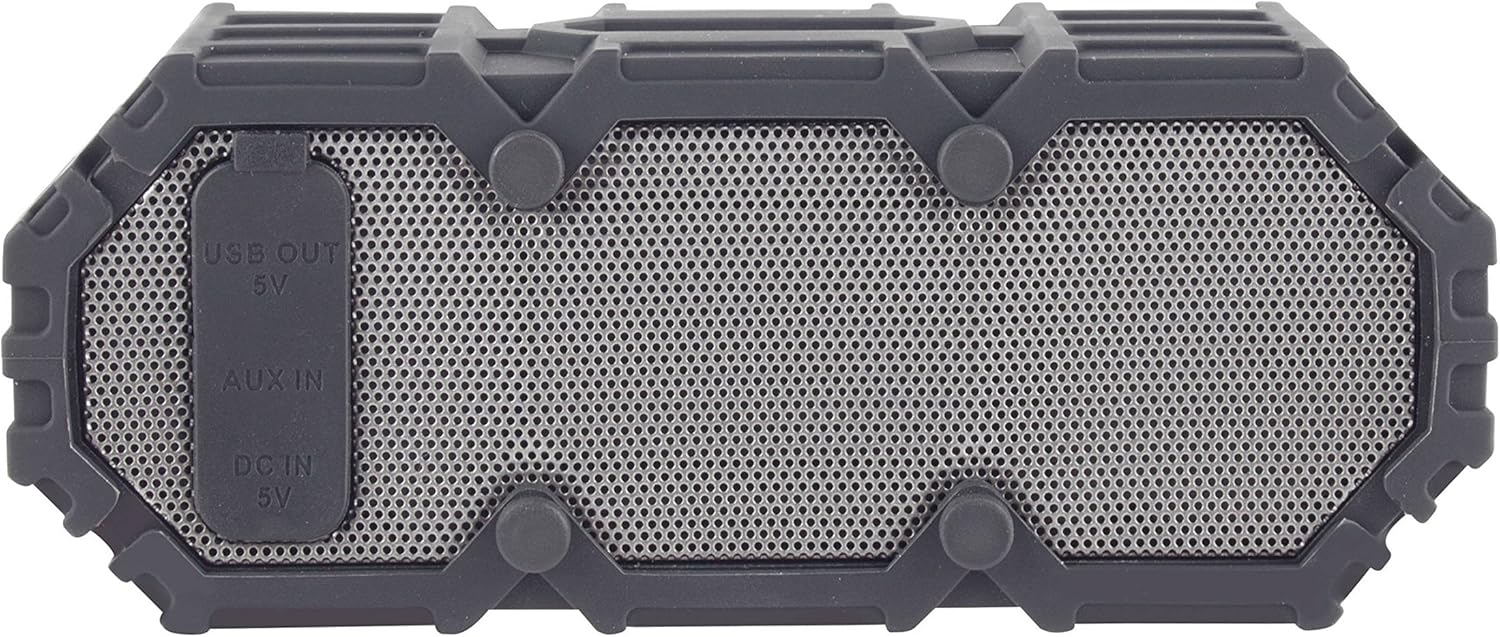
Figure 3: Side view of the speaker revealing the protective flap covering the USB OUT (5V), AUX IN, and DC IN (5V) ports.
- DC IN (5V) Port: For charging the speaker using the provided USB cable.
- AUX IN Port: For connecting external audio devices via a 3.5mm auxiliary cable.
- USB OUT (5V) Port: Functions as a power bank to charge other portable devices.
Setup
Initial Charging
- Before first use, fully charge the speaker.
- Open the protective flap on the side of the speaker.
- Connect the small end of the USB charging cable to the DC IN (5V) port on the speaker.
- Connect the large end of the USB cable to a USB power adapter (not included) or a computer's USB port.
- The LED indicator will show charging status (e.g., solid red while charging, off when fully charged). Charging typically takes a few hours.
- Once fully charged, disconnect the cable and securely close the protective flap to maintain waterproofing.
Powering On/Off
- To power on: Press and hold the Power button until the LED indicator lights up and you hear an audible prompt.
- To power off: Press and hold the Power button until the LED indicator turns off and you hear an audible prompt.
Operating Instructions
Bluetooth Pairing
- Ensure the speaker is powered on and within 30 feet (10 meters) of your Bluetooth device.
- The speaker will automatically enter Bluetooth pairing mode when powered on for the first time, or if no device is connected. The LED indicator will flash blue. If already connected, press the Bluetooth button to enter pairing mode.
- Enable Bluetooth on your device (smartphone, tablet, computer).
- Search for "Mini LifeJacket 3" in your device's Bluetooth settings.
- Select "Mini LifeJacket 3" to connect. Once paired, the LED indicator will turn solid blue, and you will hear a confirmation tone.
- If pairing fails, turn off the speaker and your device's Bluetooth, then repeat the steps.
Audio Playback
- Play/Pause: Press the Play/Pause button.
- Volume Control: Press the Volume Up (+) or Volume Down (-) buttons.
- Next Track: Press and hold the Volume Up (+) button.
- Previous Track: Press and hold the Volume Down (-) button.
Call Management
- Answer/End Call: Press the Play/Pause/Call button.
- Reject Call: Press and hold the Play/Pause/Call button.
True Wireless Stereo Plus Pairing (TWS)
The Mini LifeJacket-3 supports TWS pairing, allowing you to connect two Mini LifeJacket-3 speakers for a stereo audio experience.
- Ensure both Mini LifeJacket-3 speakers are powered on and not connected to any Bluetooth device.
- On one speaker (this will be the primary speaker), press and hold the Bluetooth button for 3 seconds until you hear a tone indicating TWS pairing mode.
- The primary speaker will automatically search for the second speaker.
- Once connected, you will hear a confirmation tone, and the LED indicators on both speakers will show a solid blue light.
- Now, connect your Bluetooth device to the primary speaker as described in the "Bluetooth Pairing" section. Audio will play through both speakers in stereo.
Auxiliary Input (AUX)
To play audio from a device without Bluetooth capability:
- Open the protective flap on the side of the speaker.
- Connect one end of the 3.5mm auxiliary cable to the AUX IN port on the speaker.
- Connect the other end of the cable to the headphone jack or audio output of your device.
- The speaker will automatically switch to AUX mode.
- Control playback and volume from your connected device.
- Remember to close the protective flap when not in use.
Power Bank Function
The Mini LifeJacket-3 can be used to charge other USB-powered devices.
- Open the protective flap on the side of the speaker.
- Connect your device's USB charging cable to the USB OUT (5V) port on the speaker.
- The speaker's internal battery will begin charging your device.
- Note that using the power bank function will deplete the speaker's battery.
- Remember to close the protective flap when not in use.
Charging the Speaker
The Mini LifeJacket-3 provides up to 16 hours of battery life on a full charge. When the battery is low, the LED indicator may flash, or you may hear an audible low battery warning.
To charge the speaker, follow the steps outlined in the "Initial Charging" section under Setup. Ensure the protective flap is securely closed after charging to maintain the speaker's waterproof integrity.
Waterproofing and Care
The Altec Lansing IMW478s Mini LifeJacket-3 is rated IP67 Waterproof, Dustproof, and Shockproof, and it floats. This means it can be submerged in water up to 1 meter (3.3 feet) for up to 30 minutes.

Figure 4: The Mini LifeJacket-3 speaker floating on the surface of water, demonstrating its waterproof and buoyant design.
Important Waterproofing Notes:
- Always ensure the protective flap covering the charging and AUX ports is securely closed before exposing the speaker to water or dust.
- Do not submerge the speaker in water deeper than 1 meter or for longer than 30 minutes.
- Rinse the speaker with fresh water after exposure to saltwater or chlorinated water, then dry thoroughly.
- Avoid exposing the speaker to extreme temperatures.
Maintenance
- Cleaning: Use a soft, damp cloth to clean the speaker. Do not use harsh chemicals or abrasive cleaners.
- Storage: Store the speaker in a cool, dry place away from direct sunlight and extreme temperatures. If storing for an extended period, charge the battery periodically to maintain its health.
- Port Care: Ensure the charging and AUX ports are free of debris before connecting cables. Always close the protective flap when not in use.
Troubleshooting
| Problem | Possible Cause | Solution |
|---|---|---|
| Speaker does not turn on. | Battery is depleted. | Charge the speaker fully. |
| Cannot pair with Bluetooth device. | Speaker is not in pairing mode; device Bluetooth is off; speaker is too far from device. | Ensure speaker is in pairing mode (flashing blue LED). Turn Bluetooth on your device. Move speaker closer to device (within 30 ft/10m). Forget "Mini LifeJacket 3" on your device and try pairing again. |
| No sound from speaker. | Volume is too low; speaker is not connected; incorrect input mode. | Increase volume on both speaker and connected device. Ensure speaker is successfully paired or AUX cable is properly connected. Check if speaker is in the correct mode (Bluetooth or AUX). |
| Sound is distorted. | Volume is too high; low battery; interference. | Decrease volume. Charge the speaker. Move speaker away from other electronic devices. |
| Cannot charge external device using power bank. | Speaker battery is too low; cable issue. | Ensure speaker has sufficient charge. Try a different USB cable. |
Specifications
| Feature | Detail |
|---|---|
| Brand | Altec Lansing |
| Model | IMW478s (Mini LifeJacket-3) |
| Connectivity Technology | Bluetooth |
| Wireless Range | Up to 30 feet (10 meters) |
| Battery Life | Up to 16 hours |
| Waterproof Rating | IP67 (Waterproof, Dustproof, Shockproof, Floats) |
| Audio Output Mode | Stereo (with TWS pairing) |
| Power Source | Battery Powered |
| Product Dimensions (D x W x H) | 2.76" x 7.87" x 1.57" (7.01 cm x 19.99 cm x 3.99 cm) |
| Item Weight | 15.8 ounces (447.9 grams) |
| Special Features | Built-in Microphone, Power Bank (USB OUT 5V), True Wireless Stereo Plus Pairing |

Figure 5: The Mini LifeJacket-3 speaker mounted on an ATV handlebar, demonstrating its versatility and the use of the included mounting bracket.
Warranty and Support
The Altec Lansing IMW478s Mini LifeJacket-3 Bluetooth Speaker comes with a Limited Warranty. For specific warranty terms and conditions, please refer to the warranty card included with your product or visit the official Altec Lansing website.
For technical support, troubleshooting assistance, or to inquire about replacement parts, please contact Altec Lansing customer service or visit their official support page. Contact information can typically be found on the product packaging or the manufacturer's website.
Official Website: https://alteclansing.com/
Ask a question about this manual
Ask about setup, troubleshooting, compatibility, parts, safety, or missing instructions. Manuals+ will review the question and use this page’s manual context to help answer it.