
Integra CDC-3.4
Integra CDC-3.4
6-Disc CD Carousel Changer User Manual
Introduction
This manual provides detailed instructions for the proper setup, operation, and maintenance of your Integra CDC-3.4 6-Disc CD Carousel Changer. Please read this manual thoroughly before using the unit to ensure optimal performance and longevity. The Integra CDC-3.4 is designed for high-fidelity audio playback from compact discs, featuring a robust carousel mechanism for convenient disc management.
Important Safety Information
To reduce the risk of electric shock, fire, or damage to the unit, please observe the following safety precautions:
- Read Instructions: Read all safety and operating instructions before operating the appliance.
- Retain Instructions: Keep the safety and operating instructions for future reference.
- Heed Warnings: Adhere to all warnings on the appliance and in the operating instructions.
- Follow Instructions: Follow all operating and use instructions.
- Water and Moisture: Do not use this apparatus near water.
- Cleaning: Clean only with a dry cloth.
- Ventilation: Do not block any ventilation openings. Install in accordance with the manufacturer's instructions.
- Heat: Do not install near any heat sources such as radiators, heat registers, stoves, or other apparatus (including amplifiers) that produce heat.
- Power-Cord Protection: Protect the power cord from being walked on or pinched, particularly at plugs, convenience receptacles, and the point where they exit from the apparatus.
- Unplug During Storms: Unplug this apparatus during lightning storms or when unused for long periods of time.
- Servicing: Refer all servicing to qualified service personnel. Servicing is required when the apparatus has been damaged in any way, such as power-supply cord or plug is damaged, liquid has been spilled or objects have fallen into the apparatus, the apparatus has been exposed to rain or moisture, does not operate normally, or has been dropped.
What's in the Box
Carefully unpack your Integra CDC-3.4 and ensure all the following items are present:
- Integra CDC-3.4 CD Player
- Power cord
- Basic manual (this document)
- RCA Cable (for analog audio connection)
- RI Cable (for system remote integration)
- Remote Control (RC-778C)
- 2 AAA Batteries (for remote control)
Setup
1. Placement
Place the Integra CDC-3.4 on a stable, level surface with adequate ventilation. Ensure there is sufficient space around the unit for proper airflow to prevent overheating. Avoid placing it near heat sources or in direct sunlight.
2. Connecting Audio Cables
The CDC-3.4 offers multiple audio output options. Choose the connection type that best suits your audio receiver or amplifier:
- Analog Audio Output (RCA): Connect the supplied RCA cable from the ANALOG OUTPUT (L/R) jacks on the CDC-3.4 to the corresponding analog audio input jacks on your receiver/amplifier.
- Digital Coaxial Output: For a digital audio connection, use a coaxial digital cable (not supplied) to connect the COAXIAL jack on the CDC-3.4 to a digital coaxial input on your receiver/amplifier.
- Digital Optical Output: For an optical digital audio connection, use an optical digital cable (not supplied) to connect the OPTICAL jack on the CDC-3.4 to a digital optical input on your receiver/amplifier.
3. Connecting RI Cable (Remote Interactive)
If your receiver/amplifier supports Integra's RI (Remote Interactive) system, connect the supplied RI cable from the REMOTE CONTROL (RI) jack on the CDC-3.4 to the RI jack on your receiver/amplifier. This allows for integrated control functions between the components.
4. Connecting Power
After all audio and control cables are connected, plug the supplied power cord into the AC INLET on the rear of the CDC-3.4, and then plug the other end into a wall outlet.
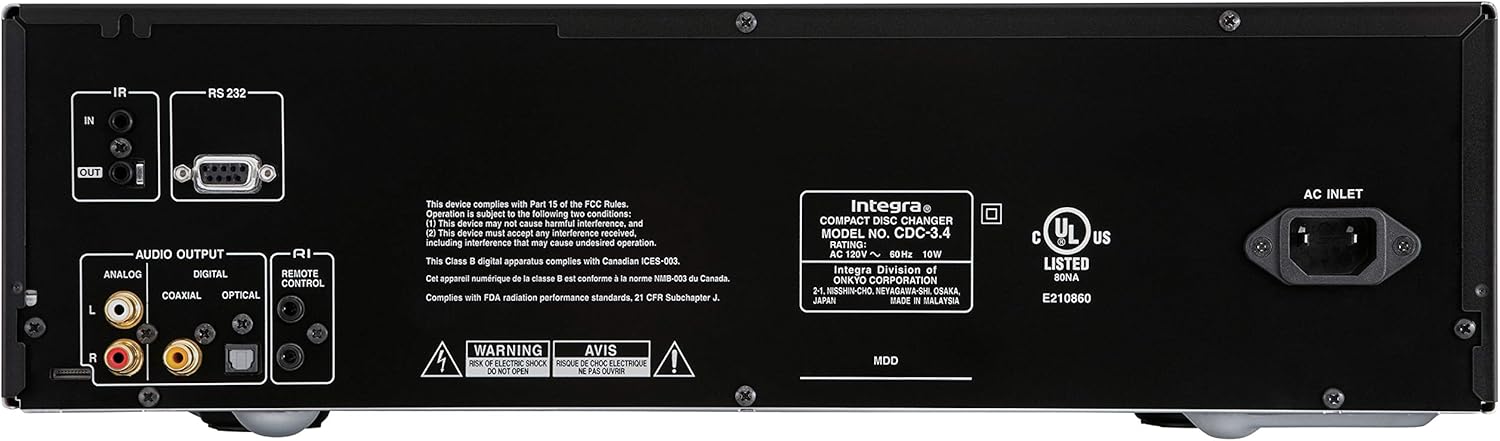
Figure 1: Rear panel connections of the Integra CDC-3.4.
Operating Instructions
1. Power On/Off
Press the Standby/On button on the front panel or the On button on the remote control to turn the unit on or off.
2. Loading Discs
The CDC-3.4 is a 6-disc carousel changer. To load discs:
- Press the Open/Close button on the front panel or remote to open the disc tray.
- Place a CD onto an empty disc well, ensuring it is seated correctly. The disc wells are numbered 1 through 6.
- You can swap up to 5 discs while the 6th disc continues to play.
- Press Open/Close again to close the tray.
3. Disc Selection
To select a specific disc for playback:
- On the front panel, use the Disc Select buttons (1-6) to directly choose a disc.
- On the remote control, use the numbered buttons (1-6) to select a disc.
4. Playback Controls
Use the following buttons on the front panel or remote control for playback:
- Play/Pause (►/▐▐): Starts or pauses playback.
- Stop (■): Stops playback.
- Skip (◀◀/►►): Skips to the previous or next track.
- Search (◀◀◀/►►►): Fast forwards or reverses within a track (hold down).
5. Playback Modes
- Random: Press the Random button to play tracks in a random order.
- Repeat: Press the Repeat button to repeat the current track, current disc, or all discs.

Figure 2: Front panel controls of the Integra CDC-3.4.

Figure 3: Integra RC-778C Remote Control.
Maintenance
Cleaning the Unit
To clean the exterior of the unit, use a soft, dry cloth. For stubborn stains, slightly dampen the cloth with water or a mild, non-abrasive cleaner. Do not use harsh chemicals, solvents, or abrasive cleaning pads, as these can damage the finish.
Disc Care
Handle CDs by their edges to avoid fingerprints and scratches. Store discs in their cases when not in use. If a disc is dirty, wipe it gently from the center outwards with a soft, lint-free cloth. Do not use abrasive materials or solvents.
Internal Maintenance
The Integra CDC-3.4 contains no user-serviceable parts. Do not attempt to open the casing or perform any internal maintenance. Refer all servicing to qualified service personnel.
Troubleshooting
If you experience issues with your Integra CDC-3.4, please consult the table below before contacting support.
| Problem | Possible Cause | Solution |
|---|---|---|
| No power | Power cord not securely connected. | Ensure the power cord is firmly plugged into the unit and the wall outlet. |
| Wall outlet is not active. | Test the outlet with another device. | |
| No sound | Audio cables not connected correctly. | Check all audio cable connections between the CDC-3.4 and your receiver/amplifier. |
| Incorrect input selected on receiver/amplifier. | Select the correct input source on your receiver/amplifier. | |
| Disc not playing or reading | Disc is dirty or scratched. | Clean the disc with a soft, lint-free cloth. Try another disc. |
| Disc is inserted incorrectly. | Ensure the disc is placed correctly in the disc well with the label side up. | |
| Remote control not working | Batteries are depleted or inserted incorrectly. | Replace batteries with new AAA batteries, ensuring correct polarity. |
| Obstruction between remote and unit. | Ensure there is a clear line of sight between the remote and the unit's IR sensor. |
Specifications
| Feature | Detail |
|---|---|
| Model Number | CDC-3.4 |
| Disc Capacity | 6 Discs (CD Carousel Changer) |
| Digital to Analog Converters (DACs) | Dual High Quality Wolfson 192 kHz / 24-bit |
| Oversampling | 128 times oversampling |
| Signal Path Technology | Vector Linear Shaping Circuitry (VLSC) for Noise-free Signal Path, Proprietary Direct Digital Path |
| Audio Outputs | Analog (RCA L/R), Digital Coaxial, Digital Optical |
| Control Interfaces | RS232, IR (Infrared), RI (Remote Interactive) |
| Product Dimensions (W x H x D) | Approximately 17.1 x 9.8 x 21 inches (43.4 x 24.9 x 53.3 cm) |
| Item Weight | 15.2 pounds (6.9 kg) |
| Power Requirements | AC 120V ~ 60Hz |
| Included Accessories | Remote Control, RCA Cable, RI Cable, Power Cord, AAA Batteries |
Warranty and Support
Manufacturer's Warranty
The Integra CDC-3.4 typically comes with a manufacturer's warranty, which may vary by region. Please refer to the warranty card included with your product or visit the official Integra (Onkyo) website for specific warranty terms and conditions. It is recommended to retain your proof of purchase for warranty claims.
Customer Support
For technical assistance, troubleshooting beyond this manual, or warranty inquiries, please contact Integra customer support. You can find contact information, including phone numbers and online support resources, on the official Onkyo/Integra website.
Related documentsCDC-3.4


Ask a question about this manual
Ask about setup, troubleshooting, compatibility, parts, safety, or missing instructions. Manuals+ will review the question and use this page’s manual context to help answer it.