
JBL JBLA120W
JBL Stage A120 Bookshelf Speaker Instruction Manual
Model: JBLA120W | Brand: JBL
1. Introduction
Welcome to your new JBL Stage A120 bookshelf speakers. These compact 2-way speakers feature a 114mm Polycellulose cone woofer and a horn-loaded tweeter, delivering clear highs and powerful lows. Designed with HDI (High Definition Imaging) waveguide technology, they provide a wide and consistent soundstage for an immersive listening experience.

Image: The JBL Stage A120 bookshelf speakers, showcasing their design and components.
Key Features
- 2-year manufacturer's warranty for new domestic genuine products.
- JBL's unique constant directivity horn design.
- 25mm aluminum dome tweeter for transparent high frequencies.
- Polycellulose cone woofer.
- Optimized crossover network to enhance unit performance.
- Optimized cabinet design.
- Elegant cabinet design.
- System configuration that excels in multi-channel playback.
- Output sound pressure level: 86dB (2.83V/1m).
2. Package Contents
Please verify that all items are included in the package:
- Adhesive rubber feet x 8
- Port tube inserts x 2
- Grilles x 2
- Wall mount brackets x 4
- Screws for wall mount brackets x 8
3. Setup
Speaker Placement
Proper speaker placement is crucial for optimal sound performance.
- Place speakers on a stable, level surface.
- For stereo listening, position speakers equidistant from the listening position, forming an equilateral triangle.
- Ensure speakers are at ear level when seated.
- Maintain a distance from walls to allow bass reflex ports to function correctly.
Connecting to Your Amplifier
Use high-quality speaker cables to connect your JBL Stage A120 speakers to your amplifier.
- Identify the positive (+) and negative (-) terminals on both the speaker and the amplifier.
- Connect the red (+) terminal on the speaker to the red (+) terminal on the amplifier.
- Connect the black (-) terminal on the speaker to the black (-) terminal on the amplifier.
- Ensure all connections are secure to prevent short circuits.

Image: Rear view of the JBL Stage A120 speaker, showing the bass reflex port and the red and black speaker terminals for connecting to an amplifier.
4. Operation
Initial Power-On
Before powering on your amplifier, double-check all connections. Start with the amplifier volume at its lowest setting.
Adjusting Volume and Tone
Gradually increase the volume to a comfortable listening level. Use your amplifier's tone controls (bass, treble) sparingly to fine-tune the sound to your preference.
Break-in Period
Like many audio components, your speakers may benefit from a "break-in" period. Play music at moderate volumes for several hours to allow the drivers to settle and achieve their optimal performance.
5. Maintenance
Cleaning
Dust the speaker cabinets regularly with a soft, dry cloth. For stubborn marks, use a slightly damp cloth, then dry immediately. Avoid abrasive cleaners or solvents.
Grille Care
The speaker grilles protect the drivers. They can be carefully removed for cleaning or if you prefer the aesthetic of the exposed drivers. Clean grilles with a soft brush or vacuum cleaner with a brush attachment.
Environmental Considerations
Avoid placing speakers in direct sunlight, near heat sources, or in areas with high humidity. Extreme temperatures or moisture can damage the cabinet and internal components.
6. Troubleshooting
| Problem | Possible Cause | Solution |
|---|---|---|
| No Sound | Power off/disconnected, incorrect input selected, faulty cable. | Ensure amplifier is powered on and connected. Select correct input source. Check speaker cables for secure connection. |
| Distorted Sound | Volume too high, faulty source, damaged speaker. | Reduce volume. Test with a different audio source. Inspect speaker drivers for visible damage. |
| Weak Bass | Incorrect speaker placement, phase issue, port blocked. | Adjust speaker position (away from walls). Check speaker wiring for correct polarity (+ to + and - to -). Ensure bass reflex port is not obstructed. |
| No Highs/Lows | Damaged tweeter/woofer, crossover issue. | Gently test individual drivers (e.g., by playing music with strong highs/lows). If a specific driver is silent, contact support. |
7. Specifications
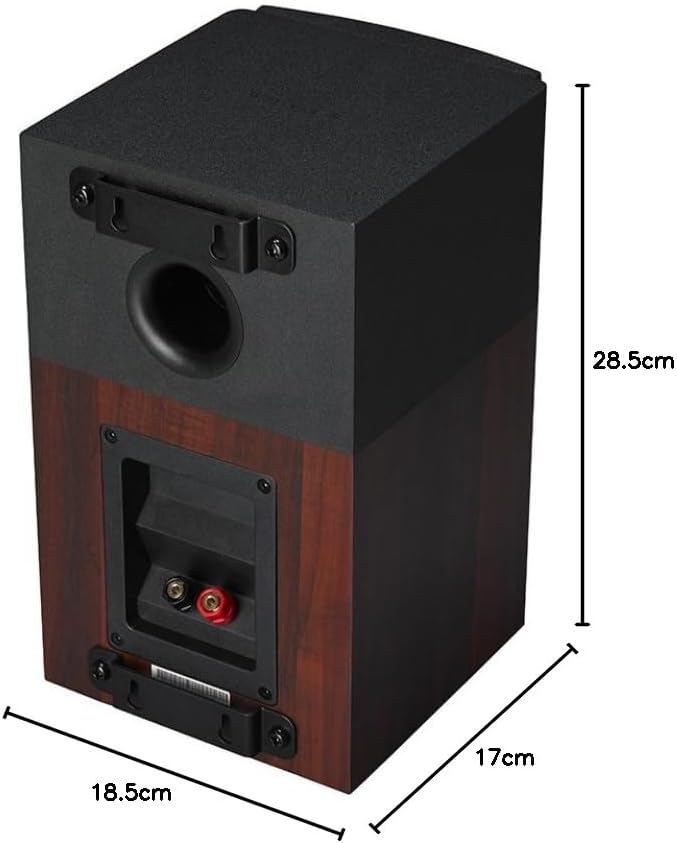
Image: Rear view of the JBL Stage A120 speaker with its dimensions.
| Product Recommended Use | Volume |
| Subwoofer Diameter | 114 mm |
| Color | Wood |
| Included Components | Adhesive rubber feet x 8, Port tube inserts x 2, Grilles x 2, Wall mount brackets x 4, Screws for wall mount brackets x 8 |
| Product Dimensions (D x W x H) | 17 cm x 18.5 cm x 28.5 cm |
| Product Weight | 3.8 kg |
| Impedance | 6 Ohms |
| Waterproof | No |
| Product Model Number | JBLA120W |
| Manufacturer Discontinued | No |
| Speaker Type | Passive |
| Brand | JBL |
| Speaker Maximum Output | 120 Watts |
| Connectivity Technology | Wired |
| Mounting Type | Tabletop Mount |
| Speaker Configuration | Bookshelf, Subwoofer, Center Speaker (referring to system compatibility) |
8. Warranty and Support
Warranty Information
This product comes with a 2-year manufacturer's warranty for new domestic genuine products. Please retain your proof of purchase for warranty claims.
Customer Support
For further assistance, technical support, or warranty inquiries, please visit the official JBL website or contact their customer service department.
Ask a question about this manual
Ask about setup, troubleshooting, compatibility, parts, safety, or missing instructions. Manuals+ will review the question and use this page’s manual context to help answer it.