
Introduction
This document provides essential information for the setup, operation, and maintenance of your Easytry123 replacement infrared (IR) remote control, designed for various Daikin Room AC Air Conditioner models. This remote serves as a direct replacement for your original unit, offering core functionalities for comfortable climate control.
Important Compatibility Notes
- Visual Match: It is crucial to ensure your current remote control visually matches the replacement remote shown in the product images. Discrepancies in appearance may indicate incompatibility.
- Model Verification: This remote is compatible with Daikin models BRC4C64, BRC7E830, BRC4C152, BRC4C153, BRC7E818, BRC7F812, BRC4C, BRC7E83, BRC7E63W, and BRC7E66. If your specific model number is not listed, please verify compatibility before use.
- Functionality: While designed as a replacement, this remote may not offer all functions identical to your original remote. Core functions are typically supported.
- No Printed Manual: A physical instruction manual is not included with the product. Please refer to this digital guide for all operational details.
Product Overview

Figure 1: Angled view of the remote control, highlighting the LCD display and primary control buttons such as ON/OFF, UP, DOWN, and FAN.

Figure 2: Front view of the remote control, providing a clear look at the button arrangement and the display screen.
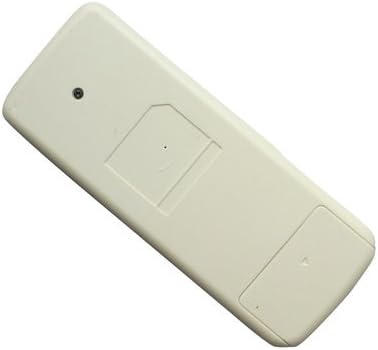
Figure 3: Back view of the remote control, illustrating the battery compartment cover.
Setup
Battery Installation
The remote control requires two (2) AAA batteries for operation. Follow these steps to install them:
- Locate the battery compartment on the back of the remote control (refer to Figure 3).
- Slide the battery compartment cover downwards or in the direction indicated by an arrow to open it.
- Insert two AAA batteries, ensuring the positive (+) and negative (-) terminals align correctly with the markings inside the compartment.
- Replace the battery compartment cover by sliding it back into place until it clicks securely.
Note: Always use new batteries of the same type. Do not mix old and new batteries, or different types of batteries.
Operating Instructions
Once batteries are installed, point the remote control directly at the infrared receiver on your Daikin AC unit. Ensure there are no obstructions between the remote and the AC unit.
- ON/OFF Button: Press the circular button labeled "ON/OFF" to power the air conditioner on or off.
- UP Button (▲): Press the "UP" arrow button to increase the temperature setting or adjust other parameters upwards.
- DOWN Button (▼): Press the "DOWN" arrow button to decrease the temperature setting or adjust other parameters downwards.
- FAN Button: Press the button labeled "FAN" to cycle through fan speed settings or fan modes.
Maintenance
- Cleaning: Wipe the remote control with a soft, dry cloth. Do not use liquid cleaners or abrasive materials.
- Battery Replacement: Replace batteries when the remote's range decreases or it stops responding. Remove batteries if the remote will not be used for an extended period to prevent leakage.
- Storage: Store the remote in a cool, dry place away from direct sunlight and extreme temperatures.
Troubleshooting
- Remote Not Responding:
- Check if batteries are installed correctly with proper polarity.
- Replace old batteries with new ones.
- Ensure there are no obstructions between the remote and the AC unit's IR receiver.
- Confirm the remote is pointed directly at the AC unit.
- Limited Functionality:
- As a replacement remote, some advanced or specific functions of your original unit may not be supported. Focus on core operations like power, temperature, and fan control.
- Refer to the "Important Compatibility Notes" section to re-verify if this remote is suitable for your specific AC model.
Specifications
| Feature | Detail |
|---|---|
| Manufacturer | Easytry123 |
| Model Number | Easytry1114 |
| ASIN | B07F41DLCB |
| Batteries Required | 2 x AAA batteries |
| Connectivity Technology | Infrared (IR) |
| Special Feature | Replacement remote, ergonomic design |
| Color | White |
| Controller Type | Button Control |
Support
For any questions, concerns, or further assistance regarding your Easytry123 replacement remote control, please contact the seller directly through the platform where you made your purchase. They will be able to provide specific support related to your order and product.