
Introduction
This manual provides essential information for the safe and efficient use of your Poppstar AC DC 12V / 2A power adapter. Please read these instructions carefully before using the product and retain them for future reference. This adapter is designed to provide a stable 12V DC power supply for compatible electronic devices requiring up to 2 Amperes of current.
Setup
Before connecting the power adapter, it is crucial to verify that the connector dimensions and electrical specifications (voltage and amperage) match your device's requirements. Incorrect usage can damage your device.

Figure 1: Always verify the DC connector dimensions (outer 5.5mm, inner 2.1mm) to ensure compatibility with your device. Mismatched connectors can lead to poor connection or damage.
- Verify Compatibility: Ensure your device requires a 12V DC input and draws no more than 2A (2000mA) of current. Confirm that your device's power input port matches the adapter's 5.5mm outer diameter and 2.1mm inner diameter DC connector.
- Connect to Device: Insert the DC connector (the round plug) firmly into the power input port of your electronic device.
- Connect to Power Outlet: Plug the AC power adapter (Type C Europlug) into a standard 100-240V AC, 50/60 Hz wall outlet.
- Power On: Once both connections are secure, your device should receive power.
Operating Instructions
The Poppstar 12V 2A power adapter is designed for continuous operation within its specified limits. Follow these guidelines for optimal performance and safety:
- Intended Use: This adapter is suitable for powering various devices such as external hard drives, charging stations, DVD players, laptops, printers, scanners, routers, and telephones that require 12V DC and up to 2A.
- Environmental Conditions: Use the adapter in a dry, well-ventilated area. Avoid exposure to moisture, extreme temperatures, or direct sunlight.
- Overload Protection: Do not connect devices that draw more than 2A of current, as this can damage the adapter and the connected device.
- Disconnecting: Always unplug the adapter from the wall outlet before disconnecting it from your device, especially if the device is still powered on.
Maintenance
Proper maintenance ensures the longevity and safe operation of your power adapter.
- Cleaning: Disconnect the adapter from both the power outlet and your device before cleaning. Use a soft, dry cloth to wipe the exterior. Do not use liquid cleaners or solvents.
- Storage: When not in use, store the adapter in a cool, dry place, away from direct sunlight and moisture. Avoid tightly coiling the cable to prevent damage.
- Cable Inspection: Periodically inspect the power cable and connector for any signs of damage, such as fraying, cuts, or bent pins. If damage is observed, discontinue use immediately and replace the adapter.
Troubleshooting
If you encounter issues with your Poppstar power adapter, refer to the following common problems and solutions:

Figure 2: Checking the output voltage with a multimeter can help diagnose power issues.
| Problem | Possible Cause | Solution |
|---|---|---|
| Device not powering on. | No power from outlet. | Check if the wall outlet is functional by plugging in another device. |
| Device not powering on. | Loose connection. | Ensure the DC connector is fully inserted into the device and the AC plug is firmly in the wall outlet. |
| Device not powering on. | Incorrect connector size or voltage. | Verify the adapter's specifications (12V, 2A, 5.5x2.1mm) match your device's requirements. |
| Adapter feels hot. | Normal operation or overload. | A slight warmth is normal. If it's excessively hot, disconnect immediately. Ensure the connected device does not exceed 2A. Provide adequate ventilation around the adapter. |
| Intermittent power. | Damaged cable or connector. | Inspect the cable for cuts or fraying and the connector for bent pins. Replace the adapter if damaged. |
Specifications
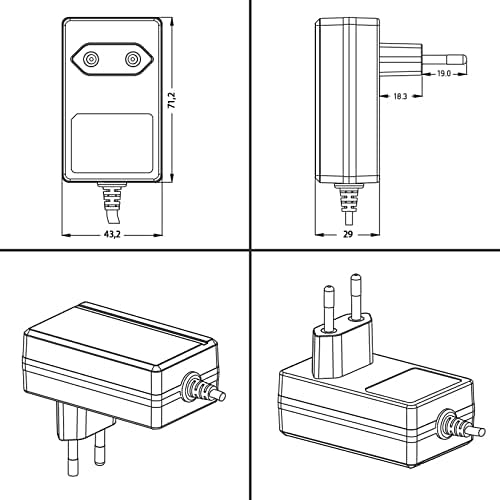
Figure 3: Technical dimensions of the power adapter.
| Feature | Detail |
|---|---|
| Brand | POPPSTAR |
| Product Model Number | 1009691 |
| Input Voltage | 100-240 Volts AC |
| Frequency Range | 50-60 Hz |
| Output Voltage | 12 Volts DC |
| Output Current | 2 Amperes (2000mA) |
| Wattage | 24 Watts |
| Main Power Connector Type | DC 5.5 mm x 2.1 mm |
| Plug Type | Type C - Europlug |
| Cable Length | 1.5 meters |
| Color | Black |
| External Material | Plastic |
| Package Dimensions | 9.6 x 7.8 x 4.8 cm |
| Weight | 140 g |
| Compatible Devices | Printers, Monitors, Laptops, Tablets, External Hard Drives, Routers |
| Included Components | 1x Poppstar 12V 2A Power Supply |
| Country of Origin | China |
Warranty Information
Poppstar products are manufactured to high-quality standards. For specific warranty terms and conditions, please refer to the documentation provided with your purchase or contact Poppstar customer support. Typically, a standard manufacturer's warranty covers defects in materials and workmanship under normal use.
Customer Support
If you have any questions, require technical assistance, or need to report an issue with your Poppstar AC DC 12V / 2A power adapter, please contact Poppstar customer support through their official website or the retailer from whom you purchased the product. Please have your model number (1009691) and purchase details ready when contacting support.


