
1. Introduction
Thank you for choosing the ECONTROLLY AKB73615309 Replacement Remote Control. This remote is designed to function as a direct replacement for various LG LCD and HDTV models, offering seamless operation without the need for complex programming. Simply insert batteries, and it is ready for use.
This manual provides essential information on setting up, operating, maintaining, and troubleshooting your new remote control to ensure a smooth user experience.
2. Product Overview
The ECONTROLLY AKB73615309 remote control is an infrared (IR) device, providing a reliable connection to your compatible LG television. Its ergonomic design ensures comfortable handling and easy access to all functions.

Figure 2.1: Front view of the ECONTROLLY AKB73615309 Replacement Remote Control.
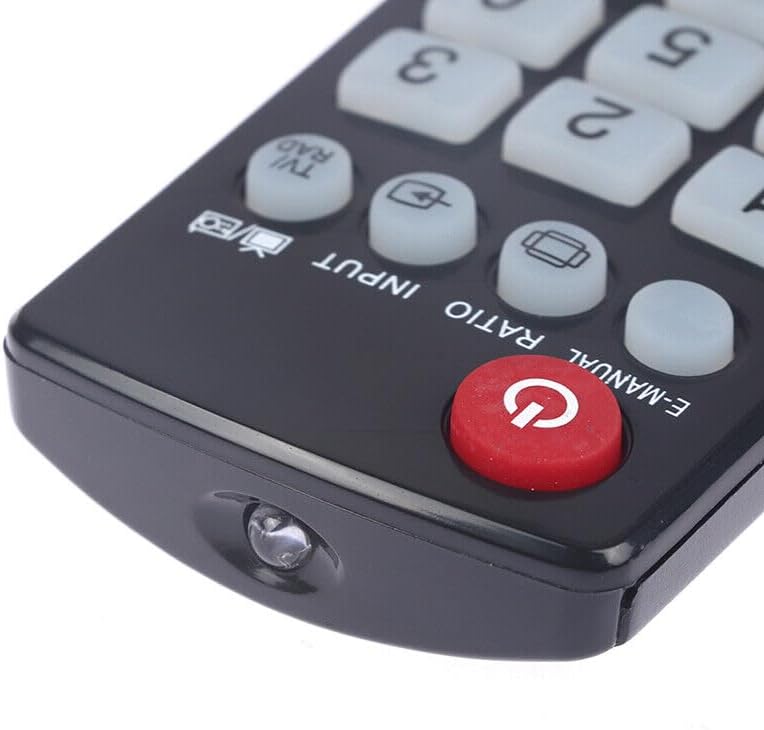
Figure 2.2: Close-up of the power button and infrared emitter.
3. Setup
3.1 Battery Installation
To begin using your remote control, you must install two AAA batteries (not included).
- Locate the battery compartment on the back of the remote control.
- Press down on the latch and slide the battery cover downwards to open it.
- Insert two AAA batteries, ensuring the positive (+) and negative (-) terminals align correctly with the markings inside the compartment.
- Slide the battery cover back into place until it clicks securely.

Figure 3.1: Battery compartment with cover removed, showing AAA battery slots.
3.2 Initial Use
This replacement remote control does not require any programming or pairing. Once the batteries are correctly installed, it is ready to operate your compatible LG TV.
4. Operating Instructions
Point the remote control directly at your LG television's infrared receiver. Ensure there are no obstructions between the remote and the TV.

Figure 4.1: Proper usage of the remote control, pointing towards the TV.
4.1 Button Functions
The remote control features standard buttons for navigating your LG TV. Refer to the image below for a visual guide to key buttons:

Figure 4.2: Key buttons on the remote control.
- Power Button (O): Turns the TV on or off.
- Number Pad (0-9): Directly selects channels.
- LIST: Accesses the channel list.
- Q.VIEW: Quick View for previously watched channels.
- Volume Up/Down (+/-): Adjusts the sound volume.
- Channel Up/Down (P +/-): Changes TV channels.
- MUTE: Mutes or unmutes the TV sound.
- 3D: Activates or deactivates 3D mode (if supported by your TV model).
- FAV: Accesses favorite channels.
- MENU: Opens the main TV menu.
- Home: Navigates to the Smart TV home screen.
- MYMENU: Accesses custom menu settings.
- Navigation Pad (Up, Down, Left, Right, OK): Used for menu navigation and selection.
- BACK: Returns to the previous screen or menu.
- GUIDE: Displays the electronic program guide.
- EXIT: Exits the current menu or application.
- Color Buttons (Red, Green, Yellow, Blue): Functionality varies by TV model and application.
- TEXT: Accesses teletext services.
- LIVE TV: Switches to live television broadcast.
- T.OPT: Teletext options.
- SUBTITLE: Toggles subtitles on/off.
- Energy Saving: Adjusts power saving modes.
- INFO/D: Displays information about the current program.
- REC: Records current program (if supported by TV and external storage).
- Play/Pause/Stop/Fast Forward/Rewind: Media playback controls.
5. Maintenance
5.1 Battery Replacement
Replace the batteries when the remote control's response becomes sluggish or stops working. Always replace both AAA batteries at the same time with new ones. Do not mix old and new batteries, or different types of batteries.
5.2 Cleaning
To clean the remote control, gently wipe it with a soft, dry cloth. Do not use liquid cleaners, sprays, or abrasive materials, as these can damage the remote's surface or internal components.
5.3 Storage
When not in use for extended periods, it is recommended to remove the batteries to prevent leakage, which can damage the remote control. Store the remote in a cool, dry place away from direct sunlight and extreme temperatures.
6. Troubleshooting
If you experience issues with your remote control, please refer to the following common problems and solutions:
- Remote is not working:
- Ensure batteries are installed correctly with the correct polarity.
- Replace old batteries with new AAA batteries.
- Check for any obstructions between the remote control and the TV's IR receiver.
- Ensure you are within the effective operating range (up to 33 feet).
- Buttons are unresponsive:
- Clean the remote control surface, especially around the buttons, to remove any dirt or debris.
- If only specific buttons are unresponsive, the remote may be damaged and require replacement.
- Remote works intermittently:
- This often indicates low battery power. Replace the batteries.
- Ensure a clear line of sight to the TV.
7. Specifications
| Feature | Detail |
|---|---|
| Brand | ECONTROLLY |
| Model Name | RCEC-5309 (AKB73615309) |
| Compatible Devices | Television (LG LCD/HDTV) |
| Connectivity Technology | Infrared |
| Maximum Range | 33 Feet |
| Battery Type | 2 x AAA Alkaline batteries (not included) |
| Color | Black |
| Special Feature | Ergonomic Design |
| Item Weight | 1 Ounce |
| Item Dimensions (L x W x H) | 6" x 2" x 0.25" |
8. Compatible LG TV Models
This remote control is compatible with a wide range of LG LCD and HDTV models, including but not limited to the following:
- AKB73615303
- AKB72914216
- AKB74115502
- AKB73756502
- AKB73615306
- 47LM6200
- 55LM7600
- 60LM6700
- 32LM6200
- 32LM6410
- 50PM4700
- 50LB5800
- 32LM6410
- 42LM7600
- 55LM8600
- 55LM9600
- 60PM6700
- 65LM6200
- 2LM6200
- 32LM6400
- 50PM6700
- 55LM6200
- 47LM6410
- 47LM6700
- 47LM7600
- 47LM8600
- 55LM6410
- 42LM6200
- 42LM6410
- 42LM6700
- 55LM6700
- 55LM7600
- 42LD550
- 46LD550
- 32LD550
- 47LD650
- 42LD550UB
- 52LD550UB
- 55LD650UA
- 46LD550UB
- 47LD650UA
- 55LD650
- 42LD520
- 42LE5350
- 60LD550
- 19LE5300
- 22LE5300
- 26LE5300
- 22LE5500
- 26LE5500
- 32LE5300
- 37LE5300
- 42LE5300
- 47LE5300
- 55LE5300
- 42LE7300
- 47LE7300
- 55LE7300
- LG 40UB8000
- LG 49UB8200
- LG 50LB6100
- LG 65LB6190
9. Warranty and Support
Specific warranty information for this ECONTROLLY product is not provided in this manual. For any product support or warranty inquiries, please refer to the retailer or manufacturer's official website where the product was purchased.