
1. Introduction
Thank you for choosing the DOMO B3951 Bread Maker. This appliance is designed to simplify the process of baking fresh bread at home. It features a capacity for 700g or 900g loaves and offers 11 pre-programmed settings, including a dedicated gluten-free option. This manual provides essential information for the safe and efficient operation, maintenance, and troubleshooting of your bread maker.

Image: The DOMO B3951 Bread Maker, a white compact appliance with a control panel on the front.
2. Important Safety Instructions
Please read all instructions carefully before using the appliance. Keep this manual for future reference.
- Ensure the voltage indicated on the appliance corresponds to your local mains voltage before connecting.
- Do not immerse the appliance, cord, or plug in water or any other liquid.
- Close supervision is necessary when the appliance is used by or near children.
- Unplug from the outlet when not in use and before cleaning. Allow to cool before putting on or taking off parts.
- Do not operate any appliance with a damaged cord or plug, or after the appliance malfunctions or has been damaged in any manner.
- Avoid contact with moving parts.
- Do not place the appliance on or near a hot gas or electric burner, or in a heated oven.
- Do not use the appliance for other than intended use.
- Always attach the plug to the appliance first, then plug the cord into the wall outlet. To disconnect, turn any control to 'off', then remove the plug from the wall outlet.
- The appliance is intended for household use only.
3. Product Components
Familiarize yourself with the parts of your DOMO B3951 Bread Maker:
- Main Unit: The primary housing of the bread maker.
- Lid with Viewing Window: Allows observation of the baking process.
- Control Panel: Features buttons for menu selection, loaf size, crust color, timer, and start/stop, along with a digital display.
- Bread Pan: Removable non-stick pan where ingredients are placed and bread is baked.
- Kneading Paddle: Attaches to the shaft inside the bread pan to mix and knead dough.
- Measuring Cup: For precise liquid measurements.
- Measuring Spoon: For precise dry ingredient measurements (e.g., yeast, salt).
- Hook: Used to remove the kneading paddle from the baked bread.

Image: The DOMO B3951 Bread Maker with its lid open, showing the interior cavity and the removable bread pan placed next to it.

Image: A close-up of the non-stick bread pan and the kneading paddle, essential components for bread making.

Image: The included accessories: a clear plastic measuring cup, a white plastic measuring spoon, and a metal hook for removing the kneading paddle.
4. Initial Setup
- Unpack: Carefully remove all packaging materials and accessories.
- Clean: Wash the bread pan and kneading paddle with warm, soapy water. Rinse and dry thoroughly. Wipe the exterior of the appliance with a damp cloth.
- Position: Place the bread maker on a stable, flat, heat-resistant surface, ensuring adequate ventilation around the unit.
- Insert Paddle: Place the kneading paddle onto the shaft inside the bread pan. Ensure it is securely seated.
- Insert Bread Pan: Lower the bread pan into the main unit and press down firmly until it clicks into place.
5. Operating Instructions
5.1 Adding Ingredients
Always add ingredients in the following order for best results:
- Liquids (water, milk, oil)
- Dry ingredients (flour, sugar, salt)
- Yeast (placed last, in a small indentation on top of the dry ingredients, away from liquids and salt)
Ensure all ingredients are at room temperature unless specified otherwise in a recipe.
5.2 Control Panel Overview
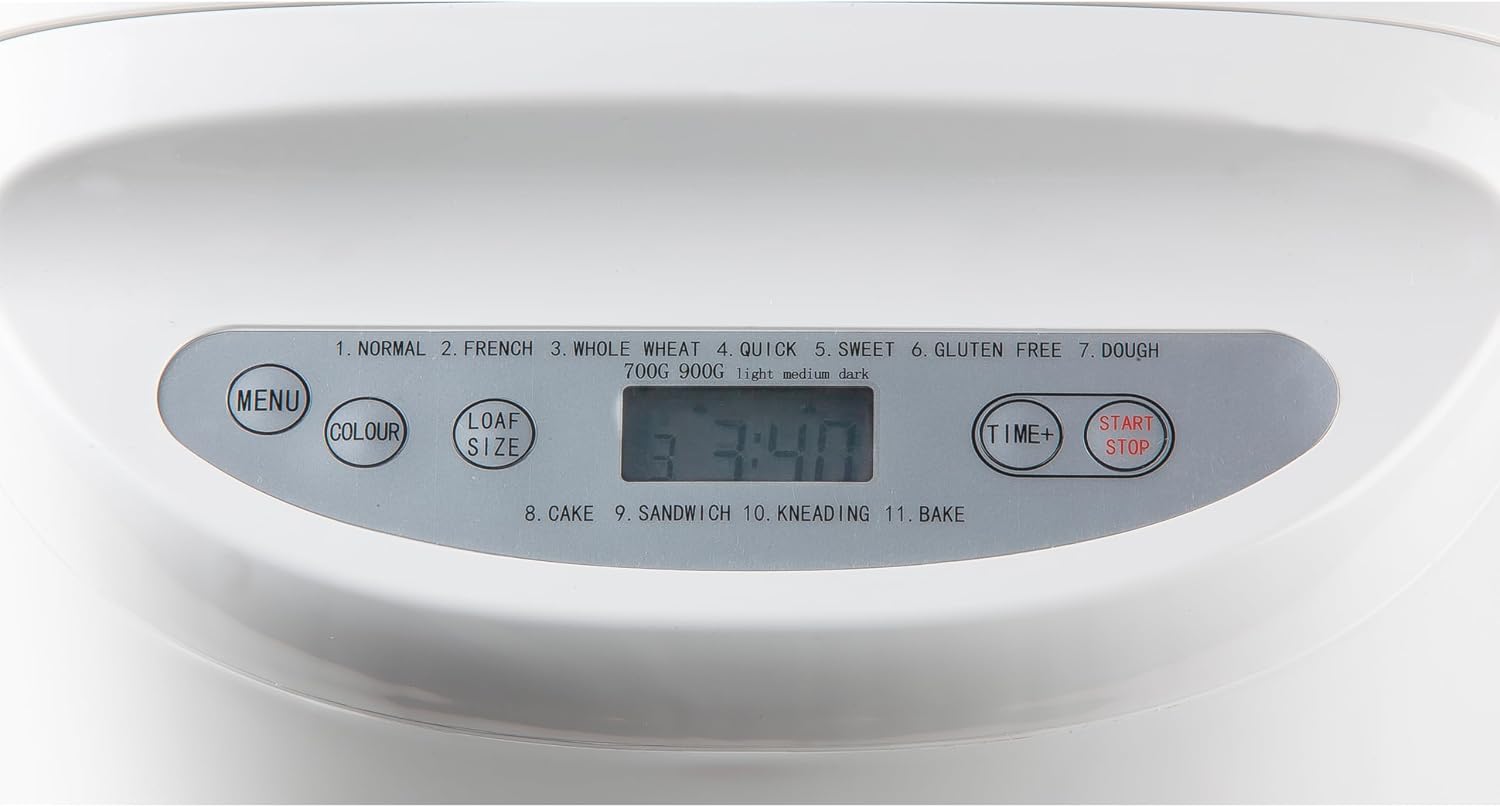
Image: A detailed view of the bread maker's control panel, showing the digital display and buttons for Menu, Colour, Loaf Size, Time+, and Start/Stop. Program numbers and names are also visible.
- MENU Button: Press to cycle through the 11 available programs.
- COLOUR Button: Selects the desired crust color (Light, Medium, Dark).
- LOAF SIZE Button: Choose between 700g and 900g loaf sizes.
- TIME+ Button: Adjusts the delay timer for delayed baking.
- START/STOP Button: Starts or stops the selected program. Press and hold for a few seconds to stop a program.
5.3 Program Selection
The DOMO B3951 offers 11 pre-set programs:
- NORMAL: For basic bread recipes.
- FRENCH: For light bread with a crispy crust.
- WHOLE WHEAT: For whole wheat bread, which is heavier.
- QUICK: For faster bread baking, typically using quick-rise yeast.
- SWEET: For breads with high sugar content, such as brioche.
- GLUTEN FREE: Specifically designed for gluten-free flours.
- DOUGH: Prepares dough for rolls, pizza, or other baked goods without baking.
- CAKE: For mixing and baking cakes.
- SANDWICH: For light-textured bread suitable for sandwiches.
- KNEADING: For kneading dough only.
- BAKE: For baking only, useful for additional browning or baking pre-made dough.
5.4 Delay Timer Function
The delay timer allows you to program the bread maker to finish baking at a later time, up to 13 hours. After selecting your program, loaf size, and crust color, press the TIME+ button to adjust the delay time. The displayed time includes the baking cycle duration. Do not use perishable ingredients with the delay timer.
5.5 Starting and Stopping
Once all settings are chosen, press the START/STOP button to begin the program. To stop a program, press and hold the START/STOP button for approximately 3 seconds.

Image: The DOMO B3951 Bread Maker with its lid open, revealing a freshly baked loaf of bread inside the pan.
6. Recipes
A recipe booklet is typically included with your DOMO B3951 Bread Maker. It provides tested recipes for various bread types, including those for the specific programs like gluten-free, whole wheat, and sweet breads. Following these recipes is recommended for optimal results, especially when first using the appliance.
7. Cleaning and Maintenance
Regular cleaning ensures the longevity and performance of your bread maker.
- Before Cleaning: Always unplug the appliance and allow it to cool completely before cleaning.
- Bread Pan and Kneading Paddle: Remove the bread pan and kneading paddle. Wash them with warm, soapy water using a soft sponge. Do not use abrasive cleaners or metal scouring pads, as this can damage the non-stick coating. Rinse thoroughly and dry completely.
- Exterior: Wipe the exterior of the bread maker with a soft, damp cloth. Do not use harsh chemicals or abrasive materials.
- Interior: Clean the interior of the baking chamber with a damp cloth. Remove any crumbs or residue.
- Do Not Immerse: Never immerse the main unit of the bread maker in water or any other liquid.
8. Troubleshooting
If you encounter issues with your bread maker, refer to the table below for common problems and solutions.
| Problem | Possible Cause | Solution |
|---|---|---|
| Bread does not rise | Expired yeast, incorrect water temperature, too much salt/sugar, incorrect ingredient order. | Check yeast expiry, use lukewarm water (38-43°C), reduce salt/sugar, ensure yeast is added last and separate from liquids/salt. |
| Bread is too dense/heavy | Too much flour, too little liquid, old yeast. | Measure ingredients precisely, ensure correct liquid-to-flour ratio, use fresh yeast. |
| Crust is too pale | Crust color setting is too light, insufficient sugar in recipe. | Select 'Dark' crust setting. Ensure recipe has adequate sugar for browning. Use 'Bake' program for additional browning if needed. |
| Kneading paddle stuck in bread | Common occurrence. | Use the provided hook to carefully remove the paddle after the bread has cooled slightly. |
| Machine not starting | Not plugged in, program not selected, START/STOP not pressed. | Check power connection, select a program, press START/STOP button. |
9. Technical Specifications
| Feature | Specification |
|---|---|
| Brand | Domo |
| Model Number | B3951 |
| Power | 550 Watts |
| Voltage | 230 Volts |
| Capacity | 700g - 900g |
| Number of Programs | 11 |
| Material | Plastic, Aluminum |
| Dimensions (L x W x H) | 26 x 23 x 28 cm |
| Weight | 3.55 Kilograms |
| Color | White |
10. Warranty and Support
The DOMO B3951 Bread Maker typically comes with a manufacturer's warranty. Please refer to the warranty card included with your product for specific terms and conditions. Spare parts are generally available for a period of 1 year from the date of purchase.
For technical assistance, service, or to inquire about spare parts, please contact DOMO customer support through their official website or the contact information provided in your product packaging.


