
1. Introduction
This manual provides detailed instructions for the FOSA Portable Wooden Retro Desktop Speaker. This device combines classic aesthetics with modern audio technology, offering Bluetooth connectivity, FM radio, and playback from USB and TF cards. It is designed for versatile use in various environments.
2. Safety Information
Please read and adhere to the following safety guidelines to ensure proper operation and prevent damage or injury:
- Do not connect the charging cable or operate the product with wet hands.
- Avoid storing this product in hot or humid environments.
- When children use the device, parental guidance is required.
- To prevent potential hearing impairment, avoid listening to music at high volumes for extended periods.
3. Package Contents
Verify that all items are present in the package:
- 1 x FOSA Portable Wooden Retro Desktop Speaker
- 1 x USB Charging Cable
- 1 x English User Manual

Image: The included USB charging cable for the speaker.
4. Product Overview
The FOSA Portable Wooden Retro Desktop Speaker features a compact design with a wooden finish, combining vintage aesthetics with modern functionality. Below are key components and controls:

Image: Front view of the FOSA Portable Wooden Retro Desktop Speaker, showing the speaker grille, control buttons, and tuning wheel.

Image: Close-up of the speaker's front panel, highlighting the 'BT/MODE' button, playback controls, USB port, TF card slot, and the tuning wheel.
Key Features:
- Tube Efficiency: Utilizes multiple capacitors and conventional analog capacitors for enhanced audio performance.
- Unique Sound Quality: Designed to deliver a distinct and enjoyable audio experience.
- Bluetooth CSR 5.0: Features a stable Bluetooth 5.0 program with aptX support for high-quality wireless audio streaming.
- Tuning Wheel: A mechanical deceleration mechanism on the tuning wheel allows for precise sound quality adjustments.
- 5-inch Full-Frequency Paper Basin Trumpet: Equipped with a 5-inch speaker unit for comprehensive sound reproduction.
- Innovative Circuit Design: Offers a warm, real, and dynamic audio experience.
- Multi-Source Playback: Supports audio playback via USB drives, TF cards, and FM radio.
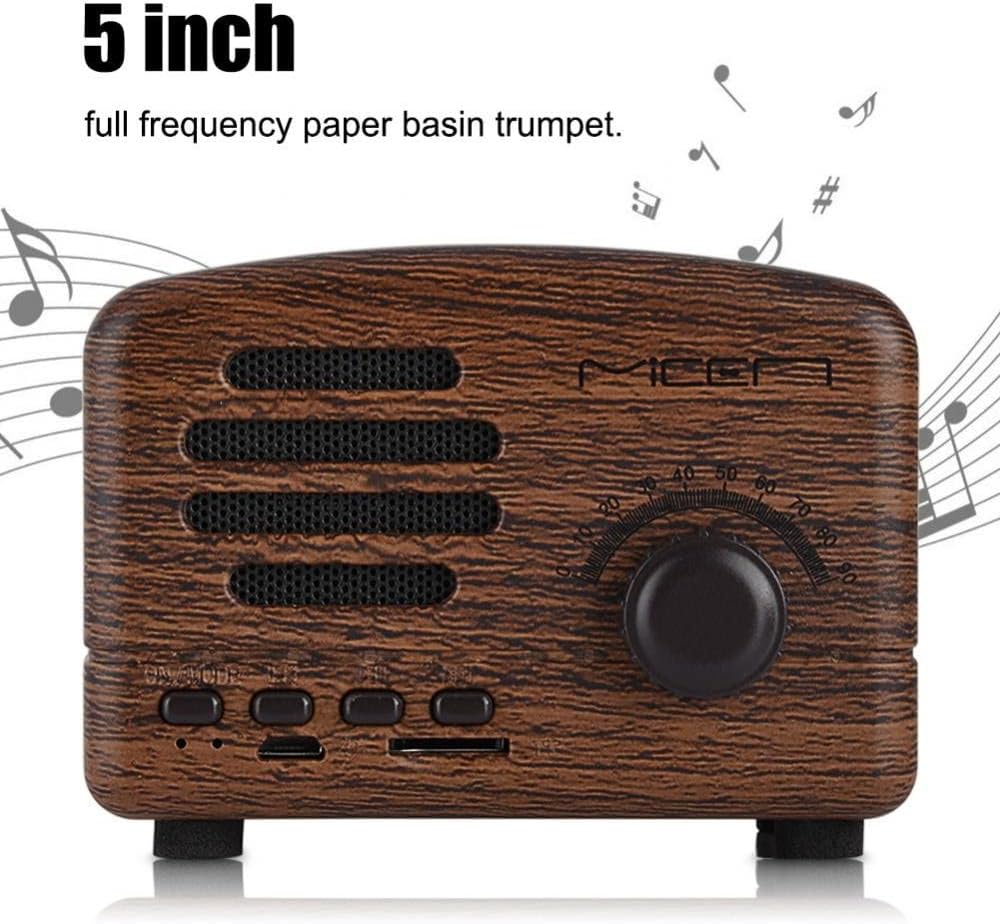
Image: The speaker's front panel with text indicating a "5 inch full frequency paper basin trumpet."

Image: Close-up of the tuning wheel, with text highlighting its mechanical deceleration mechanism for sound quality.

Image: The speaker's front panel with text indicating "Tube efficiency, using multiple capacitors and conventional analog capacitors."
5. Setup
5.1 Charging the Speaker
- Connect the provided USB charging cable to the speaker's charging port.
- Connect the other end of the USB cable to a standard USB power adapter (5V-1000mAh recommended) or a computer's USB port.
- The charging indicator light (if present) will illuminate during charging and turn off or change color when fully charged.
5.2 Powering On/Off
Locate the power button (often integrated with the 'BT/MODE' button or a separate switch). Press and hold the power button to turn the speaker on or off. A sound or indicator light will confirm the status change.
6. Operating Instructions
6.1 Bluetooth Pairing
- Ensure the speaker is powered on.
- Press the 'BT/MODE' button to switch to Bluetooth mode. The speaker will typically emit an audible prompt and an indicator light will flash, indicating it is in pairing mode.
- On your mobile device (smartphone, tablet, etc.), enable Bluetooth and search for available devices.
- Select "FOSA Speaker" (or similar name) from the list of found devices.
- Once connected, the speaker will provide an audible confirmation, and the indicator light will stop flashing. You can now play audio from your device through the speaker.

Image: An illustration showing a smartphone connecting wirelessly to the FOSA speaker via Bluetooth, with text highlighting aptX support and stable signal.

Image: A person enjoying music from the FOSA speaker, emphasizing unique sound quality and wireless Bluetooth playback.
6.2 FM Radio Operation
- Press the 'BT/MODE' button to cycle through modes until you reach FM Radio mode.
- Use the tuning wheel to manually scan for radio stations.
- For automatic scanning (if available), refer to specific button functions on your device.
6.3 USB/TF Card Playback
- Insert a USB flash drive or a TF (MicroSD) card containing MP3 audio files into the respective port on the speaker.
- The speaker should automatically detect the storage device and begin playing audio. If not, press the 'BT/MODE' button to switch to USB or TF card mode.
- Use the playback control buttons (e.g., Play/Pause, Next/Previous Track) to manage your music.
6.4 Volume Control
Adjust the volume using the dedicated volume controls on the speaker, which may be integrated with the tuning wheel or separate buttons. You can also control the volume from your connected Bluetooth device.
7. Maintenance
To ensure the longevity and optimal performance of your FOSA speaker, follow these maintenance tips:
- Cleaning: Use a soft, dry cloth to wipe the speaker's surface. Avoid using harsh chemicals or abrasive cleaners.
- Storage: Store the speaker in a cool, dry place away from direct sunlight and extreme temperatures.
- Battery Care: For extended storage, charge the battery to approximately 50% every few months to maintain battery health.
8. Troubleshooting
If you encounter issues with your speaker, refer to the following common problems and solutions:
| Problem | Possible Cause | Solution |
|---|---|---|
| Speaker does not power on. | Low battery; Power button not pressed correctly. | Charge the speaker fully. Press and hold the power button firmly. |
| No sound from speaker. | Volume too low; Incorrect mode selected; Device not connected. | Increase volume. Press 'BT/MODE' to select correct input. Ensure Bluetooth is paired or USB/TF card is inserted correctly. |
| Bluetooth connection fails. | Speaker not in pairing mode; Device too far; Interference. | Ensure speaker is in Bluetooth pairing mode. Move device closer to speaker. Restart both devices. |
| Poor FM radio reception. | Weak signal; Environmental interference. | Relocate the speaker to an area with better reception. Extend any external antenna if available. |
| Audio distortion at high volumes. | Volume set too high. | Reduce the volume level. |
9. Specifications
| Feature | Specification |
|---|---|
| Channel | 1.0 channel |
| Speaker Unit | 40mm (5-inch full-frequency paper basin trumpet) |
| Frequency Range | 90Hz - 20KHz |
| Impedance | 4Ω |
| USB Charging | USB-5V-1000mAh |
| Loudspeaker System | Full range magnetic + low frequency boost system |
| Output Power | 3W |
| Sensitivity | 85dB |
| Input Interface | 3.5mm AUX, USB, TF Card |
| Battery Capacity | 1200mAh lithium battery |
| Bluetooth Version | CSR 5.0 with aptX support |
| Product Dimensions | 4.72 x 3.15 x 2.36 inches |
| Item Weight | 11.6 ounces |
| Color | Rose wood (other colors may be available) |
10. Warranty and Support
For warranty information, technical support, or customer service inquiries, please refer to the seller's policies or contact the FOSA customer support team through the retailer where the product was purchased.