
1. Introduction
The Sangean WR-22WL is a versatile table-top digital tuning receiver designed for high-quality audio playback. It features AM/FM-RDS radio, Bluetooth wireless audio streaming, and USB playback for MP3/WMA files. This manual provides detailed instructions for the proper setup, operation, and maintenance of your device.
2. Safety Instructions
- Power Source: Use only the specified power adapter or batteries. Ensure the voltage matches the requirements of the unit.
- Water and Moisture: Do not expose the unit to rain, moisture, or dripping/splashing liquids. Do not place objects filled with liquids, such as vases, on the unit.
- Ventilation: Ensure adequate ventilation. Do not block ventilation openings. Maintain a minimum distance around the unit for sufficient ventilation.
- Heat: Do not place the unit near heat sources such as radiators, heat registers, stoves, or other apparatus (including amplifiers) that produce heat.
- Cleaning: Unplug the unit from the power outlet before cleaning. Use a soft, dry cloth. Do not use liquid cleaners or aerosol cleaners.
- Servicing: Do not attempt to service this product yourself. Refer all servicing to qualified service personnel.
3. Package Contents
Verify that all items listed below are included in your package:
- Sangean WR-22WL Digital Tuning Receiver
- AC Power Cord
- FM Wire Antenna
- Infrared Remote Control
- Owner's Manual (this document)
4. Product Features
- AM/FM-RDS Digital Tuning with 10 Station Presets (5 AM, 5 FM)
- Built-in Bluetooth Wireless Audio Streaming
- USB MP3/WMA Playback
- Easy-to-Read High Contrast LCD Display with Automatic and Adjustable Backlight
- Clock Function with FM RDS-CT Synchronization
- Dual Alarm Timers (Radio, Buzzer, or USB)
- Humane Wake System (HWS) for Adjustable Alarm Volume
- Nap, Sleep, and Snooze Timers
- Rotary Bass and Treble Controls
- Dynamic Bass Compensation for Enhanced Low Frequencies
- Loudness On/Off Function
- Single 3-inch 7W Full Range Speaker with Enlarged Magnet
- Full Function Infrared Remote Control
- Headphone Jack for Private Listening
- 12V DC Input Socket for Optional External Power Supply
5. Controls and Display
Familiarize yourself with the controls and display on your Sangean WR-22WL receiver.
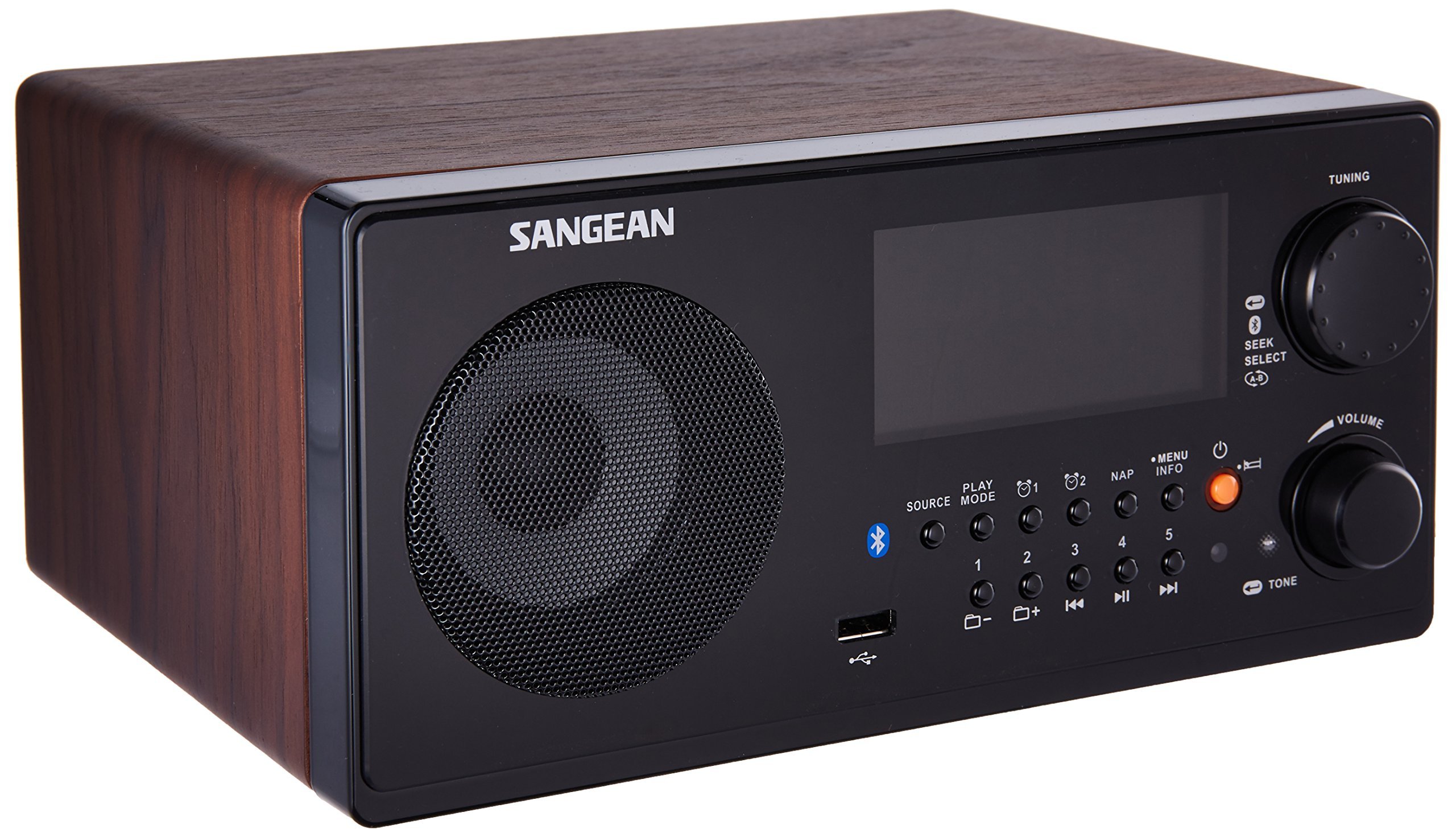
Figure 5.1: Front Panel Overview of the Sangean WR-22WL.
- Speaker: Audio output.
- LCD Display: Shows time, station information, source, and settings.
- Tuning Knob: Rotates to adjust frequency or navigate menus.
- SEEK/SELECT Button: Press to auto-seek stations or confirm menu selections.
- VOLUME Knob: Rotates to adjust audio output level.
- SOURCE Button: Cycles through available audio sources (AM, FM, Bluetooth, USB).
- MODE Button: Changes playback mode (e.g., repeat for USB).
- PLAY/PAUSE Button: Controls playback for Bluetooth and USB sources.
- NAP Button: Activates the nap timer.
- INFO Button: Displays additional information (e.g., RDS data).
- MENU Button: Accesses system settings and options.
- POWER Button: Turns the unit on or off.
- Preset Buttons (1-5): Stores and recalls favorite radio stations.
- USB Port: Connects USB drives for MP3/WMA playback.
- TONE Button: Adjusts bass and treble settings.
- Headphone Jack (Rear Panel): For connecting headphones for private listening.
6. Setup
6.1 Power Connection
Connect the supplied AC power cord to the AC IN jack on the rear of the unit and then to a standard wall outlet. The unit can also be powered by a 12V DC input source (not supplied) via the DC IN jack for portable use.
6.2 Antenna Connection
For optimal FM reception, fully extend the supplied FM wire antenna and position it for the best signal. For AM reception, the unit has a built-in AM antenna; rotate the unit for best reception.
6.3 Remote Control Battery Installation
Insert two AAA batteries (not supplied) into the remote control, observing the correct polarity (+/-) as indicated inside the battery compartment.
7. Operating Instructions
7.1 Basic Operation
- Power On/Off: Press the POWER button to turn the unit on or off.
- Volume Adjustment: Rotate the VOLUME knob clockwise to increase volume, counter-clockwise to decrease.
- Source Selection: Press the SOURCE button repeatedly to cycle through AM, FM, Bluetooth, and USB modes.
7.2 AM/FM Radio Operation
- Tuning: In AM or FM mode, rotate the TUNING knob to manually adjust the frequency. Press the SEEK/SELECT button to automatically scan for the next available station.
- Storing Presets: Tune to your desired station. Press and hold one of the PRESET (1-5) buttons until the display confirms the station is saved.
- Recalling Presets: Briefly press one of the PRESET (1-5) buttons to recall a saved station.
- RDS (Radio Data System): When tuned to an FM station broadcasting RDS, information such as station name, song title, and artist may be displayed. Press the INFO button to cycle through available RDS data.
7.3 Bluetooth Operation
- Pairing: Select Bluetooth as the source. The display will show "PAIRING". On your Bluetooth-enabled device, search for "Sangean WR-22WL" and select it to connect. Once paired, the display will show "CONNECTED".
- Audio Streaming: Play audio from your paired device. Use the PLAY/PAUSE and track skip buttons on the unit or your device to control playback.
7.4 USB Playback
- Connecting USB: Insert a USB flash drive containing MP3/WMA audio files into the USB port.
- Playback: Select USB as the source. The unit will automatically begin playing files. Use the PLAY/PAUSE and track skip buttons to control playback.
7.5 Clock and Timer Functions
- Setting Clock: Access the clock settings via the MENU button. You can set the time manually or allow it to synchronize with FM RDS-CT (Clock Time) signals.
- Setting Alarms: The unit features two independent alarms. Access alarm settings via the MENU. Set the alarm time, source (radio, buzzer, or USB), and desired volume. The Humane Wake System (HWS) gradually increases the alarm volume.
- Snooze: When an alarm sounds, press any button (except Power) to activate snooze for a short period.
- Sleep Timer: Set the sleep timer via the MENU to automatically turn off the unit after a set duration.
- Nap Timer: Press the NAP button to set a short nap timer.
7.6 Audio Settings
- Bass and Treble: Press the TONE button to access bass and treble adjustments. Rotate the TUNING knob to modify levels.
- Dynamic Bass Compensation: This feature enhances bass response at lower volumes. It can be toggled on/off in the menu.
- Loudness: The loudness function can be enabled or disabled via the menu to further enhance audio at low volumes.
8. Maintenance
- Cleaning the Unit: Wipe the exterior of the unit with a soft, dry, lint-free cloth. Do not use abrasive cleaners, waxes, or solvents.
- Display Care: Avoid touching the LCD display with sharp objects.
- Storage: If storing the unit for an extended period, disconnect it from the power source and remove batteries from the remote control. Store in a cool, dry place.
9. Troubleshooting
| Problem | Possible Cause | Solution |
|---|---|---|
| No power | Power cord not connected; Power outlet not active. | Ensure power cord is securely connected. Test outlet with another device. |
| No sound | Volume too low; Mute activated; Incorrect source selected. | Increase volume. Check if headphones are connected. Select correct audio source. |
| Poor radio reception | Antenna not extended/positioned correctly; Interference. | Fully extend and adjust FM wire antenna. Rotate the unit for AM reception. Move away from electronic devices causing interference. |
| Bluetooth pairing fails | Device not in pairing mode; Device too far; Already paired with another device. | Ensure the WR-22WL is in Bluetooth pairing mode. Move devices closer. Disconnect from other Bluetooth devices. |
| USB playback not working | USB drive not formatted correctly; Unsupported file types; USB drive faulty. | Ensure USB drive is FAT32 formatted. Verify files are MP3/WMA. Try a different USB drive. |
10. Specifications
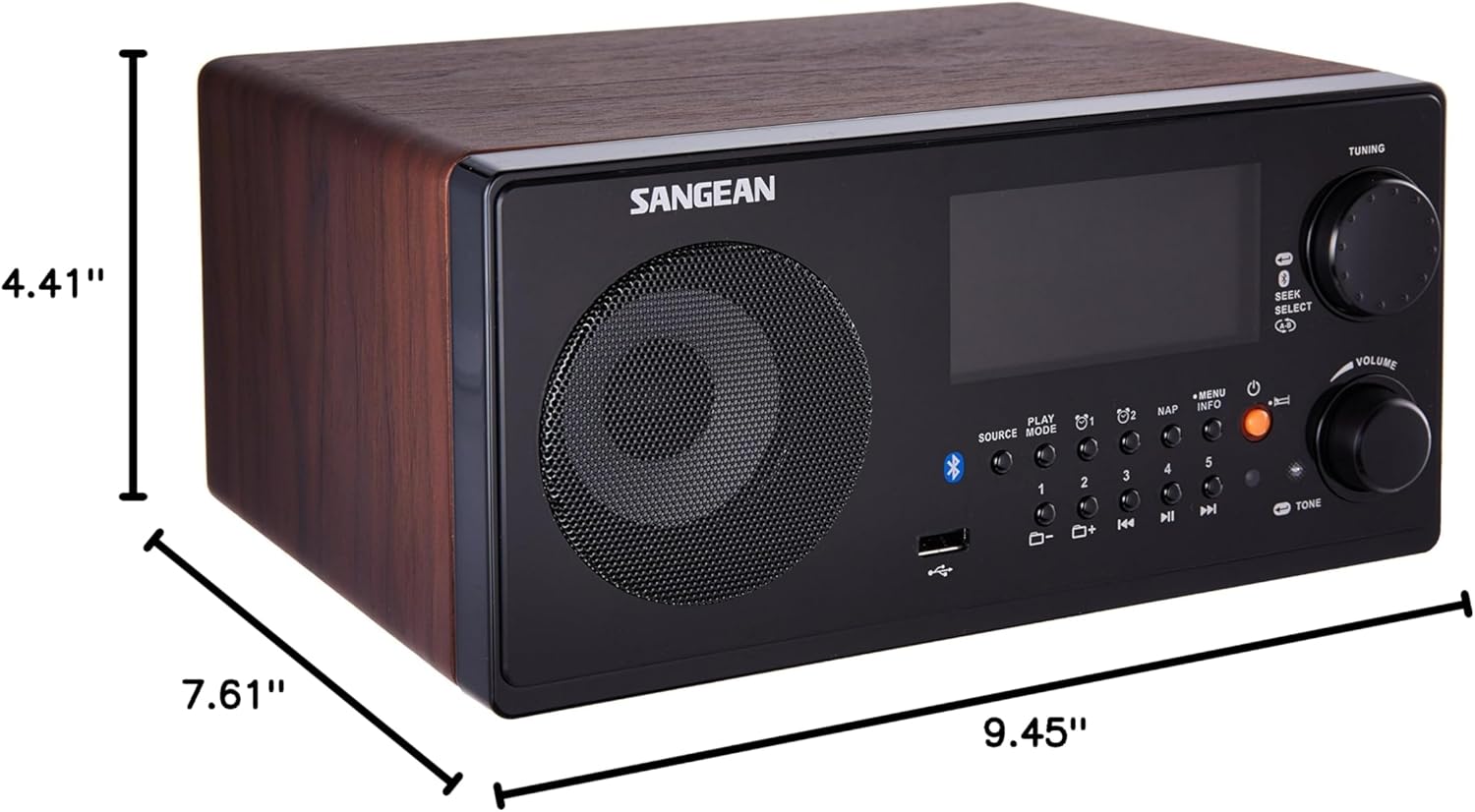
Figure 10.1: Sangean WR-22WL Product Dimensions.
- Brand: Sangean
- Model: WR-22WL
- Product Dimensions (L x W x H): 9.45" x 7.61" x 4.41" (240mm x 193mm x 112mm)
- Item Weight: 6 Pounds (2.72 kg)
- Connectivity Technology: Bluetooth, USB
- Tuner Technology: AM, FM (RDS)
- Power Source: AC Power Cord, 12V DC Input (optional), 2 x AAA batteries (for remote control)
- Speaker: 3-inch 7W Full Range Speaker
- Display Type: Digital LCD
- Hardware Interface: USB
- Color: Brown (Dark Walnut finish)
11. Warranty and Support
This Sangean WR-22WL unit comes with a 90-day limited warranty. For warranty claims or technical support, please refer to the contact information provided with your purchase documentation or visit the official Sangean website. Please have your model number (WR-22WL) and proof of purchase ready when contacting support.


