
1. Introduction
This instruction manual provides essential information for the safe and efficient operation of your Luminous Cruze+ 4KVA Pure Sine Wave Inverter, Model CL0138. This inverter is designed to provide reliable power backup for homes, offices, and shops, ensuring continuous power supply during outages. Please read this manual thoroughly before installation and use, and retain it for future reference.
2. Safety Information
Always observe the following safety precautions to prevent injury or damage to the inverter and connected appliances:
- Ensure proper grounding of the inverter.
- Do not open the inverter casing; refer servicing to qualified personnel.
- Keep the inverter away from water, moisture, and flammable materials.
- Ensure adequate ventilation around the inverter to prevent overheating.
- Connect batteries with correct polarity to avoid damage.
- Do not overload the inverter beyond its specified capacity.
3. Package Contents
Upon unpacking, verify that the following items are included:
- 1 x Luminous Cruze+ 4KVA Pure Sine Wave Inverter (Model CL0138)
- 1 x Warranty Card
4. Product Overview
The Luminous Cruze+ 4KVA Inverter is a pure sine wave inverter designed for high performance and reliability. It features advanced technology to provide stable power output and comprehensive protection for your appliances.

Figure 4.1: Front view of the Luminous Cruze+ 4KVA Pure Sine Wave Inverter.
Key Features:
- Pure Sine Wave Output: Ensures compatibility with sensitive electronic appliances, providing clean and stable power.
- Intelligent 32-bit DSP Processor: For efficient power management and enhanced performance.
- LCD Display: Provides real-time status of power backup and battery charging time in hours and minutes.
- Quick Charging: Optimized charging for faster battery replenishment.
- Comprehensive Protection: Includes safeguards against short-circuit, reverse polarity, battery over-charge, and deep-discharge.
- Input AC MCB: Provides protection for the input AC supply.
- Battery Compatibility: Supports a wide range of batteries including Flat Plate, Tubular, and SMF (Sealed Maintenance Free) batteries.

Figure 4.2: Key intelligent features of the Luminous Cruze+ Inverter, including LCD display, DSP processor, and AC MCB protection.

Figure 4.3: Additional features of the Luminous Cruze+ Inverter, highlighting quick charging, pure sine wave output, and broad battery compatibility.
5. Setup
Proper installation is crucial for the inverter's performance and safety. It is recommended that installation be performed by a qualified technician.
5.1 Battery Connection
The Luminous Cruze+ 4KVA Inverter requires a 48V battery bank, typically consisting of four 12V batteries connected in series. It is compatible with batteries ranging from 80 Ah to 220 Ah capacity.
- Ensure the inverter is switched off and disconnected from the main power supply.
- Connect the positive (+) terminal of the first battery to the negative (-) terminal of the second battery, and so on, for all four batteries to form a series connection.
- Connect the final positive (+) terminal of the battery bank to the positive (+) terminal of the inverter.
- Connect the final negative (-) terminal of the battery bank to the negative (-) terminal of the inverter.
- Secure all connections tightly to prevent loose contacts and sparking.
5.2 AC Input and Output Connections
- Connect the main AC input supply to the designated AC input terminal on the inverter.
- Connect your household or office wiring (load) to the AC output terminals of the inverter.
- Ensure all wiring is done according to local electrical codes and standards.
6. Operating Instructions
6.1 Powering On/Off
- To Power On: After ensuring all connections are secure, switch on the main AC supply. Then, press the power button on the inverter. The LCD display will illuminate, indicating the inverter is operational.
- To Power Off: First, switch off the load connected to the inverter. Then, press and hold the power button on the inverter until it shuts down. Finally, switch off the main AC supply.
6.2 Understanding the LCD Display
The LCD display provides critical information about the inverter's status:
- Battery Level: Indicates the current charge level of the connected batteries.
- Backup Time: Displays the estimated remaining backup time in hours and minutes, based on the current load.
- Charging Status: Shows if the batteries are currently charging.
- Load Level: Indicates the percentage of the inverter's capacity currently being used.
- Error Codes: In case of a fault, specific error codes will be displayed to assist in troubleshooting.
6.3 Load Management
The Luminous Cruze+ 4KVA Inverter has a peak load capacity of 924W. It can support various appliances such as refrigerators, washing machines, geysers, water pumps, and photocopiers. Refer to the following guide for typical appliance usage and battery requirements:
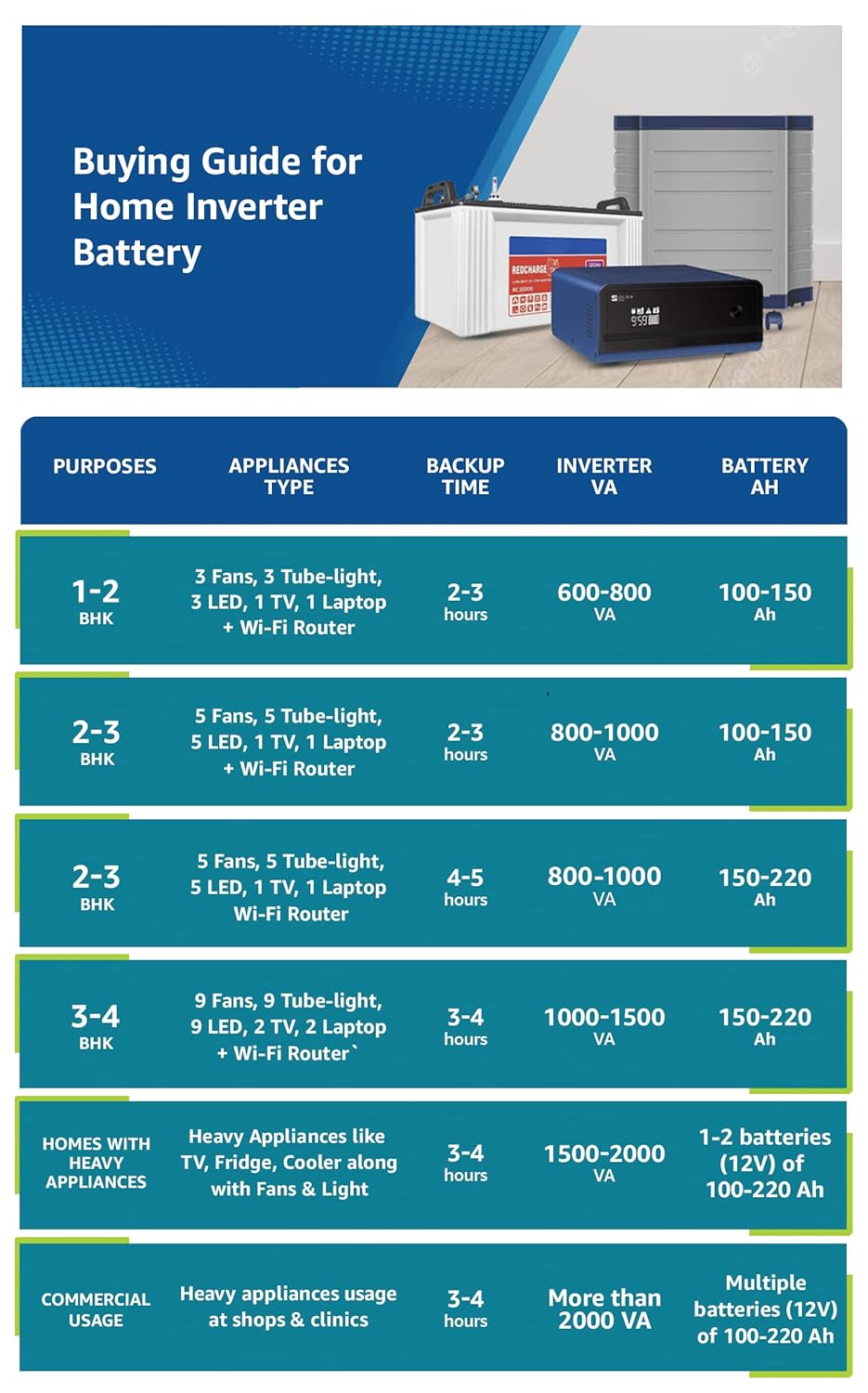
Figure 6.1: Home Inverter Battery Buying Guide, illustrating recommended inverter and battery capacities for various loads and backup durations.
7. Maintenance
Regular maintenance ensures the longevity and optimal performance of your inverter system.
- Cleaning: Keep the inverter and its surroundings clean and free from dust. Use a dry cloth to wipe the exterior. Do not use liquid cleaners.
- Ventilation: Ensure that the ventilation openings on the inverter are not blocked to allow for proper airflow and prevent overheating.
- Battery Maintenance: For tubular or flat plate batteries, regularly check the electrolyte levels and top up with distilled water as needed. Keep battery terminals clean and free from corrosion.
- Connections: Periodically check all electrical connections for tightness. Loose connections can lead to power loss or overheating.
- Load Management: Avoid consistently overloading the inverter, as this can reduce its lifespan and efficiency.
8. Troubleshooting
If you encounter issues with your Luminous Cruze+ Inverter, refer to the following common problems and solutions:
| Problem | Possible Cause | Solution |
|---|---|---|
| Inverter not turning on | No main AC supply; Battery not connected or discharged; Loose connections. | Check main AC supply; Ensure batteries are connected and charged; Verify all connections are secure. |
| No power output from inverter | Overload; Short-circuit in output wiring; Inverter fault. | Reduce connected load; Check output wiring for short-circuits; Contact customer support if fault persists. |
| Short backup time | Batteries not fully charged; Battery degradation; High load. | Allow batteries to fully charge; Check battery health; Reduce connected load. |
| Inverter beeping continuously | Overload; Low battery voltage; Over-temperature. | Reduce load; Allow batteries to charge; Ensure proper ventilation. |
| LCD display shows error code | Specific internal fault. | Refer to the inverter's specific error code guide (if available) or contact Luminous customer support. |
If the problem persists after attempting these solutions, please contact Luminous customer support for assistance.
9. Specifications
Technical specifications for the Luminous Cruze+ 4KVA Pure Sine Wave Inverter (Model CL0138):
- Model Name: CL0138
- Inverter Type: Pure Sine Wave
- VA Rating: 4000VA
- System Voltage: 48V
- Peak Load Capacity: 924 Watts
- Output Voltage (Inverter Mode): 220V
- Battery Compatibility: 4 x 12V batteries, Capacity 80 Ah - 220 Ah (Flat Plate, Tubular, SMF)
- Item Dimensions (LxWxH): 31 x 22 x 31 Centimeters
- Item Weight: 31.9 kg
- Recommended Uses: Home, Office
- Power Source: Battery Powered
10. Warranty and Support
10.1 Warranty Information
The Luminous Cruze+ 4KVA Pure Sine Wave Inverter comes with a 24-month warranty from the date of purchase. Please retain your purchase receipt and warranty card for any warranty claims. The warranty covers manufacturing defects and malfunctions under normal operating conditions.
10.2 Customer Support
For technical assistance, service requests, or any queries regarding your Luminous product, please contact Luminous customer support. Refer to the contact details provided on your warranty card or visit the official Luminous website for the most up-to-date support information.

