
Easytry123 Easytry0609
Instruction Manual
Easytry123 Replacement Remote Control for FRIGILUX R51I9/BGCE Air Conditioner
Model: Easytry0609
1. Introduction and Compatibility
This document provides instructions for the Easytry123 replacement remote control, designed for use with FRIGILUX R51I9/BGCE Air Conditioner units. This remote is an infrared (IR) replacement and is intended to function similarly to your original remote control.
Important Compatibility Note: Before use, please ensure your current remote control is visually identical to the remote shown in this manual. This replacement remote is designed to mimic the functions of the original. While it aims to provide full functionality, some advanced or rarely used features present on your original remote may not be fully supported by this replacement. If your air conditioner model number is not explicitly listed in the product title, or if your original remote differs in appearance, please contact the seller for compatibility verification before attempting to use this remote.
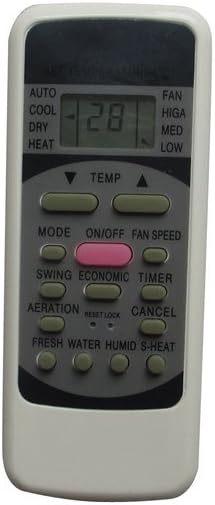
Figure 1: Front view of the Easytry123 replacement remote control. This image shows the display screen, power button, mode selection, temperature controls, fan speed, swing, timer, and other function buttons.
2. Setup
2.1 Battery Installation
The remote control requires 2 AAA batteries (not included) for operation. Follow these steps to install the batteries:
- Locate the battery compartment on the back of the remote control.
- Slide the battery compartment cover downwards or in the direction indicated by an arrow to open it.
- Insert two AAA batteries, ensuring the positive (+) and negative (-) terminals align correctly with the markings inside the compartment. Incorrect battery orientation can prevent the remote from functioning.
- Slide the battery compartment cover back into place until it clicks securely.

Figure 2: Back view of the remote control, showing the open battery compartment ready for AAA battery insertion.
3. Basic Operation
Once batteries are installed, the remote is ready for use. Point the remote directly at the infrared receiver on your air conditioner unit. Ensure there are no obstructions between the remote and the unit.
- ON/OFF Button: Press the ON/OFF button (often red or distinctively colored) to power the air conditioner on or off.
- MODE Button: Press the MODE button to cycle through available operating modes such as AUTO, COOL, DRY, HEAT, and FAN. The current mode will typically be displayed on the remote's screen.
- TEMP Buttons (▼ / ▲): Use the TEMP up (▲) and down (▼) buttons to adjust the desired temperature setting.
- FAN SPEED Button: Press the FAN SPEED button to adjust the fan's intensity (e.g., HIGH, MED, LOW, AUTO).
- SWING Button: Activates or deactivates the automatic swing function of the air conditioner's louvers.
- TIMER Button: Used to set a timer for the air conditioner to turn on or off automatically. Refer to your air conditioner's original manual for detailed timer programming.
- Other Buttons: Buttons such as ECONOMIC, AERATION, FRESH WATER, HUMID, S-HEAT, RESET, and CANCEL are present for specific functions. Their exact operation may vary slightly depending on your air conditioner model.
4. Maintenance
4.1 Battery Replacement
Replace the batteries when the remote's display becomes dim, or if the remote stops responding to button presses. Always replace both batteries at the same time with new AAA batteries. Do not mix old and new batteries, or different types of batteries.
4.2 Cleaning
To clean the remote control, gently wipe its surface with a soft, dry cloth. Do not use liquid cleaners, abrasive materials, or chemical solvents, as these can damage the remote's finish or internal components.
4.3 Storage
If the remote control will not be used for an extended period, it is recommended to remove the batteries to prevent leakage and potential damage to the remote.
5. Troubleshooting
- Remote Not Responding:
- Check if the batteries are installed correctly with the correct polarity (+/-).
- Replace old batteries with new ones.
- Ensure there is a clear line of sight between the remote's IR emitter and the air conditioner's receiver. Remove any obstructions.
- Confirm that the remote's IR signal is being emitted (can sometimes be seen with a smartphone camera pointing at the remote's front when a button is pressed).
- Some Functions Not Working:
- As a replacement remote, not all functions may be fully compatible with every air conditioner model, even if the remote looks identical. This is particularly true for very specific or advanced features.
- Refer to your air conditioner's original manual to confirm the expected behavior of specific functions.
6. Specifications
| Feature | Detail |
|---|---|
| Model Number | Easytry0609 |
| Brand | Easytry123 |
| Connectivity Technology | Infrared (IR) |
| Controller Type | Button Control |
| Color | Grey |
| Batteries Required | 2 AAA batteries |
| Manufacturer | Easytry123 |
| First Available Date | June 22, 2018 |
7. Support
For any doubts, compatibility questions, or issues not covered in this manual, please contact the seller directly through the platform where the product was purchased. Provide your order details and a clear description of the issue for prompt assistance.
Ask a question about this manual
Ask about setup, troubleshooting, compatibility, parts, safety, or missing instructions. Manuals+ will review the question and use this page’s manual context to help answer it.