1. Introduction
Thank you for choosing the MOZA HGP Shifter. This manual provides essential information for the proper setup, operation, and maintenance of your new H-pattern shifter. Please read this manual thoroughly before use to ensure optimal performance and longevity of the product.
2. Safety Information
- Keep the device away from water and other liquids.
- Do not expose the device to extreme temperatures or direct sunlight.
- Handle with care to avoid dropping or impacting the device.
- Ensure all connections are secure before operation.
3. Package Contents
The MOZA HGP Shifter package typically includes:
- MOZA HGP Shifter Unit
- USB Connection Cable
- Mounting Hardware (screws, brackets)
- Instruction Manual (this document)
4. Setup
Follow these steps to set up your MOZA HGP Shifter:
- Mounting the Shifter: Secure the MOZA HGP Shifter to your sim racing rig using the provided mounting hardware. Ensure it is firmly attached to prevent movement during use. The shifter features multiple mounting points on its base for versatile installation.

Image: Bottom view of the MOZA HGP Shifter, highlighting the various mounting points for secure attachment to a sim racing rig.
- Connecting to PC: Locate the USB port on the back of the shifter. Connect one end of the supplied USB cable to the shifter and the other end to an available USB port on your PC.

Image: Rear view of the MOZA HGP Shifter, displaying the USB port for PC connection and other potential ports.
- Driver Installation: Your PC should automatically detect the shifter. If not, please visit the official MOZA Racing website (mozaracing.com) to download and install the latest drivers and software for the MOZA HGP Shifter.
- Calibration: Follow the instructions in the MOZA Pit House software (or your sim racing software) to calibrate the shifter. This ensures accurate gear detection.
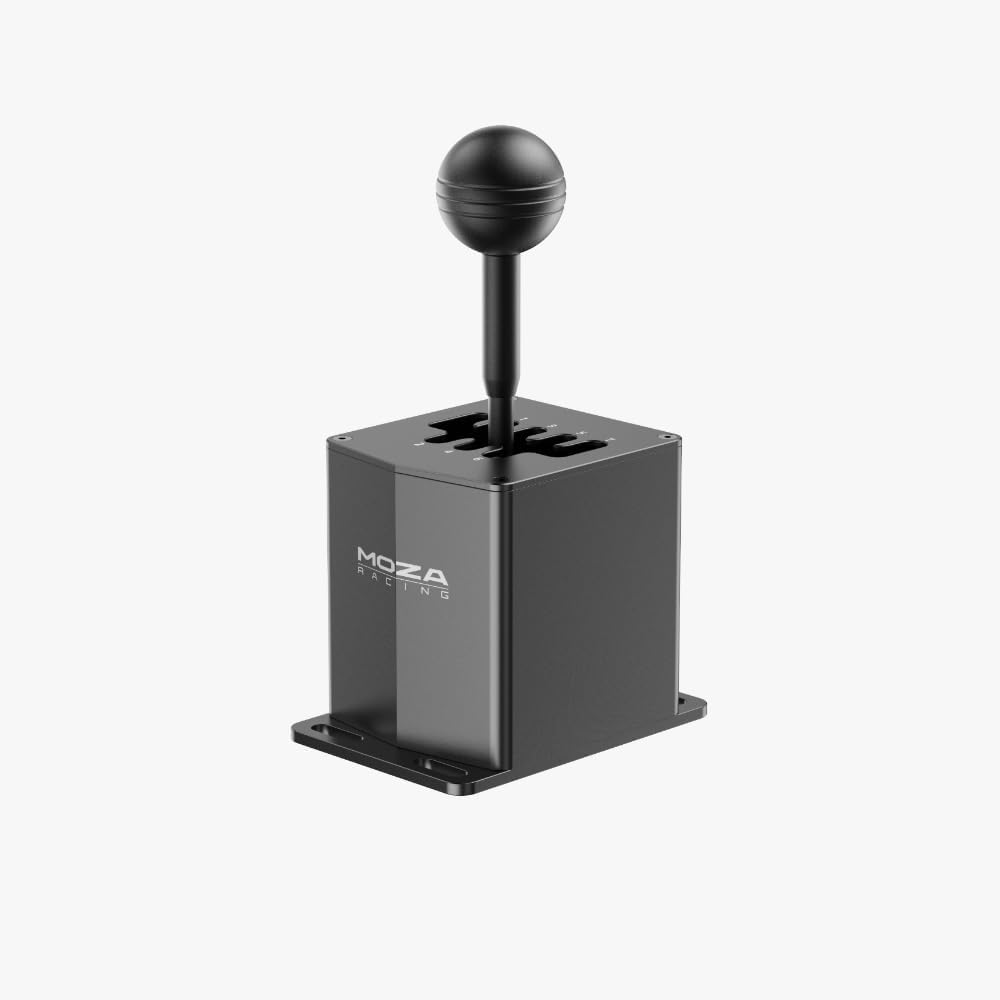
Image: Front angled view of the MOZA HGP Shifter, showcasing its robust design and gear stick.
5. Operating Instructions
The MOZA HGP Shifter is designed for realistic H-pattern gear shifting in sim racing. It features a 7+R (7 forward gears plus Reverse) configuration.
- Gear Engagement: To engage a gear, firmly push the gear stick into the desired gate. The shifter provides tactile feedback for precise engagement.
- Reverse Gear: To engage Reverse, typically you will need to push down on the shifter knob while moving it into the Reverse (R) gate. Refer to your specific sim racing game settings for exact reverse engagement mechanics.
- Compatibility: The shifter is compatible with most major sim racing titles that support H-pattern shifters. Ensure your game's control settings are configured to recognize the MOZA HGP Shifter.

Image: Top-down view of the MOZA HGP Shifter, clearly showing the engraved 7-speed plus Reverse (7+R) gear layout.
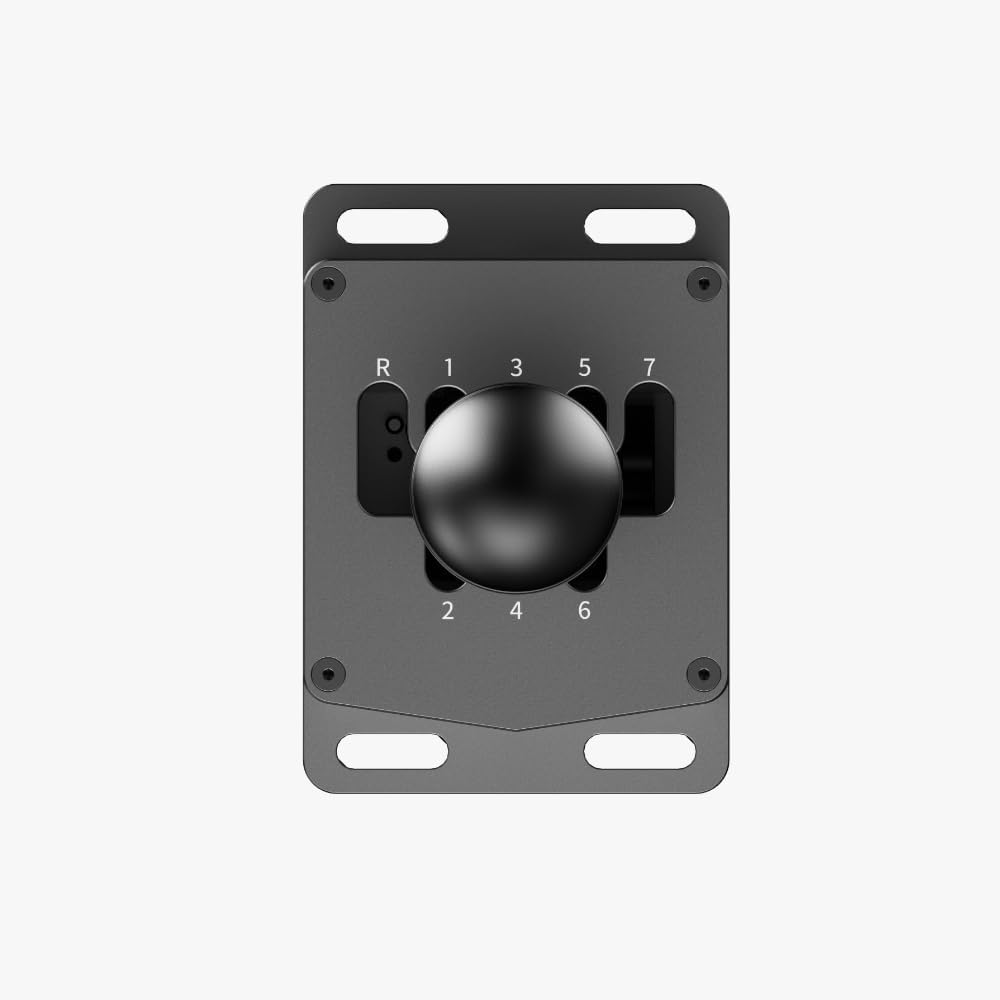
Image: Close-up top view of the MOZA HGP Shifter's gear plate, highlighting the detailed numbering and gate design.
6. Maintenance
To ensure the longevity and performance of your shifter:
- Cleaning: Use a soft, dry cloth to wipe down the shifter. Avoid abrasive cleaners or solvents.
- Storage: When not in use for extended periods, store the shifter in a clean, dry environment, away from direct sunlight and extreme temperatures.
- Inspection: Periodically check all mounting screws and connections to ensure they remain tight and secure.
7. Troubleshooting
If you encounter issues with your MOZA HGP Shifter, try the following:
- Shifter Not Detected:
- Ensure the USB cable is securely connected to both the shifter and your PC.
- Try a different USB port on your PC.
- Restart your PC.
- Reinstall the MOZA drivers from the official website.
- Incorrect Gear Detection:
- Recalibrate the shifter using the MOZA Pit House software or your sim racing game's calibration utility.
- Check for any physical obstructions preventing full gear engagement.
- Loose Gear Stick:
- Check if the screws securing the gear stick to the base are tight.
If these steps do not resolve the issue, please contact MOZA Racing customer support.
8. Specifications
| Brand | MOZA |
| Model Number | MOZA-HGP |
| Item Weight | 3.69 pounds |
| Product Dimensions | 19.69 x 19.69 x 11.02 inches |
| Color | Black |
| Connectivity | USB |
| Gear Layout | 7+R (H-pattern) |
9. Warranty and Support
For detailed warranty information and customer support, please refer to the warranty card included with your product or visit the official MOZA Racing website:
The website provides access to FAQs, driver downloads, and contact information for technical assistance.


