1. Introduction
The iDance BM-3L/WH Blaster Mini is a portable Bluetooth speaker designed for versatile audio playback and entertainment. Featuring 20W of powerful sound with strong bass and integrated LED light shows, it is suitable for various settings, from small gatherings to personal use. The built-in microphone allows for hands-free calling.
Key Features:
- 20W powerful sound with strong bass.
- 19 LED light show modes.
- Bluetooth connectivity for wireless audio streaming.
- Supports USB and MicroSD card playback.
- Integrated microphone for phone calls.
- Rechargeable battery with up to 12 hours of playback.

Image 1.1: Front view of the iDance BM-3L/WH speaker, showcasing its LED light feature.
2. Product Overview
Familiarize yourself with the various components and controls of your iDance BM-3L/WH speaker.
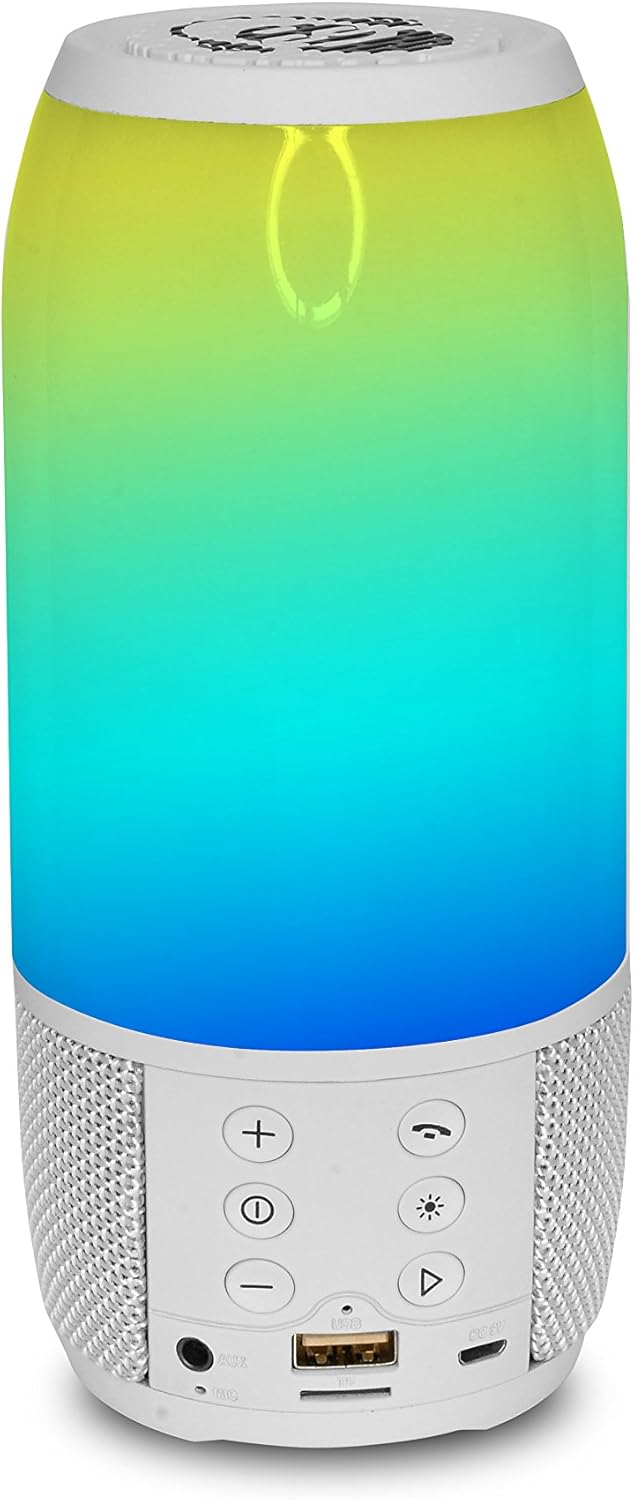
Image 2.1: Rear view of the speaker, highlighting the control panel and input ports.
Control Panel and Ports:
- Power Button: Press and hold to turn the speaker on or off.
- Volume Up (+): Increases the volume.
- Volume Down (-): Decreases the volume.
- Play/Pause/Call Button: Controls music playback and manages phone calls.
- Mode Button (M): Switches between Bluetooth, USB, and MicroSD modes.
- Light Mode Button: Cycles through the 19 different LED light shows.
- USB Port: For USB drive playback.
- MicroSD Card Slot: For MicroSD card playback.
- DC 5V Charging Port: Connect the USB charging cable here.
- AUX Input: For connecting external audio devices via a 3.5mm audio cable.
3. Setup
3.1 Charging the Speaker
- Locate the DC 5V charging port on the speaker.
- Connect the provided USB charging cable to the speaker's charging port.
- Connect the other end of the USB cable to a compatible USB power adapter (not included) or a computer's USB port.
- The charging indicator light will illuminate (color may vary) to show that the speaker is charging.
- Once fully charged, the indicator light may change color or turn off. A full charge provides up to 12 hours of playback.
3.2 Powering On/Off
- To Power On: Press and hold the Power button for a few seconds until you hear an audible prompt or see the LED lights activate.
- To Power Off: Press and hold the Power button again for a few seconds until you hear an audible prompt or the LED lights turn off.
4. Operating Instructions
4.1 Bluetooth Pairing
- Ensure the speaker is powered on and in Bluetooth mode. If not, press the Mode button until you hear the Bluetooth prompt. The LED lights may flash to indicate pairing mode.
- On your mobile device (smartphone, tablet, etc.), enable Bluetooth and search for available devices.
- Select "iDance BM-3L" or a similar name from the list of devices.
- Once paired, you will hear a confirmation sound, and the LED lights may change their pattern.
- You can now play audio from your device through the speaker.
4.2 USB/MicroSD Playback
- Insert a USB drive or MicroSD card (pre-loaded with MP3 audio files) into the corresponding port on the speaker.
- The speaker should automatically switch to USB or MicroSD mode and begin playing audio. If not, press the Mode button to cycle through modes until the correct one is selected.
- Use the Play/Pause button to control playback.
- Use the Volume Up/Down buttons to adjust the volume.
4.3 LED Light Modes
The speaker features 19 different LED light show modes. Press the Light Mode button to cycle through the various patterns and colors.
4.4 Making and Receiving Calls
When connected via Bluetooth to your smartphone:
- To Answer a Call: Press the Play/Pause/Call button once.
- To End a Call: Press the Play/Pause/Call button once during a call.
- To Reject a Call: Press and hold the Play/Pause/Call button for 2 seconds.
- To Redial Last Number: Double-press the Play/Pause/Call button.
4.5 Volume Control
Use the '+' button to increase the volume and the '-' button to decrease the volume. Adjust the volume to a comfortable listening level.
5. Maintenance
5.1 Cleaning
- Always power off the speaker before cleaning.
- Use a soft, dry, lint-free cloth to wipe the exterior surfaces.
- Do not use abrasive cleaners, waxes, or solvents as they may damage the finish.
- Avoid getting moisture into any openings.
5.2 Storage
- Store the speaker in a cool, dry place away from direct sunlight and extreme temperatures.
- If storing for an extended period, charge the battery periodically (e.g., every 3-6 months) to maintain battery health.
6. Troubleshooting
If you encounter issues with your iDance BM-3L/WH speaker, refer to the following common problems and solutions:
- No Power:
- Ensure the speaker is fully charged.
- Verify the power button is pressed and held correctly.
- No Sound:
- Check the volume level on both the speaker and your connected device.
- Ensure the speaker is in the correct mode (Bluetooth, USB, MicroSD, AUX).
- If using Bluetooth, ensure the device is properly paired.
- Bluetooth Pairing Issues:
- Make sure the speaker is in Bluetooth pairing mode.
- Disable and re-enable Bluetooth on your device.
- Move the speaker closer to your device.
- Forget the device from your phone's Bluetooth settings and try pairing again.
- Microphone Not Working During Calls:
- Ensure the speaker is properly connected via Bluetooth to your phone.
- Check your phone's audio output settings to ensure the call audio is routed to the speaker.
7. Specifications
| Model Name | BM-3L/WH |
| Brand | iDance |
| Connectivity Technology | Bluetooth |
| Wireless Communication Technology | Bluetooth |
| Speaker Type | Subwoofer |
| Audio Output Mode | Stereo |
| Maximum Output Power | 20 Watts |
| Power Source | Battery Powered |
| Battery Type | 1 Lithium-ion (included) |
| Playback Time | Up to 12 hours |
| Special Features | Bluetooth, Portable, LED Light Shows |
| Compatible Devices | Bluetooth-enabled devices |
| Connections | Bluetooth, USB, MicroSD Card |
| Control Method | Voice (via connected device), Buttons |
| Color | White |
| Material | BPA |
| Product Dimensions (L x W x H) | 11 x 21 x 11 cm |
| Item Weight | 520 grams |
8. Warranty and Support
8.1 Warranty Information
This product comes with a Limited Warranty. For specific details regarding the warranty period and coverage, please refer to the documentation included with your purchase or contact the manufacturer directly. Additionally, a 30-day return/replacement policy may apply depending on the retailer.
8.2 Customer Support
For further assistance, technical support, or inquiries regarding your iDance BM-3L/WH speaker, please contact iDance customer service. Refer to the official iDance website or product packaging for contact information.