
1. Important Safety Instructions
Please read and retain these instructions for future reference. Observe all warnings and follow all instructions.
- Do not use this apparatus near water.
- Clean only with a dry cloth.
- Do not block any ventilation openings. Install in accordance with the manufacturer's instructions.
- Do not install near any heat sources such as radiators, heat registers, stoves, or other apparatus (including amplifiers) that produce heat.
- Protect the power cord from being walked on or pinched, particularly at plugs, convenience receptacles, and the point where they exit from the apparatus.
- Only use attachments/accessories specified by the manufacturer.
- Refer all servicing to qualified service personnel. Servicing is required when the apparatus has been damaged in any way, such as power-supply cord or plug is damaged, liquid has been spilled or objects have fallen into the apparatus, the apparatus has been exposed to rain or moisture, does not operate normally, or has been dropped.
- Battery Safety: Use only the specified type and number of batteries. Ensure correct polarity when inserting batteries. Do not mix old and new batteries, or different types of batteries. Remove batteries if the unit is not to be used for an extended period. Dispose of used batteries responsibly.
2. Package Contents
Verify that all items listed below are included in your package:
- Laney Mini-Lion Amplifier
- Instruction Manual (this document)
- LSI Cable (Laney Smartphone Interface cable)
3. Product Overview
The Laney Mini-Lion is a compact, battery-powered guitar amplifier designed for portability and practice. It features a built-in Laney Smartphone Interface (LSI) for integration with digital guitar applications.

Figure 3.1: Front view of the Laney Mini-Lion amplifier, showcasing its blue and tan woven grille and compact design.
Controls and Features

Figure 3.2: Top panel of the Laney Mini-Lion, displaying the input jack, control knobs for Gain, Tone, and Volume, Aux In, LSI port, and Power switch.
- INPUT: 1/4" jack for connecting your guitar.
- GAIN: Controls the amount of overdrive or distortion. Turn clockwise for more gain.
- TONE: Adjusts the overall tonal character, from darker to brighter.
- AUX IN: 3.5mm stereo input for connecting external audio sources like an MP3 player or smartphone for backing tracks.
- LSI (Laney Smartphone Interface): 3.5mm TRRS jack for connecting your smartphone using the supplied LSI cable. This allows you to use digital guitar apps.
- VOLUME: Controls the overall output level of the amplifier.
- POWER: On/Off switch with an indicator LED.
- HEADPHONE OUT: 3.5mm stereo jack for private practice. Connecting headphones will mute the internal speaker.
4. Setup
4.1 Battery Installation
- Locate the battery compartment on the rear of the amplifier.
- Open the battery compartment cover.
- Insert 6 x AA batteries, ensuring correct polarity (+/-) as indicated inside the compartment.
- Close the battery compartment cover securely.
Note: The Mini-Lion operates solely on battery power. No external power adapter is required or supplied.
4.2 Connecting Your Guitar
Plug one end of a standard 1/4" instrument cable into your guitar's output jack and the other end into the INPUT jack on the Mini-Lion amplifier.
4.3 Connecting a Smartphone (LSI)

Figure 4.1: The Laney Mini-Lion with a smartphone connected via the LSI cable, demonstrating its use with a guitar app.
The Laney Smartphone Interface (LSI) allows you to connect your smartphone or tablet to the Mini-Lion, enabling the use of various digital guitar applications for effects, amp modeling, and recording.
- Connect one end of the supplied LSI cable to the LSI jack on the Mini-Lion.
- Connect the other end of the LSI cable to your smartphone's headphone/audio jack. If your smartphone does not have a 3.5mm jack, you may need an appropriate adapter (e.g., USB-C to 3.5mm, Lightning to 3.5mm).
- Launch your preferred guitar application on your smartphone.
Note: The LSI connection routes your guitar signal through the smartphone app and returns the processed audio to the Mini-Lion's speaker or headphone output. Ensure your app's input/output settings are correctly configured.
5. Operating Instructions
5.1 Basic Operation
- Ensure batteries are installed and your guitar is connected.
- Turn the VOLUME knob fully counter-clockwise (to minimum).
- Press the POWER switch to turn on the amplifier. The power indicator LED will illuminate.
- Slowly turn the VOLUME knob clockwise to achieve your desired listening level.
- Adjust the GAIN knob to control the amount of overdrive. Lower settings provide a clean tone, while higher settings introduce distortion.
- Use the TONE knob to fine-tune the amplifier's sound.
- To turn off the amplifier, press the POWER switch again.
5.2 Using the AUX IN
To play along with backing tracks or music from an external device:
- Connect a 3.5mm stereo audio cable from your external device (e.g., MP3 player, smartphone) to the AUX IN jack on the Mini-Lion.
- Adjust the volume on your external device to balance it with your guitar's volume. The Mini-Lion's VOLUME knob will control the overall output.
5.3 Using Headphones
For silent practice, connect standard 3.5mm stereo headphones to the HEADPHONE OUT jack. This will automatically mute the internal speaker.
6. Maintenance
- Cleaning: Wipe the amplifier with a soft, dry cloth. Do not use abrasive cleaners or solvents.
- Battery Care: Remove batteries if the unit will not be used for an extended period to prevent leakage. Replace all batteries at the same time.
- Storage: Store the amplifier in a cool, dry place away from direct sunlight and extreme temperatures.
7. Troubleshooting
| Problem | Possible Cause | Solution |
|---|---|---|
| No sound from amplifier. |
|
|
| Distorted or weak sound. |
|
|
| LSI not working with smartphone app. |
|
|
8. Specifications
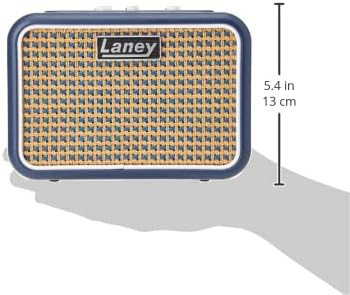
Figure 8.1: Side view of the Laney Mini-Lion, illustrating its compact size with a height of approximately 5.4 inches (13 cm).
| Feature | Detail |
|---|---|
| Brand | Laney |
| Model | Mini-Lion |
| Output Wattage | 3 Watts |
| Speaker | 1 x 3" Full Range Driver |
| Power Source | 6 x AA Batteries |
| Inputs | 1/4" Guitar Input, 3.5mm AUX IN, 3.5mm LSI |
| Outputs | 3.5mm Headphone Out |
| Controls | Gain, Tone, Volume, Power Switch |
| Compatible Devices | Guitar, Smartphones/Tablets (via LSI/AUX) |
| Material | Wood |
| Color | Black (Chassis), Blue/Tan (Grille) |
9. Warranty and Support
Laney products are designed for reliability and performance. This product is covered by a manufacturer's warranty against defects in materials and workmanship. The specific terms and duration of the warranty may vary by region and retailer.
For warranty claims, technical support, or service inquiries, please contact your authorized Laney dealer or visit the official Laney Amplification website for contact information and support resources.
Website: www.laney.co.uk


