
Introduction
Thank you for choosing the Akozon ANENG AN8008 Digital Multimeter. This powerful and reliable tool is designed for safely measuring AC/DC voltage, AC/DC current, resistance, capacitance, frequency, duty cycle, and for performing diode and continuity tests. Its auto-ranging capability and large LCD display make it an essential tool for electricians, hobbyists, and DIY enthusiasts. Please read this manual thoroughly before use to ensure safe and efficient operation.
Safety Information
Always observe basic safety precautions when using this multimeter to avoid personal injury or damage to the meter or equipment under test.
- Do not exceed the maximum input values for any function.
- Do not use the meter if it or the test leads appear damaged.
- Ensure the rotary switch is in the correct position for the desired measurement before connecting the test leads.
- Be cautious when working with voltages above 30V AC RMS, 42V peak, or 60V DC. These voltages pose a shock hazard.
- Always disconnect power to the circuit and discharge all high-voltage capacitors before measuring resistance, continuity, or diodes.
- Do not operate the meter in explosive gas, vapor, or dust environments.
- Remove the test leads from the meter before opening the battery cover.
Package Contents
Verify that all items listed below are included in your package:

Image: Contents of the Akozon Digital Multimeter package, including the multimeter, test leads, carrying bag, and user manual.
- 1 x Akozon Digital Multimeter (ANENG AN8008)
- 1 set x Test Probes and Cables
- 1 x Carrying Bag
- 1 x User Manual
- Note: 2 x 1.5V AAA batteries are NOT included and must be purchased separately.
Product Overview
Familiarize yourself with the physical components and controls of your Akozon Digital Multimeter.

Image: Front view of the Akozon Digital Multimeter, highlighting the large LCD display, rotary function switch, and input jacks.
Key Components:
- LCD Display: Large 9999-count display with backlight for clear readings in various lighting conditions.
- Rotary Function Switch: Used to select the desired measurement mode (e.g., Voltage, Current, Resistance, Diode, Frequency).
- Input Jacks:
- COM (Common): For the black test lead.
- VΩHz: For voltage, resistance, frequency, diode, and continuity measurements (red test lead).
- mA: For milliampere current measurements (red test lead).
- A: For ampere current measurements (up to 10A, red test lead).
- Function Buttons:
- RANGE: Toggles between auto-ranging and manual ranging.
- AUTO POWER OFF: Activates/deactivates auto power off feature.
- SEL/HOLD: Selects sub-functions within a rotary switch position (e.g., AC/DC, Diode/Continuity) or holds the current reading.
- Kickstand: Integrated on the back for convenient hands-free viewing at a 45-degree angle.
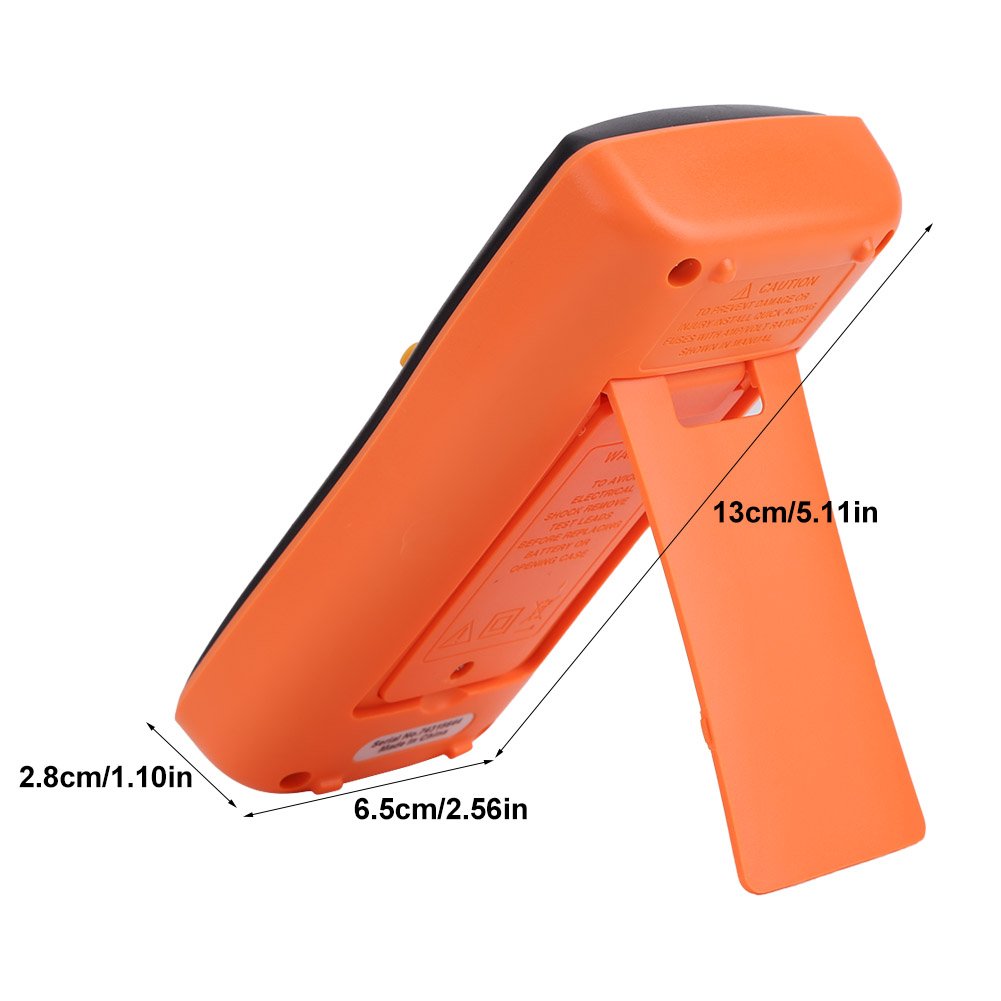
Image: Side view of the Akozon Digital Multimeter, illustrating its compact dimensions and the integrated kickstand for hands-free operation.
Setup
Battery Installation:
- Ensure the multimeter is turned OFF.
- Locate the battery compartment on the back of the unit.
- Unscrew the battery compartment cover and remove it.
- Insert two 1.5V AAA batteries, observing correct polarity (+/-) as indicated inside the compartment.
- Replace the battery compartment cover and secure it with the screw.
- Important Note: To prevent potential damage from battery leakage, it is recommended to remove the batteries if the multimeter will not be used for an extended period.

Image: Rear view of the Akozon Digital Multimeter with the battery cover removed, showing the two AAA battery slots.
Connecting Test Leads:
- Insert the black test lead into the "COM" (Common) jack.
- Insert the red test lead into the appropriate jack for your measurement:
- "VΩHz" for Voltage, Resistance, Frequency, Diode, Continuity, Capacitance.
- "mA" for milliampere current measurements.
- "A" for ampere current measurements (up to 10A).

Image: A user holding the Akozon Digital Multimeter with the red and black test leads properly connected to the input jacks.
Operating Instructions
This multimeter features auto-ranging for most measurements, simplifying operation. Always ensure the meter is set to the correct function before making a measurement.
General Operation:
- Turn the rotary switch to the desired measurement function.
- Connect the test leads to the circuit or component under test.
- Read the measurement on the LCD display.
- Use the "SEL" button to switch between functions within a single rotary switch position (e.g., AC/DC voltage, Diode/Continuity).
- Press "HOLD" to freeze the current reading on the display. Press again to release.
- Press "RANGE" to switch between auto-ranging and manual ranging (if applicable for the selected function).
- Press the backlight button (often integrated with RANGE or a separate button) to illuminate the display in low light conditions.
Specific Measurements:
Voltage Measurement (AC/DC):
Turn the rotary switch to V~ (AC Voltage) or V- (DC Voltage). Connect the test leads in parallel to the circuit or component. The meter will automatically select the appropriate range.
Current Measurement (AC/DC):
Turn the rotary switch to A~ (AC Current) or A- (DC Current) or mA. Connect the meter in series with the circuit. Important: Ensure correct jack selection (mA or A) and function to avoid damaging the meter or blowing the fuse.
Resistance Measurement (Ω):
Turn the rotary switch to Ω. Connect the test leads across the component. Ensure the circuit is de-energized and all capacitors are discharged before measuring resistance.
Continuity Test:
Turn the rotary switch to the continuity/diode symbol (Ω)))). Press "SEL" if needed to select continuity. A continuous beep indicates a low-resistance path (continuity).

Image: A user demonstrating a continuity test using the Akozon Digital Multimeter, with the test leads touching a circuit board.
Diode Test:
Turn the rotary switch to the continuity/diode symbol (Ω)))). Press "SEL" if needed to select diode. Connect the red lead to the anode and black lead to the cathode of the diode. The display will show the forward voltage drop.
Frequency and Duty Cycle Measurement (Hz/%):
Turn the rotary switch to Hz/%. Connect the test leads to the signal source. The meter will display the frequency in Hertz and the duty cycle as a percentage.
Maintenance
Cleaning:
Wipe the meter casing with a damp cloth and mild detergent. Do not use abrasive cleaners or solvents. Keep the display clean and free of scratches.
Storage:
When not in use for extended periods, remove the batteries to prevent leakage and damage to the internal circuitry. Store the multimeter and accessories in the provided carrying bag in a cool, dry place, away from direct sunlight and extreme temperatures.
Battery Replacement:
When the low battery indicator appears on the display, replace the batteries as described in the "Battery Installation" section under "Setup".
Troubleshooting
If you encounter issues with your multimeter, refer to the table below for common problems and solutions.
| Problem | Possible Cause | Solution |
|---|---|---|
| No display / Meter won't turn on | Dead or incorrectly installed batteries. | Check battery polarity, replace batteries. |
| Inaccurate readings | Incorrect function selected; damaged test leads; external interference. | Verify function setting; check test leads for damage; move away from strong electromagnetic fields. |
| "OL" (Overload) displayed | Measurement exceeds selected range or meter's maximum capacity. | Switch to a higher range (if in manual mode) or ensure measurement is within meter's limits. |
| No continuity beep | Open circuit; test leads not making good contact. | Check circuit for breaks; ensure firm contact with test points. |
| Meter turns off unexpectedly | Auto power off activated; low battery. | Press a button to reactivate; replace batteries. |
Specifications
Detailed technical specifications for the Akozon ANENG AN8008 Digital Multimeter:
| Feature | Specification |
|---|---|
| Display | 9999 Counts LCD |
| Ranging | Auto / Manual |
| True RMS | Yes |
| Refresh Rate | 3 times/second |
| Diode Test | Yes |
| Continuity Test | Yes |
| Square Wave Output | 0Hz / 100Hz / 200Hz / 300Hz / 400Hz / 500Hz / 600Hz / 700Hz / 900Hz / 1000Hz / 2000Hz / 3000Hz / 4000Hz / 5000Hz |
| Duty Cycle | 1% ~ 99% ± (0.1% + 2) |
| Data Hold | Yes |
| Backlight | Yes |
| Low Battery Indication | Yes |
| Auto Power Off | Yes |
| Power Supply | 2 x 1.5V AAA Batteries (Not included) |
| Operating Temperature | 0 ~ 40 ℃ |
| Operating Humidity | <75% |
| Storage Temperature | -20 ℃ ~ 60 ℃ |
| Storage Humidity | <80% |
| Material | ABS |
| Safety Rating | 550V High Voltage Protection, Overload Protection |
Warranty and Support
For warranty information and technical support regarding your Akozon Digital Multimeter, please refer to the official Akozon website or contact your retailer directly. It is advisable to keep your purchase receipt as proof of purchase for any warranty claims.
- Manufacturer: Akozon
- Typical Return Policy: 30 days for refund/replacement (may vary by retailer).
- First Available Date: June 20, 2018