
1. Introduction
The Multilaser Nilko NK565 is a 2000W domestic heater and dehumidifier designed for indoor use. This appliance provides warmth without consuming oxygen and helps reduce excess humidity in the air. Its features make it suitable for various environments, including bathrooms, where it can prevent intense vapor formation and mold growth. The compact design ensures ease of use and transport.
2. Safety Instructions
Read all instructions before using this appliance to prevent injury or damage. Keep this manual for future reference.
- Electrical Safety: Ensure the appliance is connected to a 220V power supply. Do not use with damaged cords or plugs. Do not operate in wet conditions or near water.
- Overheating Protection: The heater is equipped with an automatic shutdown system in case of overheating. Ensure the air inlets and outlets are not blocked.
- Tip-Over Safety: The unit features an automatic shutdown system if it falls or is tipped over.
- Placement: Always place the heater on a stable, flat, and heat-resistant surface. Maintain a safe distance from walls, furniture, curtains, and other flammable materials.
- Do Not Cover: Never cover the heater while it is in operation, as this can lead to overheating and fire hazards.
- Children and Pets: Keep the appliance out of reach of children and pets. Do not leave the heater unattended when in use.
- Maintenance: Always unplug the heater before cleaning or performing any maintenance.
3. Product Overview
The Nilko NK565 heater combines efficient heating with dehumidification capabilities. Key features include:
- 2000W heating capacity.
- Oxygen-preserving heating technology.
- Integrated dehumidification function.
- Silent operation.
- Two independent safety thermostats for temperature regulation.
- Automatic temperature maintenance, cycling on/off to hold desired warmth.
- Automatic shutdown in case of accidental tip-over or overheating.
- Integrated power cable for convenience.
Components
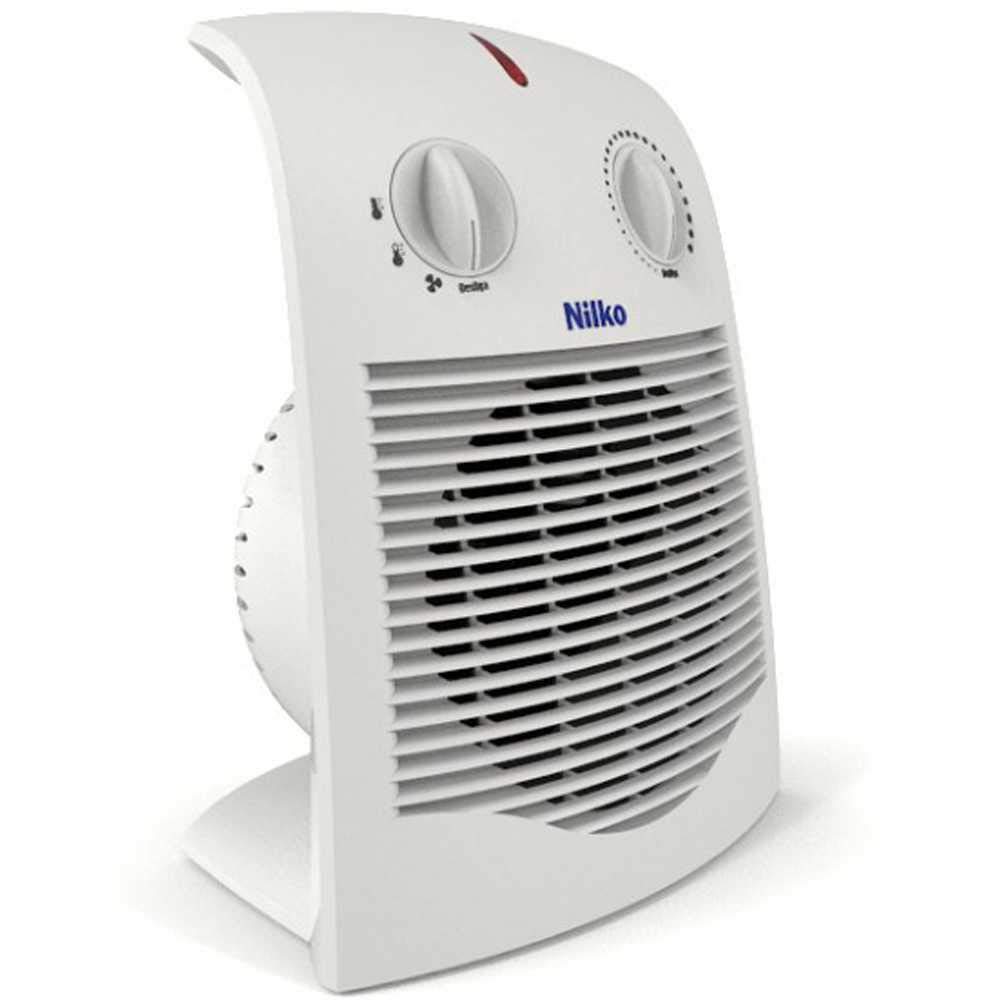

The heater features two main control knobs on the front panel: one for thermostat control (temperature adjustment) and another for power/mode selection. An indicator light typically signals when the unit is operating.
4. Setup
- Unpacking: Carefully remove the heater from its packaging. Retain packaging materials for storage or return if necessary.
- Placement: Place the heater on a firm, level surface. Ensure there is at least 3 feet (90 cm) of clear space around the front, top, and sides of the heater, and 1 foot (30 cm) at the rear, to allow for proper airflow and prevent fire hazards. Do not place it directly under a power outlet.
- Power Connection: Ensure the heater is switched off (power/mode knob set to 'Off' or 'Desliga'). Plug the power cord into a grounded 220V electrical outlet. Do not use extension cords or power strips unless absolutely necessary and rated for the heater's wattage.
5. Operating Instructions
- Power On: Turn the power/mode knob to the desired setting (e.g., low heat, high heat, or fan-only if available). The indicator light will illuminate.
- Set Thermostat: Rotate the thermostat knob clockwise to increase the desired temperature or counter-clockwise to decrease it. The heater will operate until the set temperature is reached, then cycle on and off to maintain it.
- Dehumidification: The heater's operation inherently reduces humidity. For enhanced dehumidification, ensure the heater is running in a well-ventilated area, or as per specific mode if available.
- Power Off: To turn off the heater, rotate the power/mode knob to the 'Off' or 'Desliga' position. The indicator light will turn off. Unplug the unit from the wall outlet when not in use for extended periods.
6. Maintenance
Regular maintenance ensures optimal performance and longevity of your heater.
- Cleaning: Before cleaning, always unplug the heater and allow it to cool completely. Wipe the exterior surfaces with a soft, damp cloth. Do not use abrasive cleaners, solvents, or immerse the heater in water.
- Air Vents: Periodically check the air intake and output vents for dust and debris. Use a vacuum cleaner with a brush attachment to gently remove any accumulations.
- Storage: When not in use, store the heater in a cool, dry place, preferably in its original packaging, to protect it from dust and damage.
7. Troubleshooting
If you encounter issues with your Nilko NK565 heater, refer to the following common problems and solutions:
| Problem | Possible Cause | Solution |
|---|---|---|
| Heater does not turn on. | No power, unit tipped over, overheating. | Check if plugged in correctly. Ensure power outlet is functional. Verify unit is upright. Allow unit to cool if it was recently operating and shut off due to overheating. |
| Insufficient heating. | Thermostat set too low, room too large, blocked vents. | Increase thermostat setting. Ensure heater is appropriate for room size. Clear any obstructions from air vents. |
| Unusual noise or vibration. | Internal obstruction, loose component. | Unplug the unit immediately. Check for any visible obstructions in the vents. If the noise persists, discontinue use and contact customer support. |
| Heater smells burnt. | Dust accumulation on heating element, foreign object. | Unplug immediately. Allow to cool. Clean vents and interior if accessible. If smell persists, discontinue use and contact customer support. |
If the problem persists after attempting these solutions, contact customer support for assistance.
8. Specifications
| Feature | Detail |
|---|---|
| Brand | Multilaser |
| Model | NK565 |
| Voltage | 220 V |
| Heat Output | 2000 Watts |
| Special Features | Rapid heating, Dehumidification |
| Form Factor | Residential |
| Indoor/Outdoor Use | Indoor |
| Power Source | Corded Electric |
| Heating Method | Electric conversion to heat |
| Recommended Use | Home |
| Mounting Type | Portable, ideal for bathroom use (dehumidification) |
| Room Type | Home or office |
| Max Temperature Setting | 40 Degrees Celsius |
| Smart Home Compatibility | Not Compatible |
| Dimensions (D x W x H) | 21.5 cm x 39 cm x 26.5 cm |
| Item Weight | 2 Kilograms |
9. Warranty and Support
For information regarding the product warranty, please refer to the warranty card included with your purchase or contact the retailer where the product was acquired. Extended warranty options may be available through your retailer.
For technical support, service, or replacement parts, please contact Multilaser customer service or your authorized dealer. Keep your purchase receipt and product model number (NK565) readily available when contacting support.