Introduction
Thank you for choosing the Cygnett FreePlay Bluetooth Earbuds. These truly wireless earbuds are designed to provide a seamless audio experience with comfort and convenience. This manual will guide you through the setup, operation, and maintenance of your new earbuds.
The FreePlay earbuds feature a secure fit with ultra-comfortable silicone ear tips, a lightweight design, and a 10-meter wireless range. They come with an integrated microphone and a portable charging case for extended use.
Package Contents
Please ensure all items are present in your package:
- Cygnett FreePlay Bluetooth Earbuds (Left and Right)
- Charging Case
- Micro USB Charging Cable
- Silicone Ear Tips (Small, Medium, Large)
Product Overview
Familiarize yourself with the components of your Cygnett FreePlay Bluetooth Earbuds and how they fit.

Image: A man wearing a Cygnett FreePlay earbud, demonstrating its discreet and secure fit.

Image: A woman wearing a Cygnett FreePlay earbud, illustrating its comfortable placement for active use.

Image: Close-up of a single Cygnett FreePlay earbud, showing the speaker mesh and silicone ear tip.
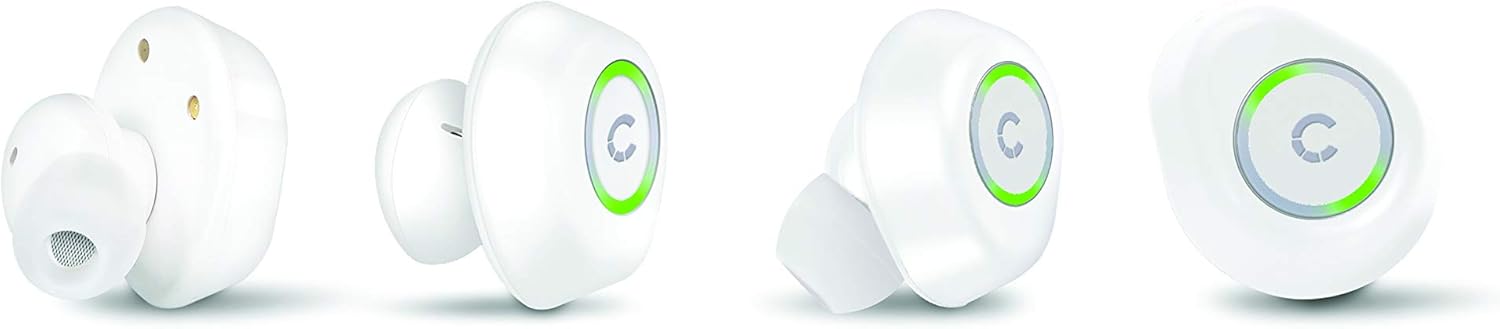
Image: Various angles of the Cygnett FreePlay earbuds, highlighting their compact design and the illuminated 'C' logo.

Image: The Cygnett FreePlay earbuds placed inside their open charging case, showing the charging contacts and the Cygnett branding.
Setup
1. Charging the Earbuds and Case
Before first use, fully charge the earbuds and the charging case.
- Place the earbuds into the charging case. Ensure they are correctly seated in their respective slots (L for left, R for right).
- Connect the Micro USB cable to the charging port on the case and the other end to a USB power source (e.g., computer, wall adapter).
- The indicator lights on the earbuds and/or case will show charging status.
- Once fully charged, disconnect the charging cable. The case provides approximately 6 hours of additional playback time for the earbuds.
2. Bluetooth Pairing
To connect your Cygnett FreePlay earbuds to your device:
- Ensure the earbuds are charged and removed from the charging case. They should automatically enter pairing mode, indicated by a flashing LED light (color/pattern may vary).
- On your smartphone, tablet, or other Bluetooth-enabled device, go to the Bluetooth settings.
- Turn on Bluetooth.
- Search for available devices. You should see "Cygnett FreePlay" or a similar name appear in the list.
- Select "Cygnett FreePlay" to connect. Once connected, the earbud LED light will typically stop flashing or change to a solid color.
- The earbuds will automatically reconnect to the last paired device when removed from the case and within range.
Note: If pairing fails, turn off the earbuds, disable Bluetooth on your device, and repeat the steps.
Operating the Earbuds
The Cygnett FreePlay earbuds feature a simple single-button control for managing calls and music playback.
Music Control
- Play/Pause: Press the button once on either earbud.
- Next Track: Double-press the button on the right earbud.
- Previous Track: Double-press the button on the left earbud.
- Volume Up: Triple-press the button on the right earbud.
- Volume Down: Triple-press the button on the left earbud.
Call Control
- Answer/End Call: Press the button once on either earbud.
- Reject Call: Press and hold the button for approximately 2 seconds on either earbud.
- Voice Assistant: Press and hold the button for approximately 2 seconds (when not on a call) to activate your device's voice assistant (e.g., Siri, Google Assistant).
Power On/Off
- Power On: Remove earbuds from the charging case. They will power on automatically. Alternatively, press and hold the button on each earbud for 3 seconds.
- Power Off: Place earbuds back into the charging case. They will power off automatically. Alternatively, press and hold the button on each earbud for 5 seconds.
Maintenance
Proper care will extend the life of your Cygnett FreePlay earbuds.
- Cleaning: Regularly clean the silicone ear tips with a soft, dry cloth. If necessary, use a slightly damp cloth with mild soap, then dry thoroughly. Do not use harsh chemicals or abrasive materials.
- Storage: Always store the earbuds in their charging case when not in use to protect them from dust, dirt, and damage.
- Avoid Moisture: Keep the earbuds and charging case away from water and excessive moisture. While designed for active lifestyles, they are not waterproof.
- Temperature: Avoid exposing the device to extreme temperatures (hot or cold) as this can shorten battery life and affect performance.
Troubleshooting
If you encounter issues with your earbuds, try the following solutions:
| Problem | Solution |
|---|---|
| Earbuds not pairing with device. |
|
| No sound from earbuds. |
|
| One earbud not working. |
|
| Charging case not charging. |
|
Specifications
| Model Name | Cy2496Frepl |
| Model Number | CY2496FREPL |
| Brand | Cygnett |
| Connectivity Technology | Wireless |
| Wireless Communication Technology | Bluetooth |
| Wireless Range | 10 meters |
| Form Factor | In-Ear |
| Material | Silicone |
| Color | White |
| Battery Type | 1 Lithium metal (included) |
| Talk Time | 3 hours |
| Standby Time | 100 hours |
| Additional Playback from Case | 6 hours |
| Control Type | Button Control |
| Compatible Devices | Smartphone, Tablet |
| Included Components | Micro USB Cable |
| Charging Port | USB |
Warranty and Support
For warranty information and customer support, please refer to the documentation provided with your purchase or visit the official Cygnett website.
If you require further assistance or have questions not covered in this manual, please contact Cygnett customer service.


