
Spigen F308W
Spigen Wireless Charger User Manual
Model: F308W
Brand: Spigen
1. Introduction
This user manual provides essential information for the safe and efficient operation of your Spigen Wireless Charger (Model: F308W). Please read this manual thoroughly before use and retain it for future reference.
Product Overview
The Spigen Wireless Charger is a Qi-certified 10W leather charging pad designed for fast wireless charging of compatible devices. Its ergonomic design features a black leather surface and an aluminum-rimmed finish. The charger includes a 4.9ft (1.5m) extra-long cable for flexible placement and a Control Light Technology LED indicator that dims after 60 seconds to avoid disturbing sleep.

Image: Top-down view of the Spigen Wireless Charger, showcasing its black leather surface and aluminum rim.
Package Contents
Verify that all items are present in the package:
- Spigen SteadiBoost 10W Leather Wireless Charger
- USB-A to Micro Charging Cable (1.5m)
- Welcome Guide (User Manual)
Note: A power adapter is NOT included and must be purchased separately. For optimal performance, a Quick Charge 2.0/3.0 compatible adapter is recommended.

Image: The contents of the product box, including the wireless charging pad, USB-A to Micro charging cable, and user manual.
2. Setup Instructions
- Connect the Cable: Insert the Micro USB end of the provided charging cable into the Micro USB port on the Spigen Wireless Charger.
- Connect to Power: Plug the USB-A end of the cable into a compatible USB power adapter (not included). For fast charging, use a Quick Charge 2.0/3.0 or Power Delivery compatible adapter.
- Placement: Place the wireless charger on a flat, stable surface, such as a desk or nightstand. Ensure there are no metal objects or foreign materials between the charger and the device to be charged.

Image: The Spigen Wireless Charger connected to a power source via its 1.5m extra-long Micro USB cable, demonstrating its extended reach.
3. Operating Instructions
Charging Your Device
- Place Device: Carefully place your Qi-compatible smartphone or other device (e.g., AirPods, Galaxy Buds) onto the center of the Spigen Wireless Charger pad.
- Charging Confirmation: A faint blue LED indicator on the charger will illuminate briefly to confirm that charging has begun. Your device's screen will also typically show a charging icon or notification. The LED indicator will turn off after approximately 60 seconds to prevent light disturbance, especially during nighttime use.
- Case Compatibility: The charger is designed to work through most protective cases up to 4mm thick. Cases containing credit cards, magnetic attachments, or metal components may interfere with charging and should be removed.
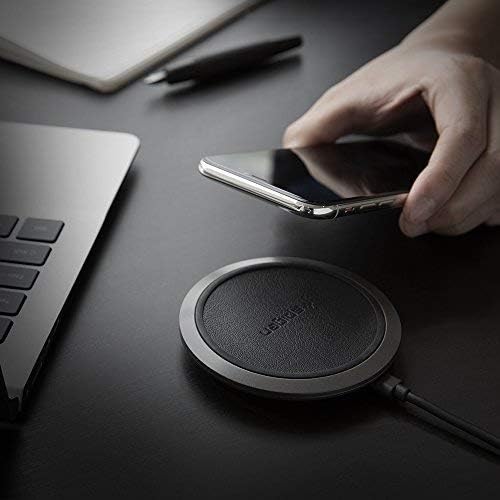
Image: A hand placing a smartphone onto the Spigen Wireless Charger, illustrating the ease of use.

Image: An illustration demonstrating the Control Light Technology, where the LED indicator on the charger turns off after 60 seconds to avoid disturbing sleep.
Charging Speeds
- 10W Output: For compatible Galaxy devices.
- 7.5W Output: For compatible iPhone devices.
- 5W Output: For other Qi-compatible devices such as AirPods/AirPods Pro/Galaxy Buds.

Image: A graphic comparing the charging speed of the Spigen charger (170 minutes) versus other chargers (182-190 minutes) for an iPhone 8/X from 0-100%.
Safety Features
The Spigen Wireless Charger incorporates several safety features to protect your device and the charger:
- ControlHeat Technology: Manages temperature to prevent overheating during charging.
- Intelligent Power Technology (iP™): Optimizes power delivery for efficient and safe charging.
- Smart IC Chip Protection: Provides safeguards against overcharge, overcurrent, and short-circuiting.

Image: A graphic illustrating the internal components and safety features of the Spigen Wireless Charger, including ControlHeat Technology, Intelligent Power Technology, and Smart IC Chip Protection.

Image: A bar chart comparing the charging temperatures of the Spigen charger versus other chargers for various phone models (iPhone X, iPhone 8, iPhone 8 Plus, Galaxy S9, Galaxy S8/S8+), showing Spigen's lower temperatures.
Product Video
Video: An official product video from Spigen demonstrating the unboxing and basic operation of the Spigen Wireless Charger F308W, highlighting its features like Qi certification, fast charging, and safety technologies.
4. Maintenance
To ensure the longevity and optimal performance of your Spigen Wireless Charger, follow these maintenance guidelines:
- Cleaning: Disconnect the charger from the power source before cleaning. Use a soft, dry cloth to wipe the surface of the charging pad. Do not use harsh chemicals, abrasive cleaners, or excessive moisture.
- Storage: When not in use for extended periods, store the charger in a cool, dry place away from direct sunlight and extreme temperatures.
- Handling: Avoid dropping the charger or subjecting it to strong impacts, as this may damage internal components.
5. Troubleshooting
If you encounter issues with your Spigen Wireless Charger, refer to the following common problems and solutions:
| Problem | Possible Cause | Solution |
|---|---|---|
| Device not charging or charging intermittently. |
|
|
| Slow charging speed. |
|
|
| LED indicator not lighting up. |
|
|
6. Product Specifications
| Feature | Detail |
|---|---|
| Model Number | F308W |
| Product Dimensions | 3.54 x 3.54 x 0.59 inches |
| Item Weight | 3.52 ounces |
| Color | Black |
| Connectivity Technology | Wireless (Qi Certified) |
| Connector Type | Wireless |
| Input | 5V/2A, 9V/1.67A (Requires QC 2.0/3.0 adapter for fast charge) |
| Output | 10W (Max) / 7.5W / 5W |
| Cable Length | 1.5m (4.9ft) Micro USB |
| Case Compatibility | Up to 4mm thick (excluding cases with credit cards/magnetic/metal attachment) |
| Manufacturer | Spigen |
| First Available Date | August 16, 2018 |
Compatible Devices (Partial List)
- Apple iPhone: 13 / 13 Pro / 13 Pro Max / 13 Mini / 12 / 12 Pro / 12 Pro Max / 12 Mini / 11 / 11 Pro / 11 Pro Max / X / XS / XR / XS Max / SE 2020 / 8 / 8 Plus
- Samsung Galaxy: S22 / S22 Ultra / S22 Plus / S21 FE / S21 / S21 Ultra / S21 Plus / S20 / S20 Ultra / S20 Plus / S20 FE / Note 20 / Note 10 / S10 / S9 / S8 / Z Fold 3 / Z Flip 3 / Z Fold 2 / Z Flip 5G / Z Flip / Fold 5G / Fold
- Google Pixel: 6 Pro / 6 / 5a / 5 / 4xl / 4
- Other: AirPods / AirPods Pro / Galaxy Buds / Buds 2 / Buds Live / Buds Pro
7. Warranty and Support
Warranty Information
The Spigen Wireless Charger (Model: F308W) comes with a 24-Month Warranty from the date of purchase. This warranty covers manufacturing defects and issues arising from normal use. It does not cover damage caused by misuse, accidents, unauthorized modifications, or natural disasters.
Please retain your proof of purchase for warranty claims.
Customer Service
For any questions, technical support, or warranty inquiries, please contact Spigen Customer Service. Refer to the contact information provided in your Welcome Guide or visit the official Spigen website for the most up-to-date support details.
You can also find a digital version of the user manual here.
Related documentsF308W

Ask a question about this manual
Ask about setup, troubleshooting, compatibility, parts, safety, or missing instructions. Manuals+ will review the question and use this page’s manual context to help answer it.